7. BIOS Setup
52
SPC-8520-LA , SPC-8521-LA
Description Choice
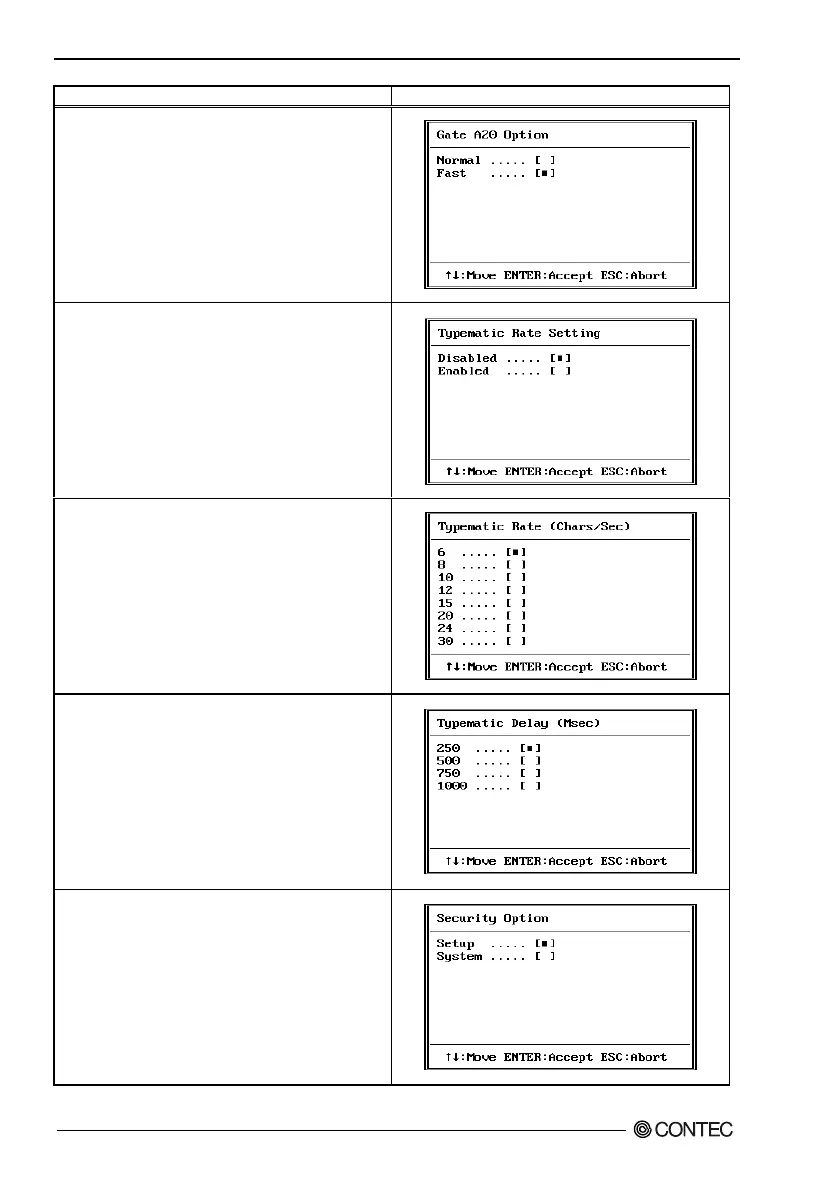
Gate A20 option
Gate A20 refers to the way the system addresses memory
above 1 MB (extended memory). When set to Fast, the
system chipset controls Gate A20. When set to Normal,
a pin in the keyboard controller controls Gate A20.
Setting Gate A20 to Fast improves system speed,
particularly with OS/2 and Windows
Typematic Rate Setting
When Disabled, the following two items (Typematic Rate
and Typematic Delay) are irrelevant. Keystrokes repeat at
a rate determined by the keyboard controller in your
system. When Enabled, you can select a typematic rate and
typematic delay.
Typematic Rate (Chars/Sec)
When the typematic rate setting is enabled, you can select
a typematic rate (the rate at which character repeats when
you hold down a key) of 6, 8, 10,12, 15, 20, 24 or 30
characters per second.
Typematic Delay (Msec)
When the typematic rate setting is enabled, you can select
a typematic delay (the delay before key strokes begin to
repeat) of 250, 500, 750 or 1000 milliseconds.
Security Option
Select whether the password is required every time the
system boots or only when you enter setup. If you have set
a password, select whether the password is required every
time the System boots, or only when you enter Setup.
System: The system will not boot and access to Setup will be
denied if the correct password is not entered at the prompt.
Setup: The system will boot, but access to Setup will be
denied if the correct password is not entered at the prompt.



 To Next Page