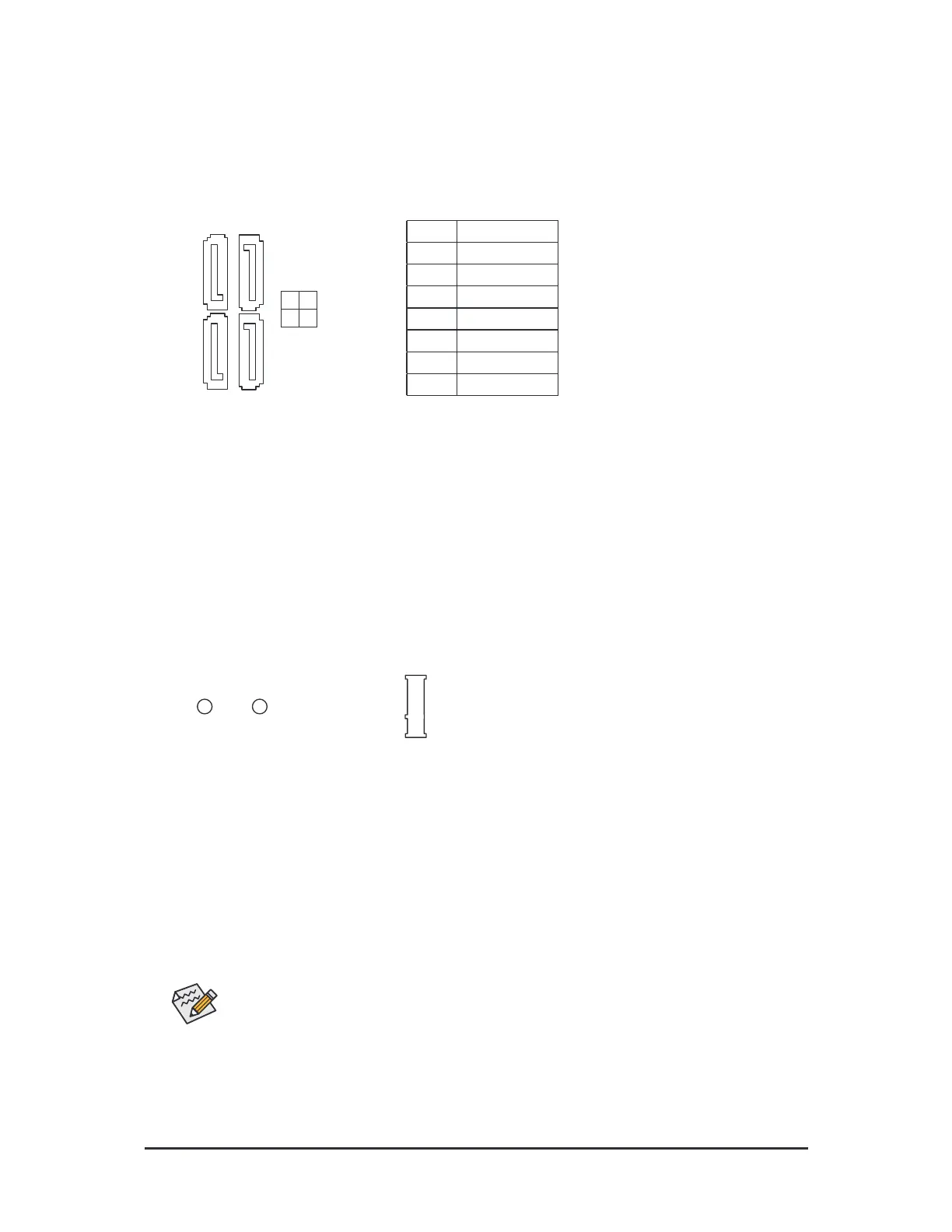
8) M2A_CPU (M.2 Socket 3 Connector)
The M.2 connector supports M.2 SATA SSDs or M.2 PCIe SSDs and support RAID conguration. Please
note that an M.2 PCIe SSD cannot be used to create a RAID set with a SATA hard drive. Reer to Chapter 3,
"Conguring a RAID Set," or instructions on conguring a RAID array.
Follow the steps below to correctly install an M.2 SSD in the M.2 connector.
Step 1:
Use a screwdriver to unasten the screw on the heatsink and then remove the heatsink rst.
Step 2:
Locate the proper mounting hole or the M.2 SSD to be installed and then tighten the stando rst. Insert
the M.2 SSD into the M.2 connector at an angle.
Step 3:
Press the M.2 SSD down and then secure it with the screw. Replace the heatsink and secure it to the
original hole.
7) SATA3 0/1/2/3 (SATA 6Gb/s Connectors)
The SATA connectors conorm to SATA 6Gb/s standard and are compatible with SATA 3Gb/s and SATA
1.5Gb/s standard. Each SATA connector supports a single SATA device. The SATA connectors support
RAID 0, RAID 1, and RAID 10. Reer to Chapter 3, "Conguring a RAID Set," or instructions on conguring
a RAID array.
SATA3
2 3
0 1
1 7
7 1




 To Next Page