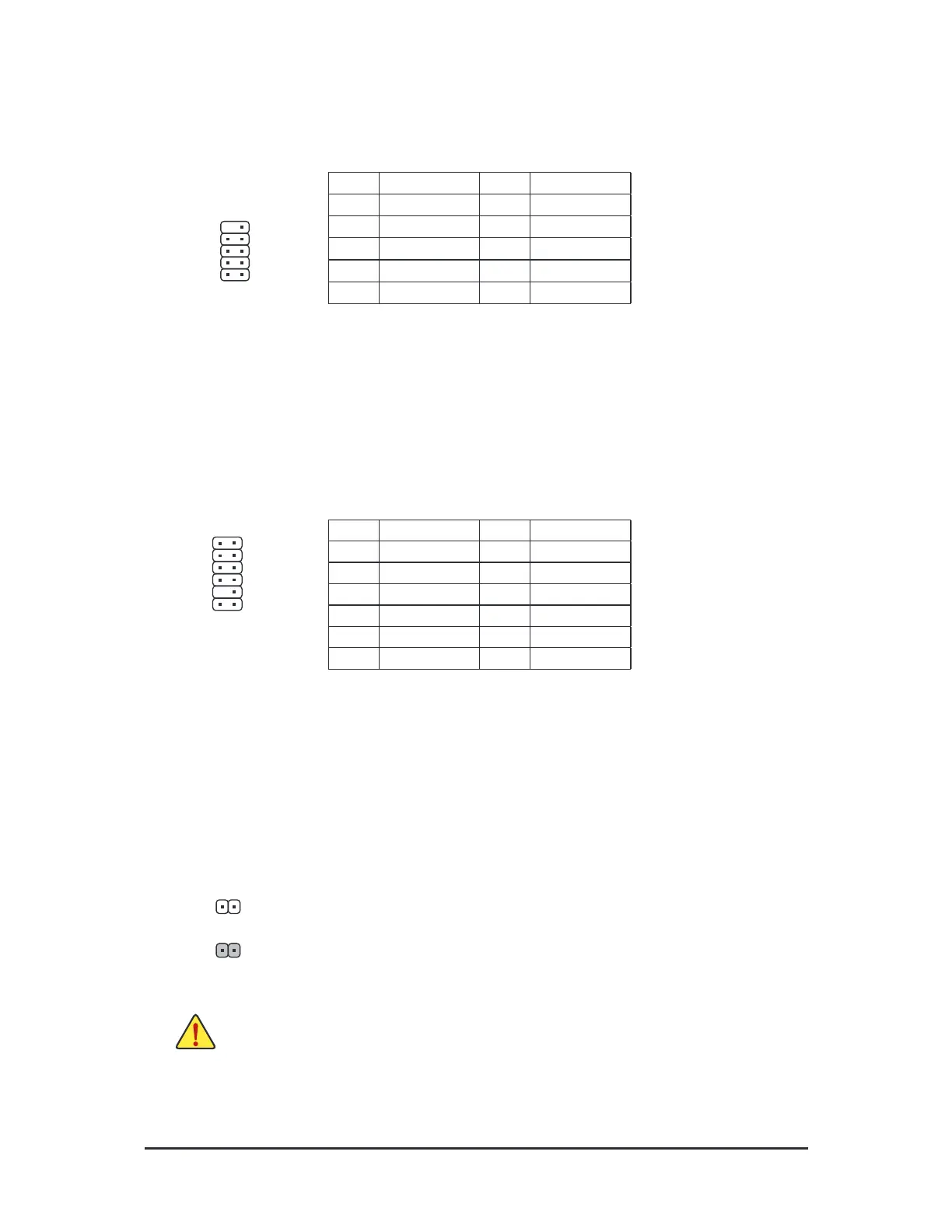
16) CLR_CMOS (Clear CMOS Jumper)
Use this jumper to clear the BIOS conguration and reset the CMOS values to actory deaults. To clear
the CMOS values, use a metal object like a screwdriver to touch the two pins or a ew seconds.
• Always turn o your computer beore clearing the CMOS values.
• Ater system restart, go to BIOS Setup to load actory deaults (select Load Optimized Deaults) or
manually congure the BIOS settings (reer to Chapter 2, "BIOS Setup," or BIOS congurations).
Open: Normal
Short: Clear CMOS Values
14) COM (Serial Port Header)
The COM header can provide one serial port via an optional COM port cable. For purchasing the optional
COM port cable, please contact the local dealer.
Pin No. Denition Pin No. Denition
1 NDCD- 6 NDSR-
2 NSIN 7 NRTS-
3 NSOUT 8 NCTS-
4 NDTR- 9 NRI-
5 GND 10 No Pin
12
910
15) TPM (Trusted Platform Module Header)
You may connect a TPM (Trusted Platorm Module) to this header.
2
12
1
11
Pin No. Denition Pin No. Denition
1
LAD0
7
LAD3
2
VCC3
8
GND
3
LAD1
9
LFRAME
4
No Pin
10
NC
5
LAD2
11
SERIRQ
6
LCLK
12
LRESET
- 18 -



 To Next Page