StreamEnjin User Manual
48
Upgrading the Unit
Follow the steps below to upgrade the unit.
Note: Make sure the prepared USB storage device is plugged into
the rear USB port (USB 3.2 Gen1 Type-A Port) of the unit.
1. Press the Cut , Pause (the ) and Mute buttons at the same time
to start the firmware upgrade.
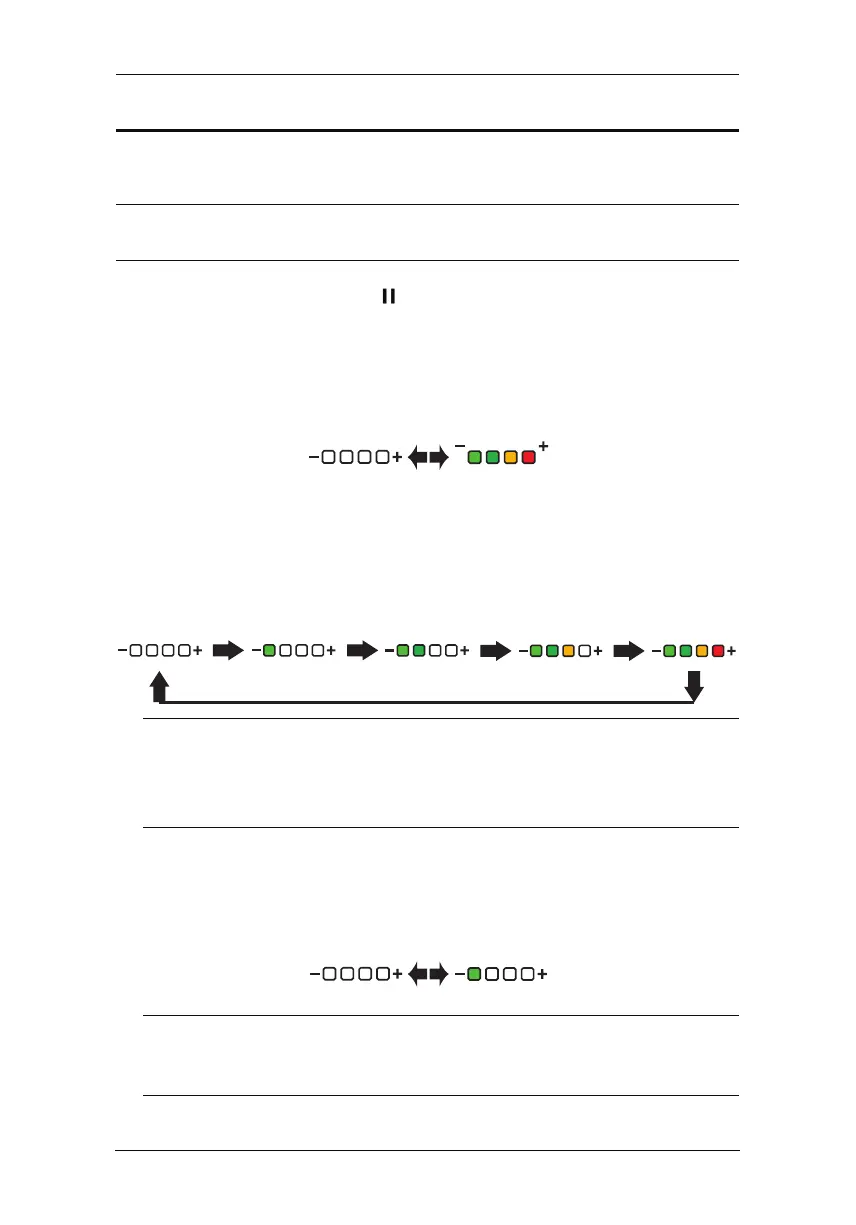
2. The unit will start the Upgrade Assessment where all the Volume
Meter LEDs will blink every 0.5 seconds. Pictorial behavior is shown
3. If the assessment succeeds, the unit will start upgrading.
The Volume Meter LED will start filling in from the negative side
every 0.5 seconds. When all the LEDs are filled, they will all dim for
0.5 seconds and start filling in again. Pictorial behavior is shown
Note:If the upgrade assessment fails, the GO LIVE button and
the last LED of Volume Meter LEDs will blink every 0.3
seconds. Refer toUpgrade Assessment Fail on page 57 for
4. If the firmware upgrade was successful, the first LED of the Volume
Meter LEDs will blink every 0.3 seconds. The unit will reboot after
some time to complete the process.
Note:
If the firmware upgrade fails, the last LED of Volume Meter
LEDs will blink every 0.3 seconds. Refer to Upgrade Fail on
page 57 for more information.
0.3s
0.3s
below:
below:
more information.



 To Next Page