25
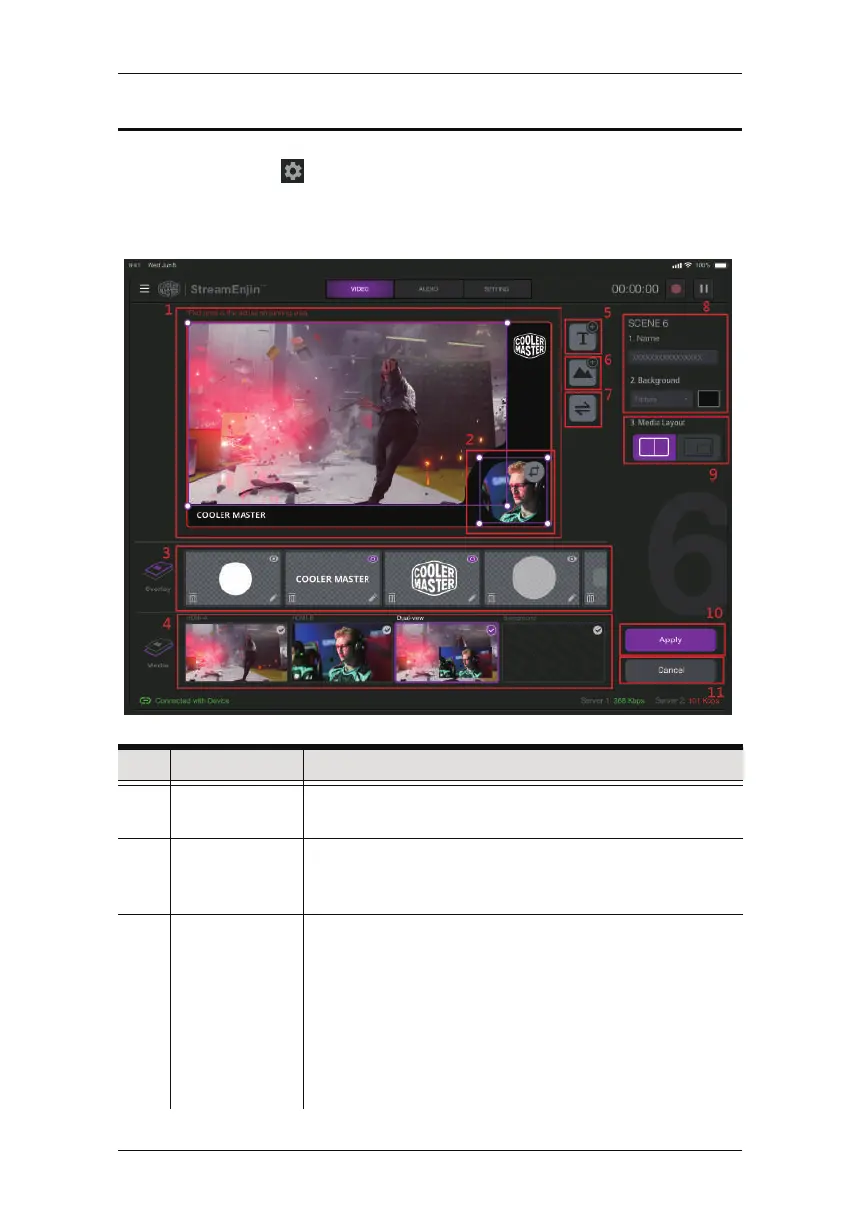
Scene Editor
When you tap the icon under a scene in the scene selector region,
you can start editing the scene’s display.
An example is shown below:
No. Component Description
1 Scene Display This region is how this scene will be displayed. You can
configure the components within the region.
2 Resize/Crop
tool
Tap to resize/crop the selected item.
Refer to Resize/Crop Tool on page 27 on how to use this
function.
3 Overlay Edit overlay in this region. You can Delete, Edit, and
Show/Hide Overlay.
1. Show/Hide Overlay: Tap to show or hide
2. Edit: Tap to edit
3. Delete: Tap to delete
You can also re-order the overlays to determine which
overlay is to be displayed on top. Refer to ... for more
details.
Chapter 4. StreamEnjin App & Video Mixer



 To Next Page