Chapter1. Introduction
3
Components
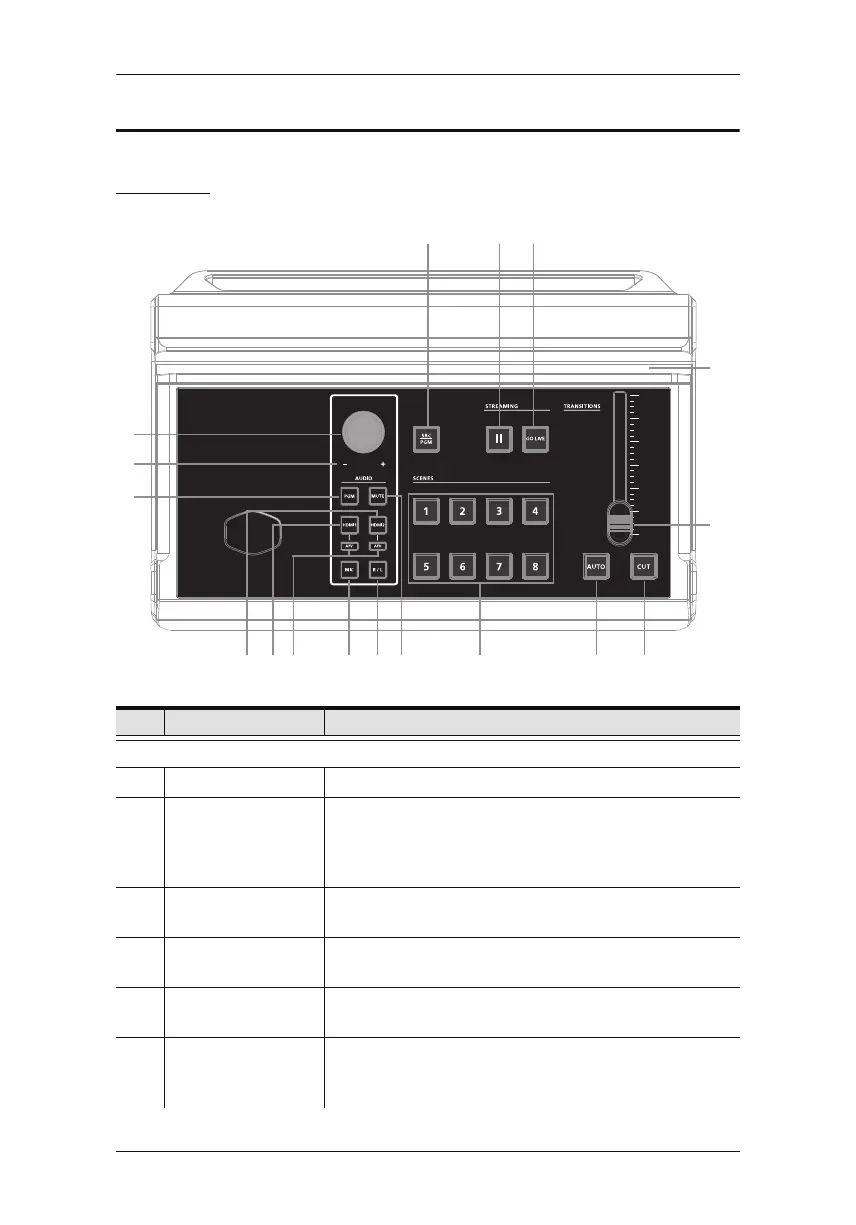
Top View
No. Component Description
Audio Section (Controls the audio settings of the system)
1 Audio Level Control Controls the volume of the selected audio source.
2 Volume Meter LEDs
During firmware upgrade, the LED behavior is changed.
Refer to Upgrading the Unit on page48 for the LED
behavior during firmware upgrade.
3 PGM Switches to the PGM audio source.
The button will light up when switched to this source.
4 HDMI 2 audio
source
Switches to the HDMI 2 audio source.
The button will light up when switched to this source.
5 HDMI 1 audio
source
Switches to the HDMI 1 audio source.
The button will light up when switched to this source.
6 AFV Audio-Follows-Video: Pressing the AFV button will light
up. If the video source is selected, the source’s audio will
also be played
.
15
16
8
9
13
10 11
74
1
3
2
5
17
14
6
12
The LED reflects the controlled volume.



 To Next Page