Chapter 2. Hardware Setup
10
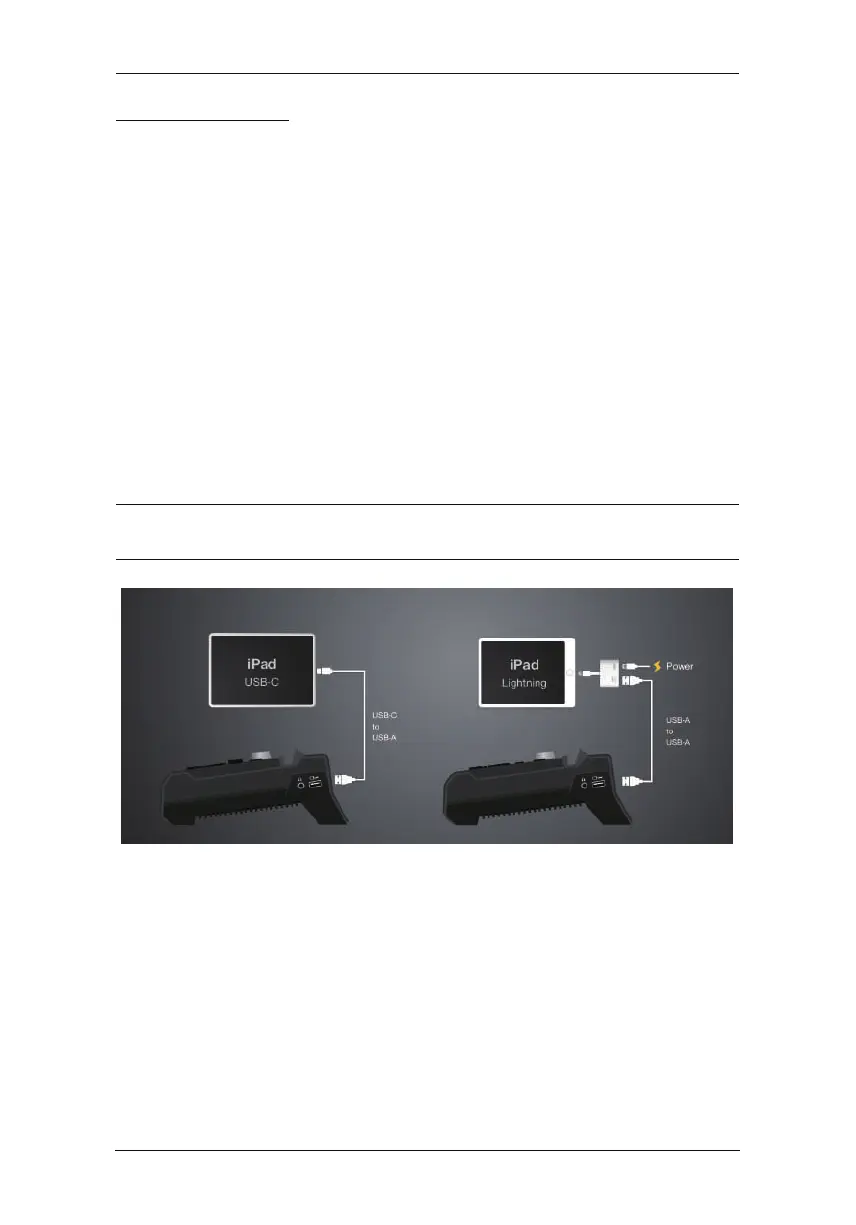
Connecting iPad
Lightning Connector on iPad
For iPads having lightning connectors, simply connect the Apple
Lightning USB 3 Adapter (not included, may need additional purchase)
and the USB-A to USB-A cable serially between the StreamEnjin
and your iPad.
If you wish to have the charging function, connect your lightning
charging cable to the Apple Lightning to USB 3 Adapter.
USB-C Connector on iPad
For iPads having USB-C connectors (e.g. iPad Pro Gen 3), simply
connect the USB-A to USB-C cable included in the package between
your iPad and the StreamEnjin.
Note: The USB-A to USB-C cable included in the package is custom-made
for this setup, a general USB-A to USB-C cable will not work.



 To Next Page