16
CMS Manual
For Inspire Blue and Inspire Red DVR Models
Duplex Talkback
The DVR features a full duplex talkback system (Inspire Blue Plus and Inspire Red models.
To use this feature when a microphone is connected to the Line Input of the DVR or a
broadcast unit is connected to the audio output of the DVR click the Talkback button.
Once Talkback has been selected the audio stream from the DVR Line Input will be
played through speakers or a headset connected to the remote PC.
Broadcast (Available on all units)
If a microphone is also connected to the PC then when the user talks their voice will be
broadcast out through the DVR audio output.
PTZ Control
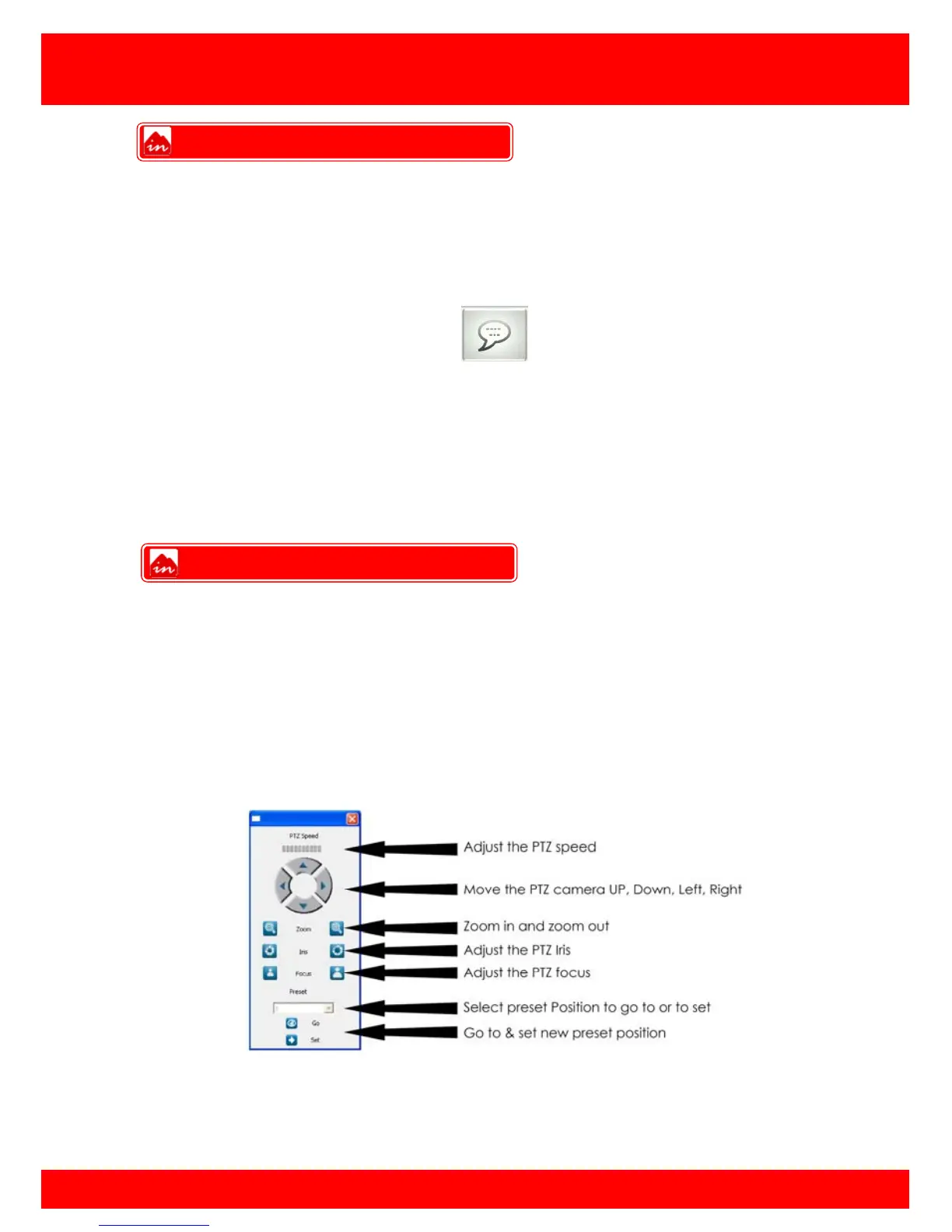
The Inspire CMS supports control of PTZ cameras if connected and programmed in the
DVR.
To use the PTZ feature single click on desired camera (green border highlights selected
camera) then press the PTZ button.
This will bring up the PTZ Interface
Note: PTZ speed may be limited by the capabilities of the PTZ camera connected
Talkback
PTZ Control



 To Next Page