The device is a Mini Portable Home Theater Projector, model CJR620WHBY, manufactured by Core Innovations. It is designed for home theater use, offering portability and various connectivity options.
Function Description:
The projector's primary function is to project images and videos onto a screen, creating a home theater experience. It supports multiple input sources, including USB drives, Micro SD cards, HDMI-enabled devices, and AV devices, allowing users to play various media content. It also features Bluetooth connectivity for connecting to external speakers and a headphone jack for private listening. The projector can be placed in four different configurations: Front Table, Rear Table, Front Ceiling, and Rear Ceiling, offering flexibility in setup.
Important Technical Specifications:
- Native Display Resolution: 800 x 480
- Supported Video Resolutions: 1080p, 1080i, 720p, 576i, 480p, 480i
- Light Source Type: LED
- Power: DC 12V/3A; 110-240V, 50/60Hz
- Brightness: 40 lumens
- Connection Types: HDMI®, USB, Micro SD card, AV, audio
- Inputs: HDMI® input x 1 / AV x 1 / Micro SD card x 1 / USB port x 1
- Output: 3.5mm headphone x 1
- USB Port Support: Supports USB devices up to 1TB
- Micro SD Card Slot Support: Supports Micro SD cards up to 1TB
- Supported Image Formats: .jpg, .png, .bmp
- Supported Audio Formats: .mp3
- Supported Video Formats: .avi, .mp4, .mov
- Projector Weight: 1.15 lb
- Projector Dimensions: 5.6 x 4.6 x 3.9 in
- Recommended Projection Distance: 39-118 inches for optimal image sharpness.
- Optimal Performance: Achieved in dark viewing environments.
Usage Features:
- Power On/Off: The projector is powered on by connecting the adapter and pressing the power button. It turns on after 5 seconds. To power off, the power button must be pressed twice, and then the power adapter unplugged.
- Remote Control: A remote control is included for convenient operation, offering functions such as power on/off, previous/next chapter, play/pause, source selection, menu access, navigation (arrows/OK), mute, back/forward search, volume adjustment, display flip (180°), zoom in/out, exit menus, and a number key pad for direct chapter/track selection. The remote requires 2xAAA batteries (not included).
- Handle Attachment: The projector comes with a handle that can be attached to the buttons on each side of the device for easy portability.
- Focus Adjustment: A focus adjustment knob allows users to fine-tune the image sharpness. Optimal focus is achieved when pixels near the center of the screen are clearly visible.
- Input Source Selection: Users can select desired input sources (AV, HDMI®, Media Player) using the Source button on the projector or remote.
- Media Playback: Supports playback from USB drives and Micro SD cards. Users can select Video, Music, or Picture modes to access content. It is important to power off the projector before removing USB drives or Micro SD cards.
- HDMI Connectivity: Allows connection to various HDMI-enabled devices like laptops, DVD players, streaming devices, and smartphones (with an HDMI adapter).
- AV Connectivity: Supports connection to AV devices using an AV cable.
- Audio Output: A 3.5mm headphone jack allows connection of headphones or wired audio systems.
- Bluetooth Connectivity: The projector can connect to Bluetooth-enabled speakers. Users can enable Bluetooth in the projector's setup menu, search for devices, and connect to their speaker.
- Projector Menus: The projector offers several menus for customization:
- Picture Mode (Menu 01): Adjusts picture effects (Soft, Standard, Vivid, User), contrast, brightness, color, sharpness, color temperature (Cool, Medium, Warm), aspect ratio (4:3, 16:9), and noise reduction (Off, Low, Medium, High, Default).
- Sound Mode (Menu 02): Adjusts sound effects (Standard, Music, Movie, Sports, User), treble, bass, and balance.
- Setup (Menu 03): Configures OSD language, restores factory defaults, panel flip rotate (Front, Rear Ceiling, Front Ceiling, Rear), and displays device information.
- Time (Menu 04): Adjusts clock (Day, Month, Year, Hours, Minutes), off timer, on timer, sleep timer (Off, 10, 20, 30, 60, 90, 120, 180, 240 minutes), and auto sleep (Never, 4, 6, 8 hours). Note that date and time settings are not saved when the device is unplugged.
Maintenance Features:
- Cleaning: The device should be cleaned only with a dry cloth.
- Ventilation: Ventilation openings should not be blocked to prevent overheating.
- Lens Cleaning: For spots on the display, use lens-cleaning paper or a clean, lint-free cloth to remove dust and smudges from the projector lens.
- Troubleshooting: The manual provides troubleshooting tips for common issues such as the projector not turning on, images not displaying, lamp switching off, dim display, spots on display, blurry images, and loud noises.
- Servicing: All servicing should be referred to qualified service personnel, especially if the device has been damaged.
- Battery Handling: Batteries should not be exposed to extreme heat, mixed with old/new or different types, or recharged. They should be disposed of properly.
- Safety Precautions: Users are advised not to look directly into the projector light or touch the projector lens. The power cord should be protected from damage and unplugged from the wall outlet to disconnect power.

 Need help?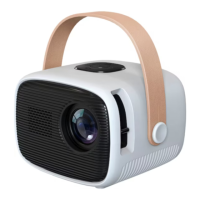

 To Next Page
 General