CRADLEPOINT CBR400| USER MANUAL Firmware ver. 3.3.0
© 2011 CRADLEPOINT, INC. PLEASE VISIT HTTP://KNOWLEDGEBASE.CRADLEPOINT.COM/ FOR MORE HELP AND RESOURCES PAGE 135
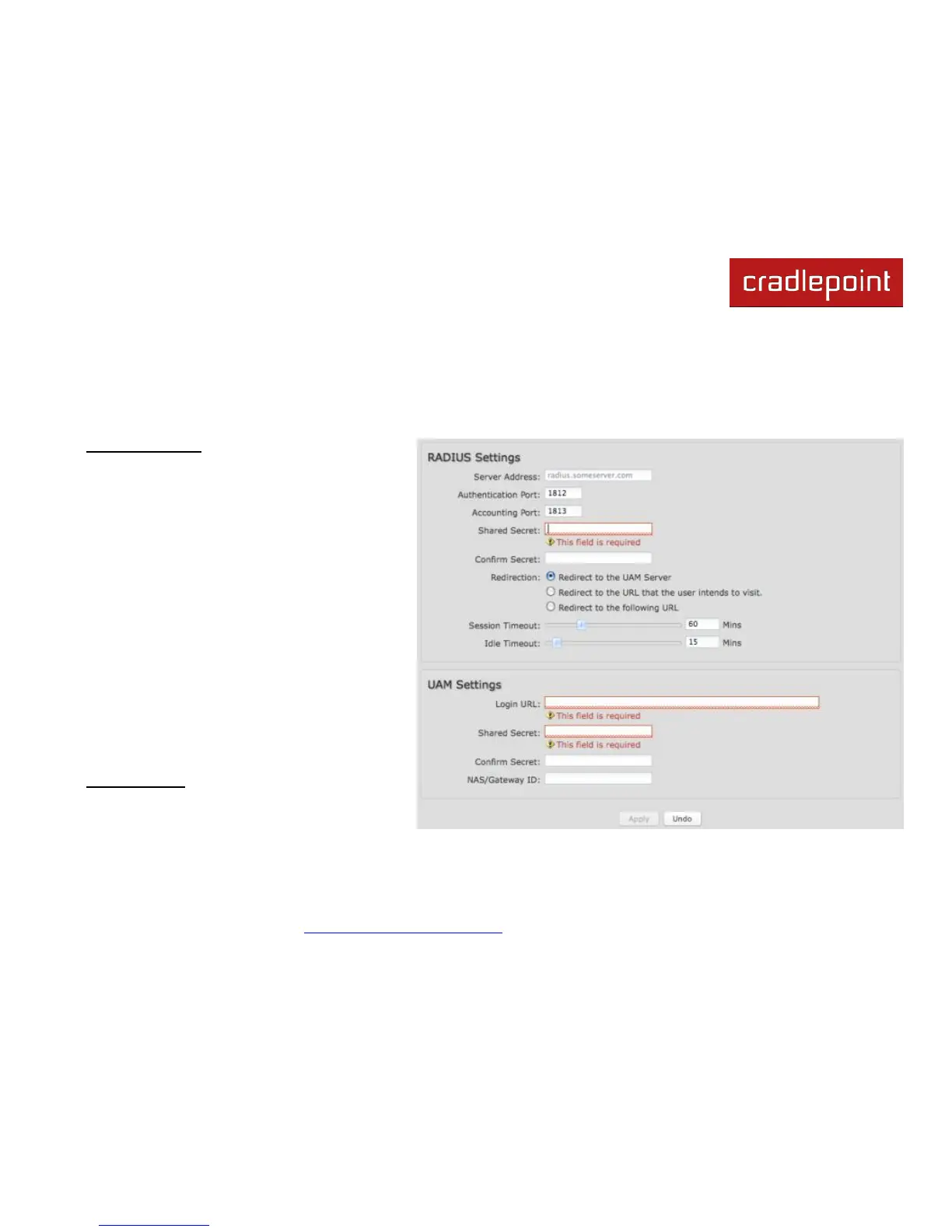
8.3.2 RADIUS/UAM Settings
This section allows you to configure a RADIUS or Universal Access Method server. After the user accepts the terms, you
can either let him/her continue to the URL they were trying to reach or you can force the user to go to a specified UAM
Server or URL once before continuing on.
RADIUS settings:
Server Address
Authentication Port (Default: 1812)
Accounting Port (Default: 1813)
Shared Secret
Redirection: Choose from the dropdown
list of options for redirection:
o Redirect to the UAM Server
o Redirect to the URL that the user
intends to visit.
o Redirect to the following URL (input
the desired URL)
Session Timeout: The amount of time the
user may use the router before being
forced to authenticate again. This value
can be overwritten by the RADIUS server.
Idle Timeout: If the user is idle for this
amount of time, make them re-
authenticate.
UAM Settings:
Login URL
Shared Secret
NAS/Gateway ID















 To Next Page