21
REMOVE THE COVERS
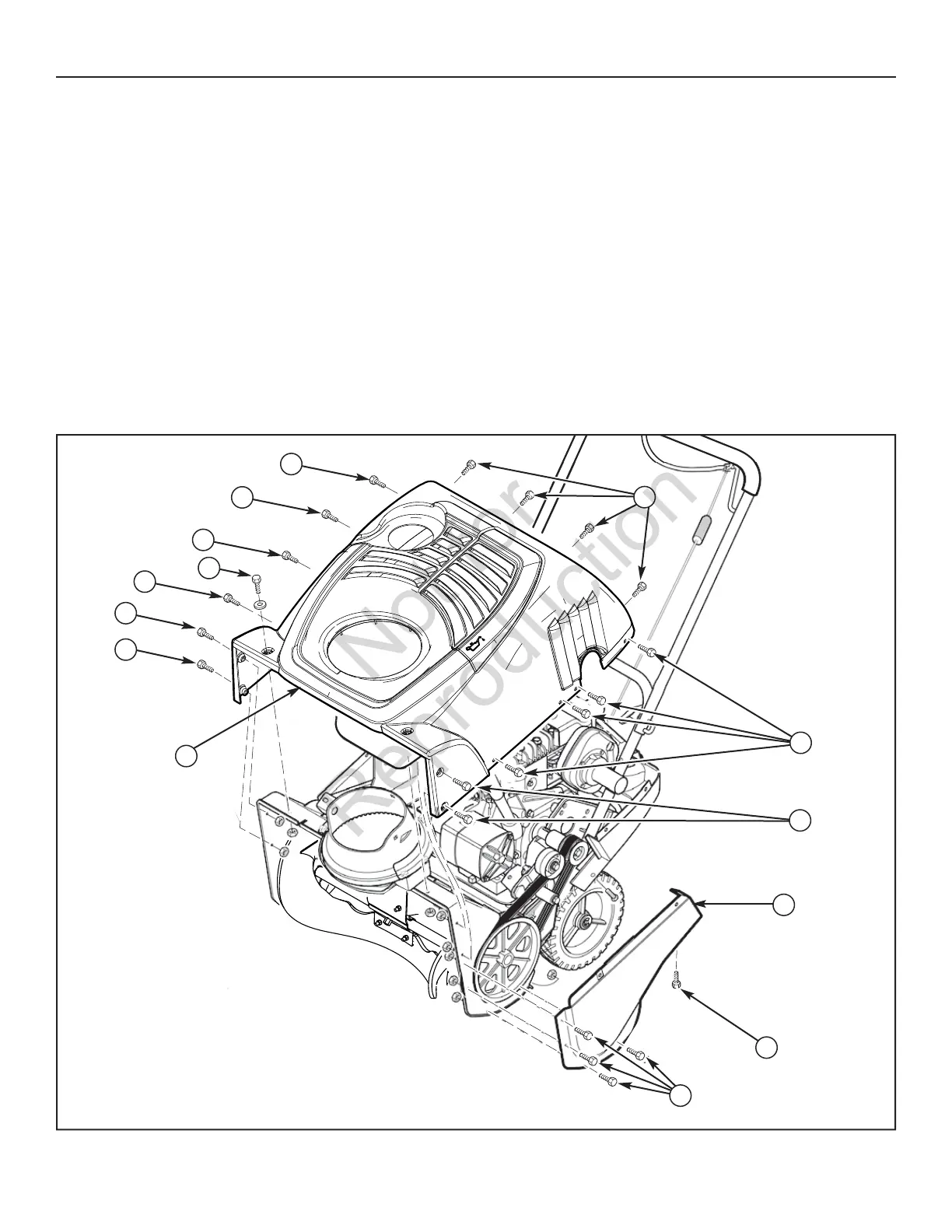
To access the drive system or the engine, the covers must be re-
moved as follows:
REMOVE THE TOP COVER
1. Remove the discharge chute. See “Remove The Discharge
Chute”.
2. Remove the fuel cap.
3. Remove the two bolts (A, Figure 19) and nuts from the front
of the top cover (G).
4. Remove the two bolts (B) and nuts from the left and right side
of the top cover.
5. Remove the eight screws (C) on the left and right side of the
top cover.
6. Remove the four screws (D) from the top portion of the con-
trol panel.
7. Carefully pull the rear of the top cover up and over the gas
tank.
8. To install the top cover, reverse the above steps.
REMOVE THE BELT COVER
1. Remove the bolts (E, Figure 19)) and nuts that hold the belt
cover (H) to the auger housing.
2. If the top cover has not been removed, then remove the
screws (C) that attach the belt cover to the top cover.
3. Remove screw (F) that holds the belt cover to the bottom
cover.
4. To remove, hold the bottom portion of the belt cover and pull
down and out.
5. To install the belt cover, reverse the above steps.
C
C
C
C
A
B
B
C
B
E
F
H
G
Remove Top Cover
Figure 19
D
MAINTENANCE




 To Next Page