Standby Mode. To turn the soundbar on again, press the Power button on the Soundbar or Remote Control. If a
connected HDMI CEC-compliant TV or source device is connected to the soundbar, the soundbar will turn on and
enter standby mode in sync with the connected device. Standby timing, power synchronization over HDMI, and more
are customizable using the Creative app.
Setting up Creative SXFI CARRIER
Setting Up the Soundbar
Connecting the Soundbar to your TV*
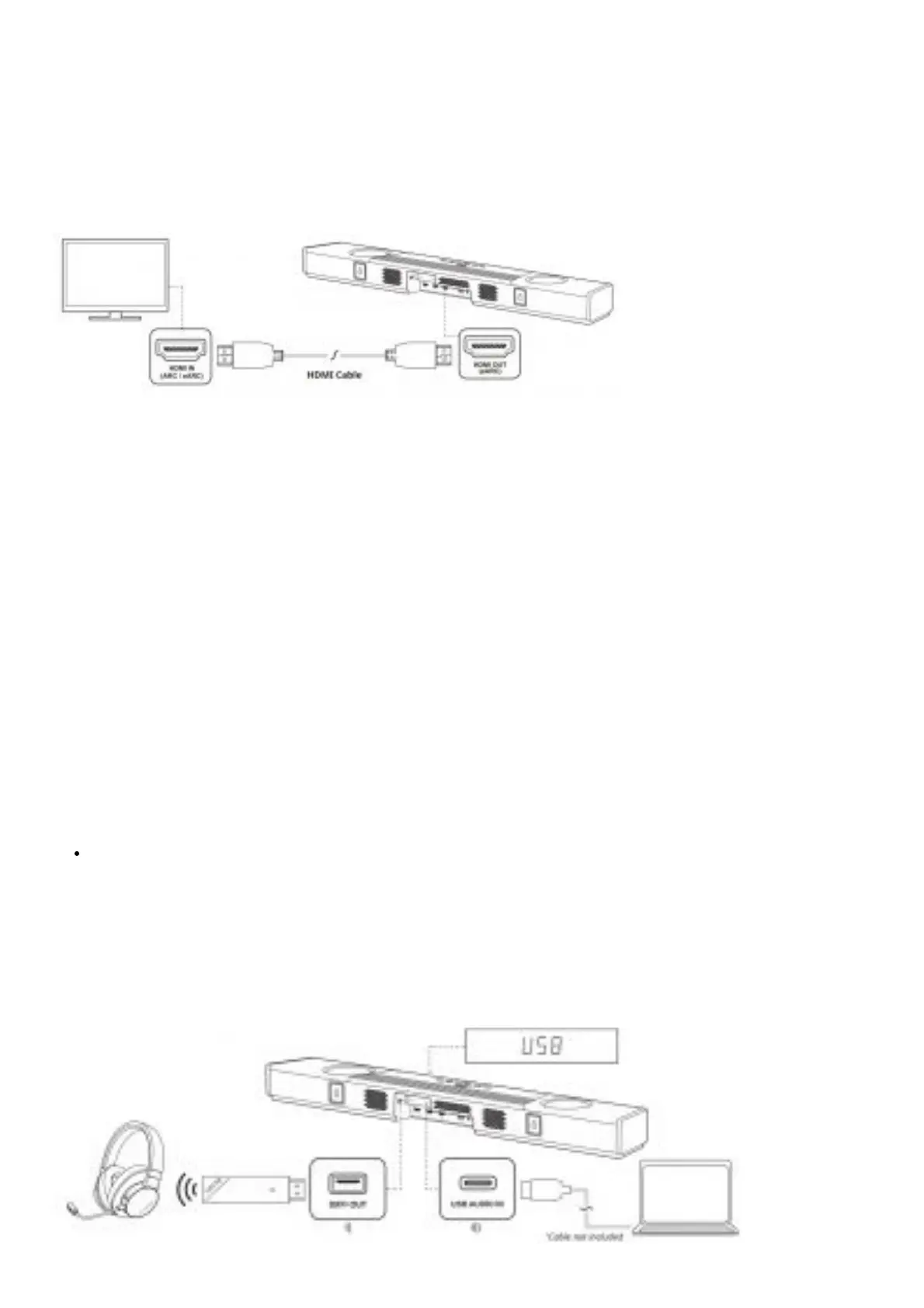
1. Creative SXFI CARRIER supports HDMI Audio Return Channel (ARC) and enhanced Audio Return Channel
(eARC). This allows the soundbar to play lossless multichannel audio from the TV, or audio from sources
connected to the TV. For convenience, we recommend that you connect all HDMI input sources to the TV, as
this allows most of the interaction you would have with the system (Source Switching, Volume Control) to be
carried out with the TV’s remote control.
2. Creative SXFI CARRIER supports HDMI 2.1 with 8K passthrough. If 8K capable sources are connected to the
soundbar, please use a HDMI-certified ultra-high speed cable (48 Gbps) to establish the connection between
the soundbar and TV.
3. Connect Creative SXFI CARRIER’S HDMI-out to the HDMI-in of the TV marked with ARC (or eARC). Typically,
only one of the TV’s HDMI-ins will support ARC. If you cannot find the port, please consult your TV user
manual.
Note: If your TV does not support HDMI ARC, connect the TV’s Optical Digital-out to the Optical-in, and
configure the TV’s
audio-out to Optical-out.
4. For certain TVs, you will need to manually configure its audio settings to enable ARC (or eARC). Ensure that
Creative SXFI CARRIER is turned on and connected to the TV while the settings are being configured.
Note: The HDMI ARC-in may be manually selected by pressing the TV’s button on the remote control if
necessary
We recommend that the wired connections to the soundbar are made before wall mounting the soundbar or
deciding on the final placement of the soundbar in the cabinet
Setting up Creative SXFI CARRIER
Setting Up the Soundbar
Connecting External Devices to the Soundbar






 To Next Page