Commercial Power Amplifiers Crestron AMP-2210S/3210S
4. Remove the fuse from the fuse holder and insert a new fuse.
5. Insert the fuse holder in the AMP-2210T/3210T/2210HT.
6. Push in the fuse holder with a flat head screwdriver. While pushing in the
fuse holder, turn the screwdriver clockwise until the fuse holder sets into
place.
7. Push in the fuse holder a little further and turn the screwdriver clockwise
until the fuse holder locks in place.
8. Connect power to the AMP-2210T/3210T/2210HT.
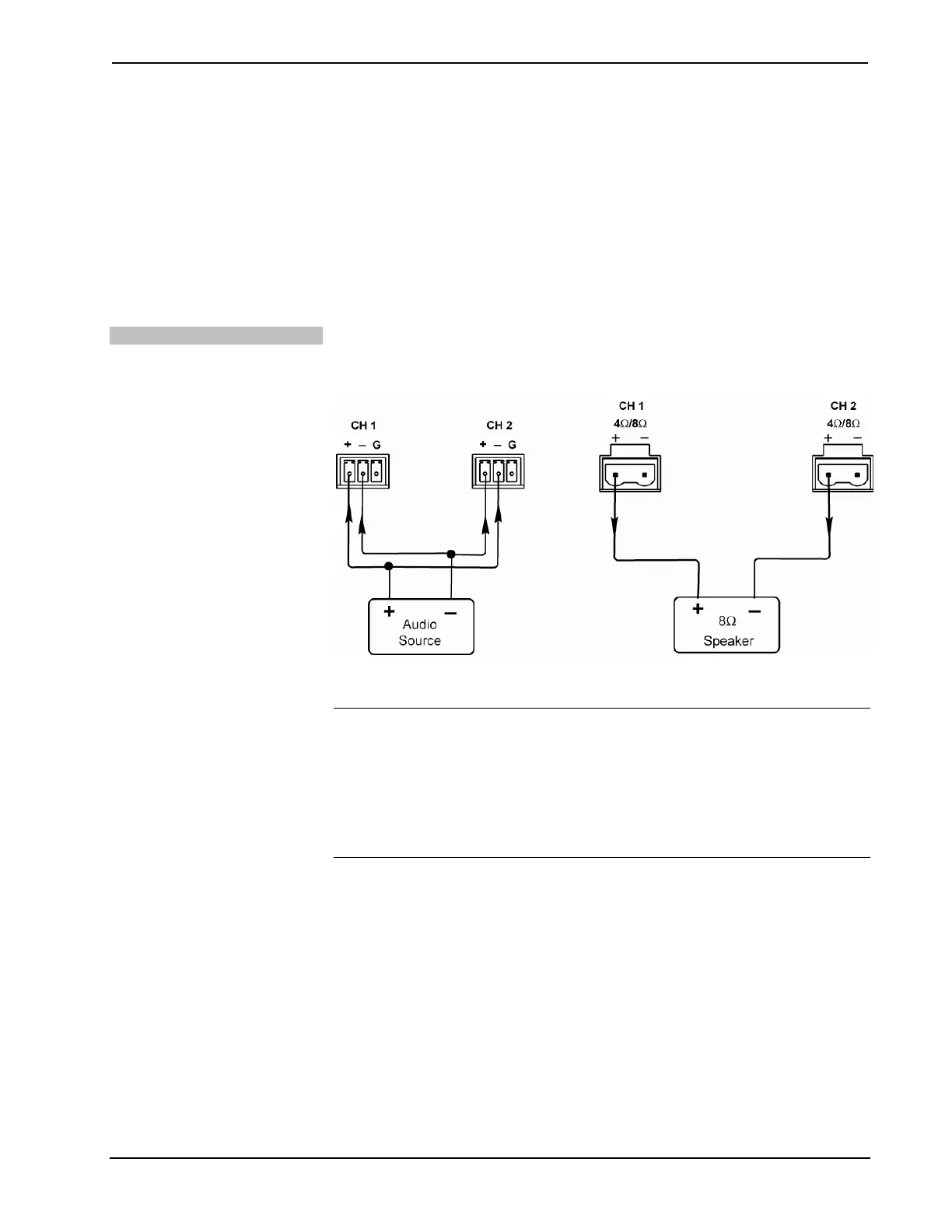
Bridging Inputs/Outputs
Channels 1 and 2 can be bridged to provide a more robust
420W @ 8Ω to a single load.
To bridge channels 1 and 2, refer to the following illustrations.
Bridging Audio Input Channels Bridging Speaker Output Channels
NOTE: The INPUT LEVEL controls for both channels must be set to the same
level.
NOTE: The minimum allowable load impedance in bridged mode is 8 Ohms.
NOTE: When operating in bridged mode, the CLIPPING and FAULT LEDs for
each channel continue to operate independently.
12 Commercial Power Amplifiers: AMP-2210S/3210S Operations & Installation Guide – DOC. 7251A






 To Next Page