Commercial Power Amplifiers Crestron AMP-2210S/3210S
Problem Solving
Troubleshooting
The following table provides corrective action for possible trouble situations. If
further assistance is required, please contact a Crestron customer service
representative.
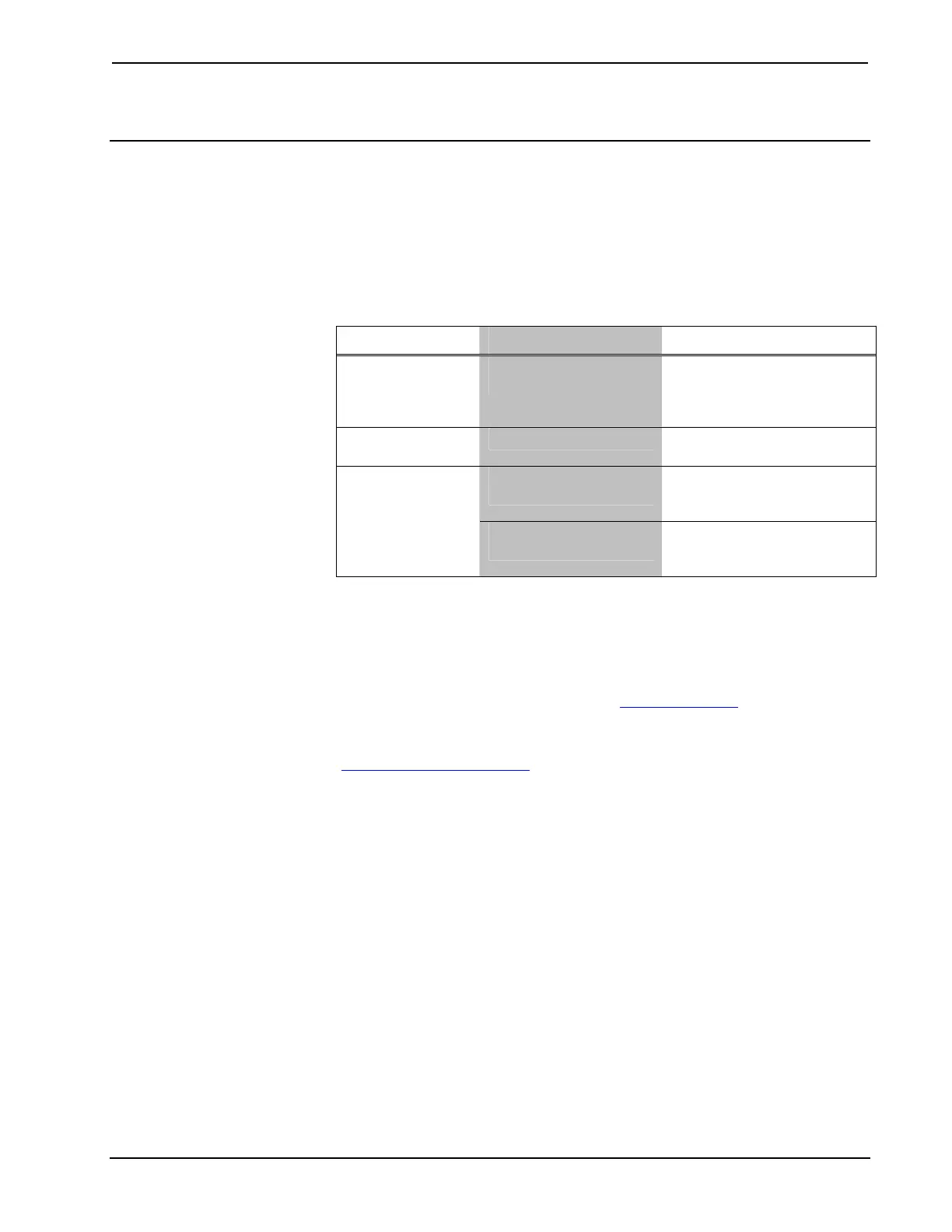
AMP-2210S/3210S Troubleshooting
TROUBLE POSSIBLE CAUSE(S) CORRECTIVE ACTION
PWR LED does
not illuminate
AMP-2210S/3210S is
not receiving power
Verify that the
AMP-2210S/3210S is
connected to an AC outlet.
Check the fuse.
Hum on audio Grounding problem
Connect chassis to earth
ground.
Audio is distorted
or not present at
speakers
Audio input cables loose
or not connected.
Verify that the input cables
are connected to the
appropriate input ports.
Room speaker wires
loose or disconnected.
Verify that the speaker wires
are connected to the
appropriate output ports.
Further Inquiries
If you cannot locate specific information or have questions after reviewing this
guide, please take advantage of Crestron's award winning customer service team by
calling Crestron at 1-888-CRESTRON [1-888-273-7876]. For assistance in your
region, please refer to the Crestron Web site (www.crestron.com
) for a listing of
Crestron worldwide offices.
You can also log onto the online help section of the Crestron Web site
(www.crestron.com/onlinehelp
) to ask questions about Crestron products. First-time
users will need to establish a user account to fully benefit from all available features.
Future Updates
As Crestron improves functions, adds new features and extends the capabilities of
the AMP-2210S/3210S, additional information may be made available as manual
updates. These updates are solely electronic and serve as intermediary supplements
prior to the release of a complete technical documentation revision.
Check the Crestron Web site periodically for manual update availability and its
relevance. Updates are identified as an “Addendum” in the Download column.
14 Commercial Power Amplifiers: AMP-2210S/3210S Operations & Installation Guide – DOC. 7251A




 To Next Page