Crestron AMP-2210S/3210S Commercial Power Amplifiers
Hardware Hookup
Connect the Device
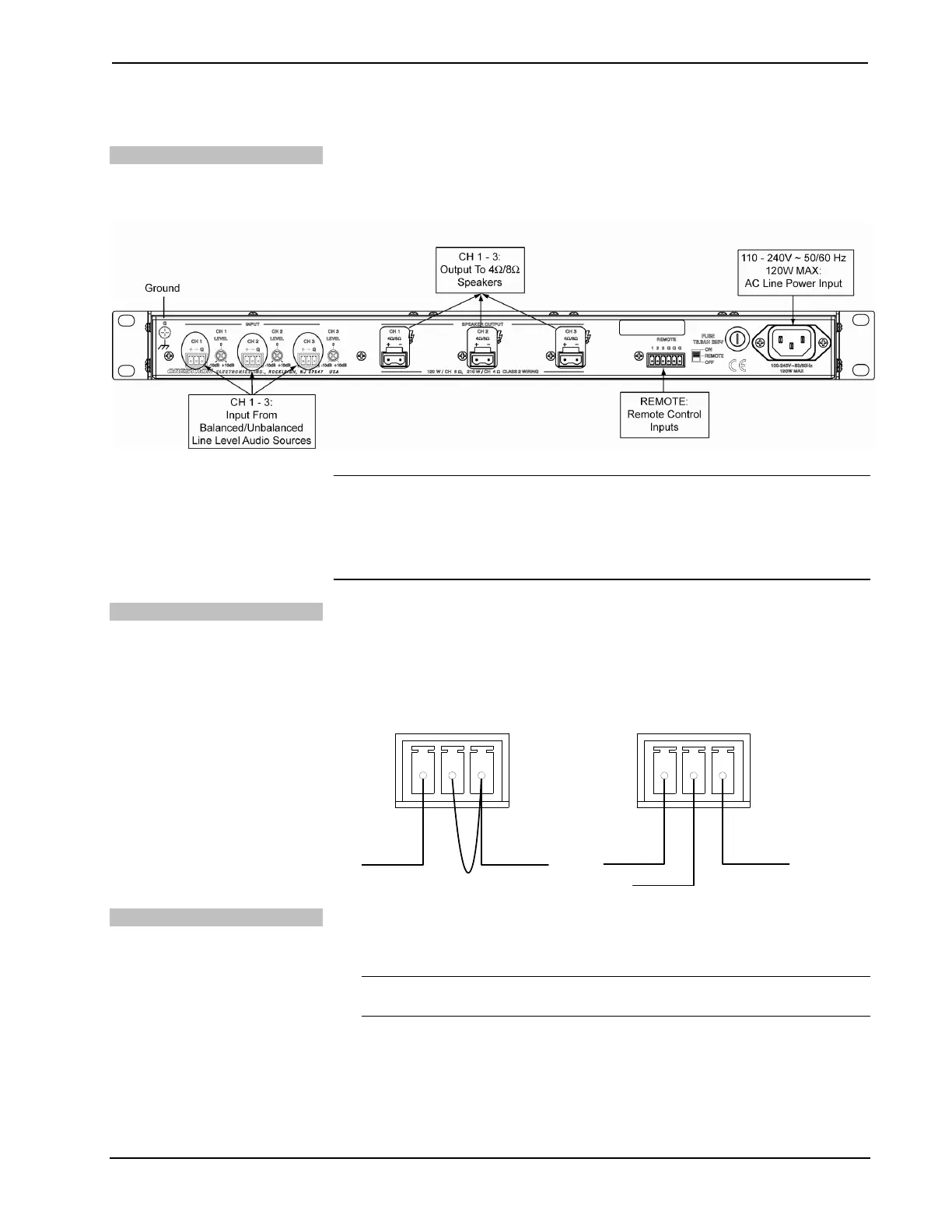
Make the necessary connections as called out in the illustration that follows this
paragraph. Apply power after all connections have been made.
Hardware Connections for the AMP-3210S
NOTE: Ensure the unit is properly grounded by connecting the chassis ground lug
to an earth ground (building steel).
NOTE: To prevent overheating, do not operate this product in an area that exceeds
the environmental temperature range listed in the table of specifications.
Connecting Audio Sources
The AMP-2210S/3210S can receive balanced or unbalanced audio input signals.
Refer to the following illustrations when connecting balanced and unbalanced
sources to the input connectors.
Wiring for Unbalanced Audio Wiring for Balanced Audio
+G-
Signal Ground
Jumper
+G-
Signal + Ground
Signal -
Fuse Replacement
If the AMP-2210S/3210S does not power up when it is plugged into an AC outlet,
the fuse may need to be replaced. The fuse holder is located on the rear panel. To
replace the fuse:
CAUTION: Use only time lag type fuses, T6.3AH / 250 Volts. Failure to do so
may cause damage to the AMP-2210T/3210T/2210HT.
1. Disconnect power to the AMP-2210S/3210S.
2. Use a flat head screwdriver to push in the fuse holder.
3. While pushing in the fuse holder, turn screwdriver counterclockwise until
the fuse holder pops out.
Operations & Installation Guide – DOC. 7251A Commercial Power Amplifiers: AMP-2210S/3210S 11




 To Next Page