Page 57
CDi DriveCore Series Operation Manual
System Settings
Amplifier Diagnostics
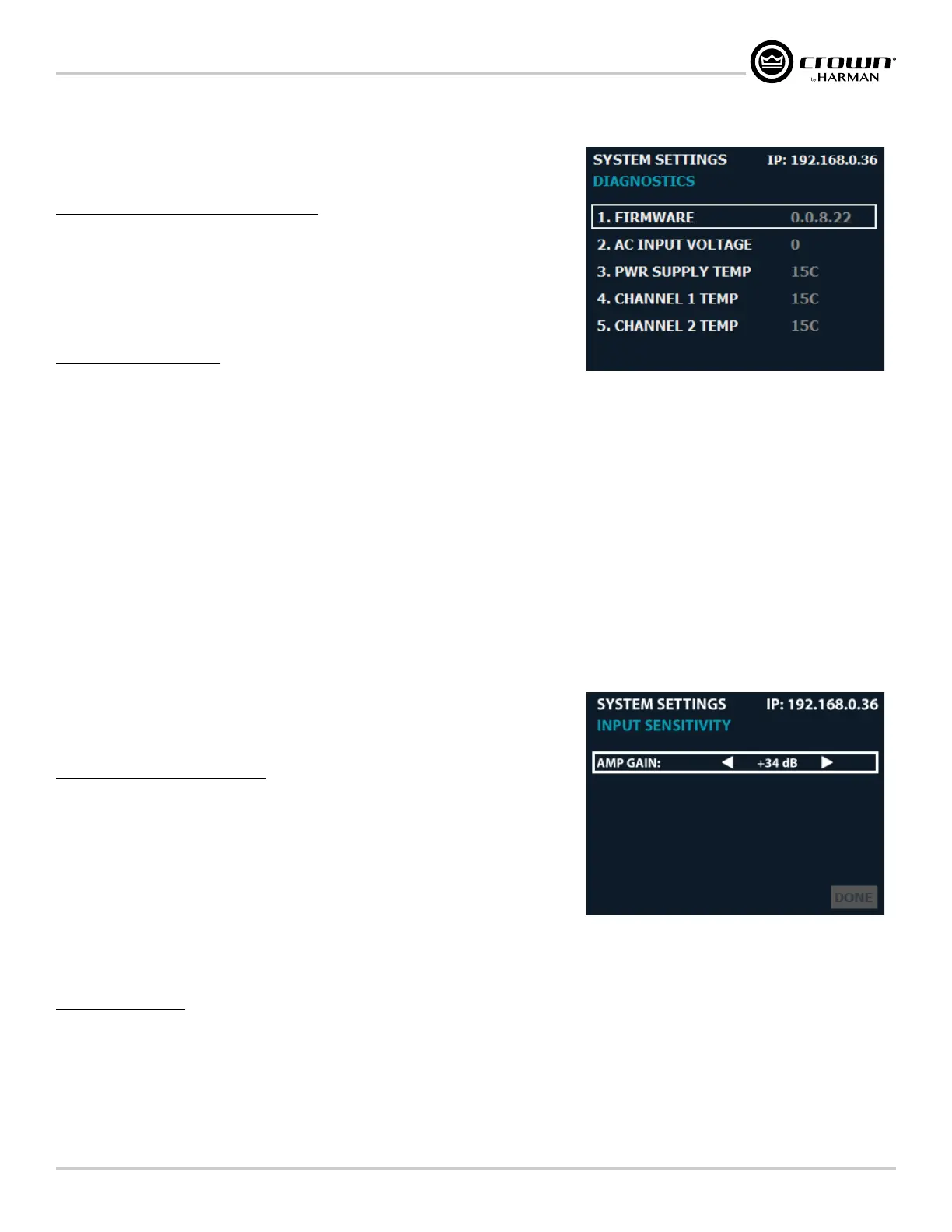
The Diagnostics screen provides a read-only list of amplifier information (see Figure 72).
To enter the System Settings screen:
1� From the Home screen, press the MENU button.
2� Select the "System Settings" option from the menu using the ENCODER.
3� Select the "Diagnostics" option.
4� Use the ENCODER to scroll the menu.
Information displayed:
• Firmware Version
• AC Input Voltage
• Power Supply Temperature
• Channel 1 Temperature
• Channel 2 Temperature
• Channel 3* Temperature
• Channel 4* Temperature
• Serial Number
• Manufactured Date
*Channel 3 and 4 options available in 4-channel CDi DriveCore models only.
Amp Gain Mode
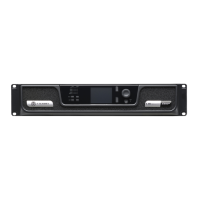
The Amp Gain setting sets how much gain will be applied to the signal within the amplifier
(from input to output) and can be set from the Amp Gain Mode screen.
To edit the Amp Gain setting:
1� From the Home screen, press the MENU button.
2� Select the "System Settings" option from the menu using the ENCODER.
3� Select the "Amp Gain" option from the menu.
4� Press the ENCODER to edit the Amp Gain setting.
5� Turn the ENCODER to select the desired Amp Gain setting.
6� When done, press the ENCODER to make the selection then select "Done" at the
bottom of the screen.
Available options:
• Amp Gain (+37dB, +34dB, +26dB)
Sets how much gain will be applied to the signal within the amplifier (from input to output).
Figure 72: Diagnostics screen
Figure 73: Amp Gain Mode screen



 To Next Page