D-1
Appendix D. Using the RV50 Ethernet
Port
The RV50 Ethernet port can be used to communicate with IP-enabled devices
such as dataloggers and IP cameras. However, the use of Ethernet
communication increases the total system current demand (the modem and the
device you are connecting to) by several milliamps as compared to the use of
serial communication.
The following example can be used to communicate with a CR1000 / NL121
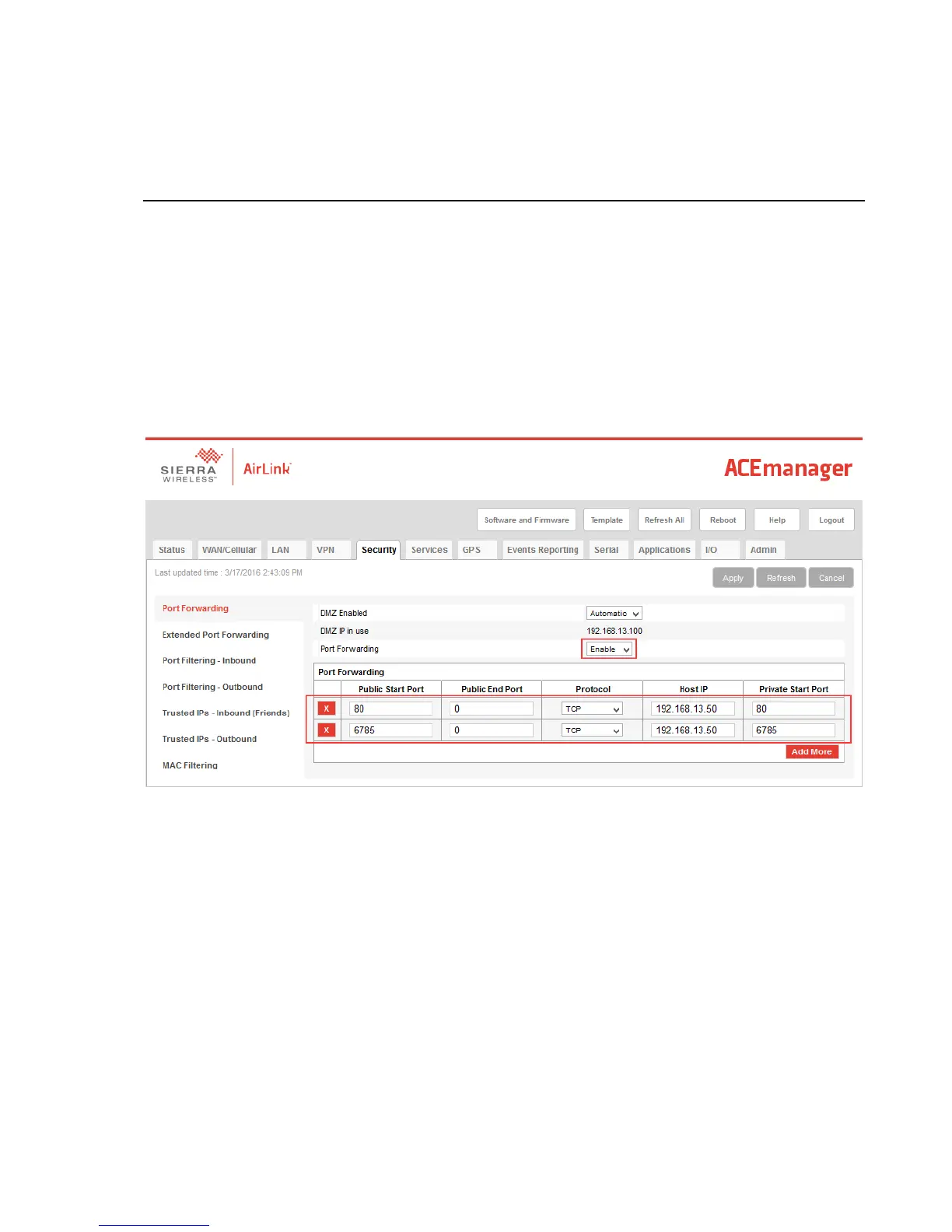
via the RV50 Ethernet port. Port forwarding in the RV50 must be enabled and
specific ports need to be forwarded to the CR1000 (in this case ports 80 and
6785). Additional ports can be configured as needed. The host IP address
192.168.13.50 specified in the figure below is the IP address of the CR1000.
For this example, a static IP Address, Subnet Mask, IP Gateway, and DNS
Server is configured in the CR1000 as shown in the figure below. The example
CR1000 IP address of 192.168.13.50 is the same address used in the RV50 port
forwarding configured previously.


 To Next Page