10
01045704 A 09/24
Display Functions and Programming
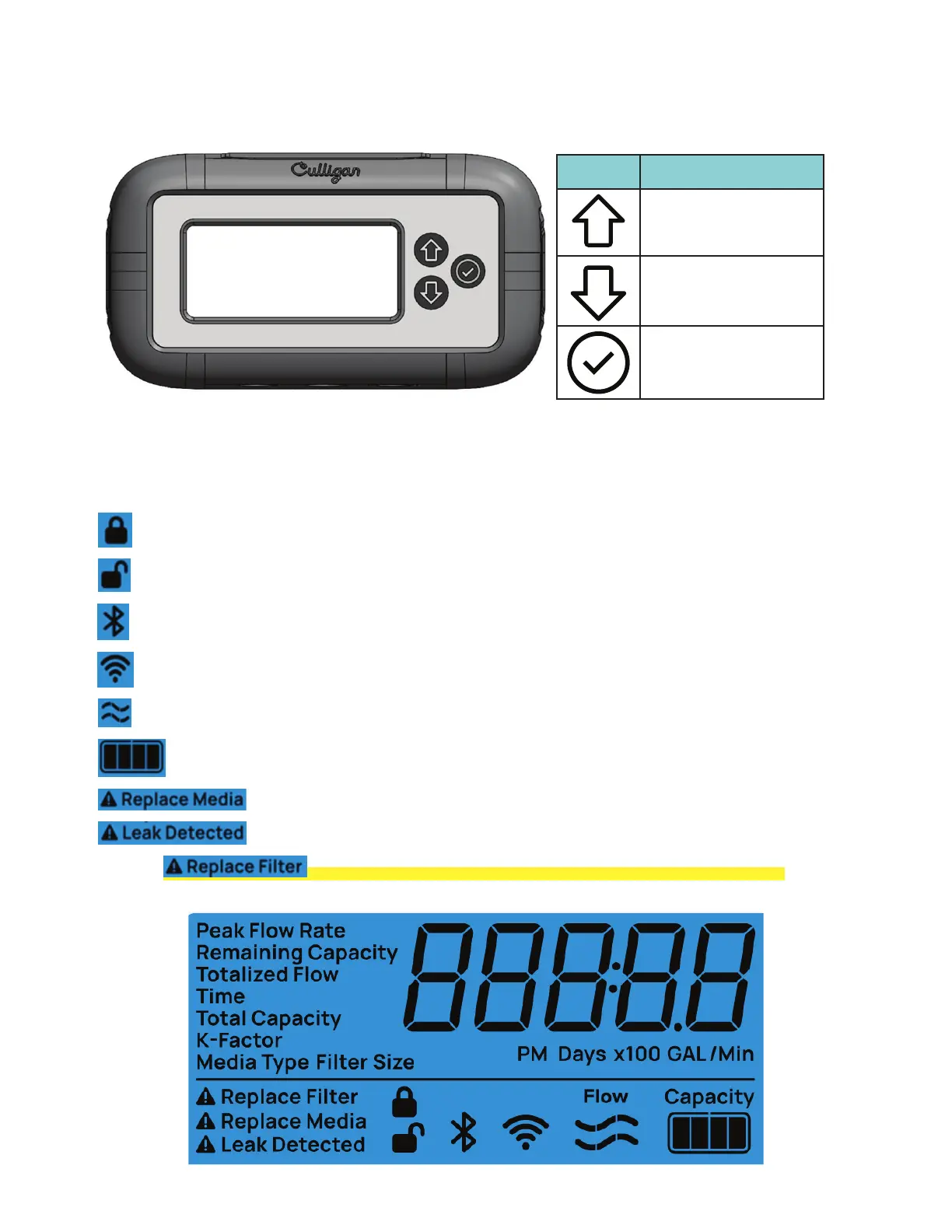
Figure 1� Smart Flow Monitor Keypad
Programming by Keypad on Enclosure
Time of day programming and advancing the display screen to the next or previous function is accomplished by using
the Check, Up, Down buttons on the display�
Smart Flow Monitor Display Icons
Lock icon indicating circuit board programming is locked and will not accept input or changes�
Unlock icon indicating circuit board programming is unlocked and able to accept programming changes�
Bluetooth icon indicating circuit board is in BLE pairing mode�
WiFi icon indicating circuit board can receive and transmit WiFi signals�
Flow icon indicating water flow is registering� Segments illuminate and light sequentially from left to right�
Remaining Capacity icon indicates the percentage of capacity remaining based on programmed value�
Replace Media Alert icon illuminates and flashes when programmed capacity reaches zero�
Leak Detected Alert icon illuminates and flashes when the optional Leak Sensor detects water�
NOTE! Replace Filter Alert icon is not currently used for Smart Flow Monitors.
Figure 2� Display Window
Icon Description
UP ARROW - Button
scrolls up the menu and
increases setting values
DOWN ARROW - Button
scrolls down the menu and
decreases setting values
CHECK MARK -
Selects and/or accepts
programming and
advances program menu



 To Next Page