Installing Accessories 33
Cat. No. 01024514
Auxiliary Outputs (P/N 01020748)
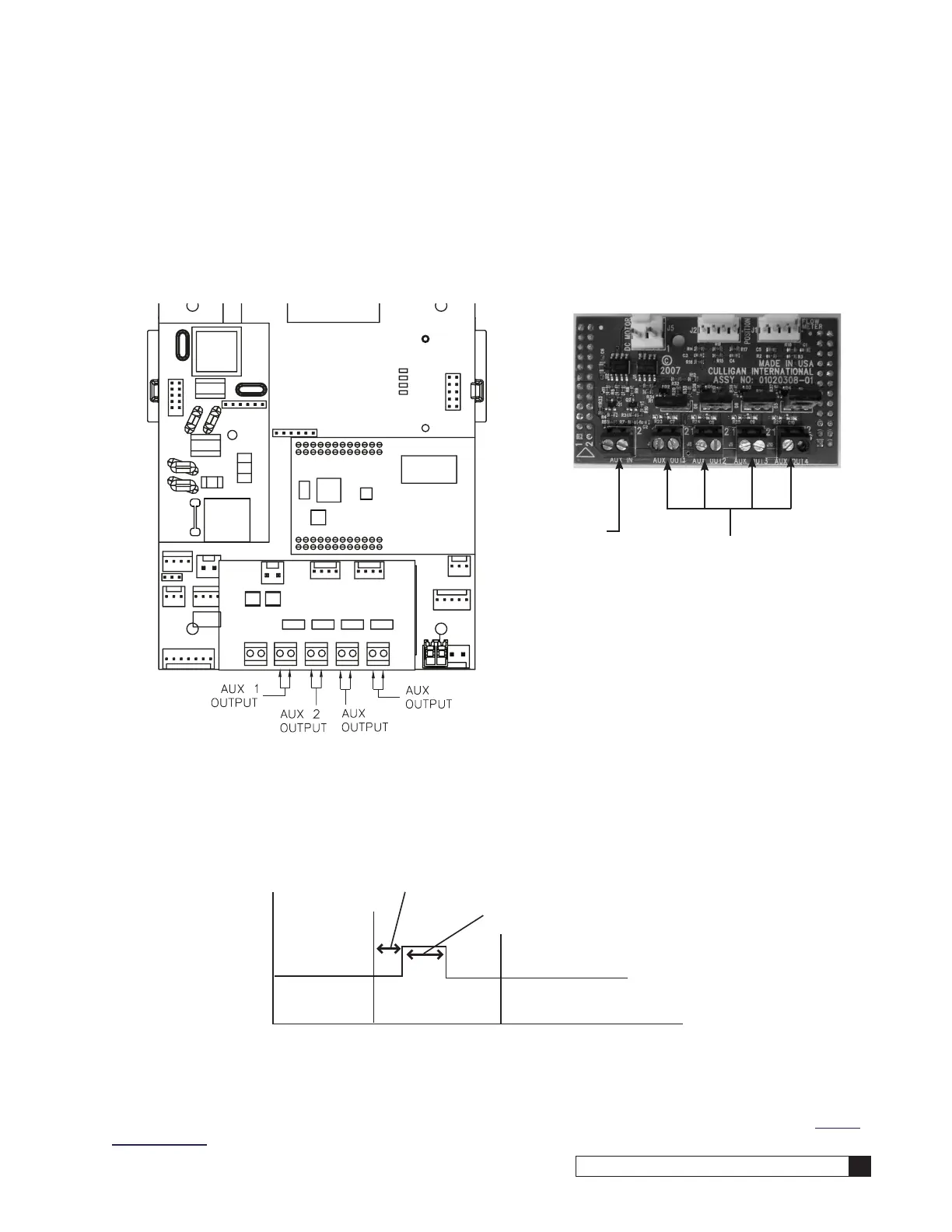
The auxiliary board (Figure 41) can be purchased as an accessory. It has four 24 VAC outputs for driving 24 VAC control
valve motors, energizing 24 VAC relay coils, or 24 VAC solenoids directly. Each solid state triac output is capable of han-
dling up to 4 Amps maximum; HOWEVER, the 24 VAC transformer determines how much total current is available. Max
supply current of the 01014897 transformer is only 2.1 Amps, so the sum of all loads on the triac outputs should never
exceed the maximum that the transformer can supply. The Auxiliary Outputs (see Figure 42) can be programmed to be
“normally off” (output stays OFF until the designated time, it is needed to be ON) or “normally on” (output stays ON until
the designated time, it is needed to be turned OFF).
Figure 41. Auxiliary outputs.
Auxiliary Outputs
Auxiliary Input
Figure 42. Auxiliary board input and outputs.
Aux Output 1 is used to power the 24 VAC drive motor found on all valves. When Aux Output 1 is used for this, then Aux
Output 4 is automatically configured to operate a solenoid which can be used for a standby or blocking. Aux Output 4 is
powered during all cycles except service, and unpowered during service.
For example, Figure 43 shows how the timing would work if an auxiliary output is set to NORMALLY OFF. The cycle posi-
tion is set to BACKWASH, the delay minutes setting is greater than zero, and ON minutes is greater than zero.
Delay Minutes
On Minutes
Service Backwash Brine Draw
Service Backwash Brine Draw
ON SECONDS
@ 1500 gallons, on seconds is activated by GALLONS
@ 3000 gallons, on seconds is activated by GALLONS
@ 4500 gallons, on seconds is activated by OFF MINUTES
OFF MINUTES
EXAMPLE
GALLONS: 1500
ON SECONDS: 10
OFF MINUTES: 15
Figure 43. Auxiliary board activation timing.
Refer to GBE Programming for Commercial Softeners and Filters (except for HFxN) Manual (P/N 01027295) for program-
ming information. This manual can be obtained from your local dealer, C-Port (www.cport.culligan.com) under the Techni-
cal Service Tab or on the Service Tech App.




 To Next Page