9
4.0 SETTING GAS FLOW CONTROL LIMITS
4.1 Description
To use the GFM as a Sure-Flow gas switch, the user can set the “Max Limit” and
“Min Limit”.
The GFM will activate the internal fault relay as long as the gas flow remains above
the lower limit and below the upper limit. If the gas flow rate moves outside of the
control limits the fault relay will be deactivated. The "Test Delay" parameter is used
to delay the start of high limit testing. The value of this parameter will determine
when the GFM will begin testing for the upper control limit after the gas flow is
initiated. The lower limit is always being checked during the gas flow period. A high
gas flow fault will only occur after this time period has expired.
4.2 Setup
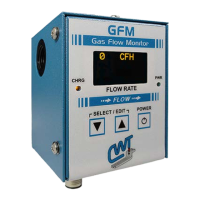
To program the High/Low limits and test parameters press both “▼” and "▲" switch
simultaneously to enter the “Select Para INC/DEC” mode. The first programmable
parameter will appear on the display. To increment through the program menus
press the “▲” button. To decrement through the menus press the “▼” button. To
edit a menu option press both “▼” and "▲" switch simultaneously to enter the “Edit
Para INC/DEC” mode. To increment the parameter press the “▲” button. To
decrement the parameter press the “▼” button. To end the “Edit Para INC/DEC”
press both “▼” and "▲" switch simultaneously to exit and return to the normal display
mode.


 To Next Page