28/38
Sept.
2014
V3.1
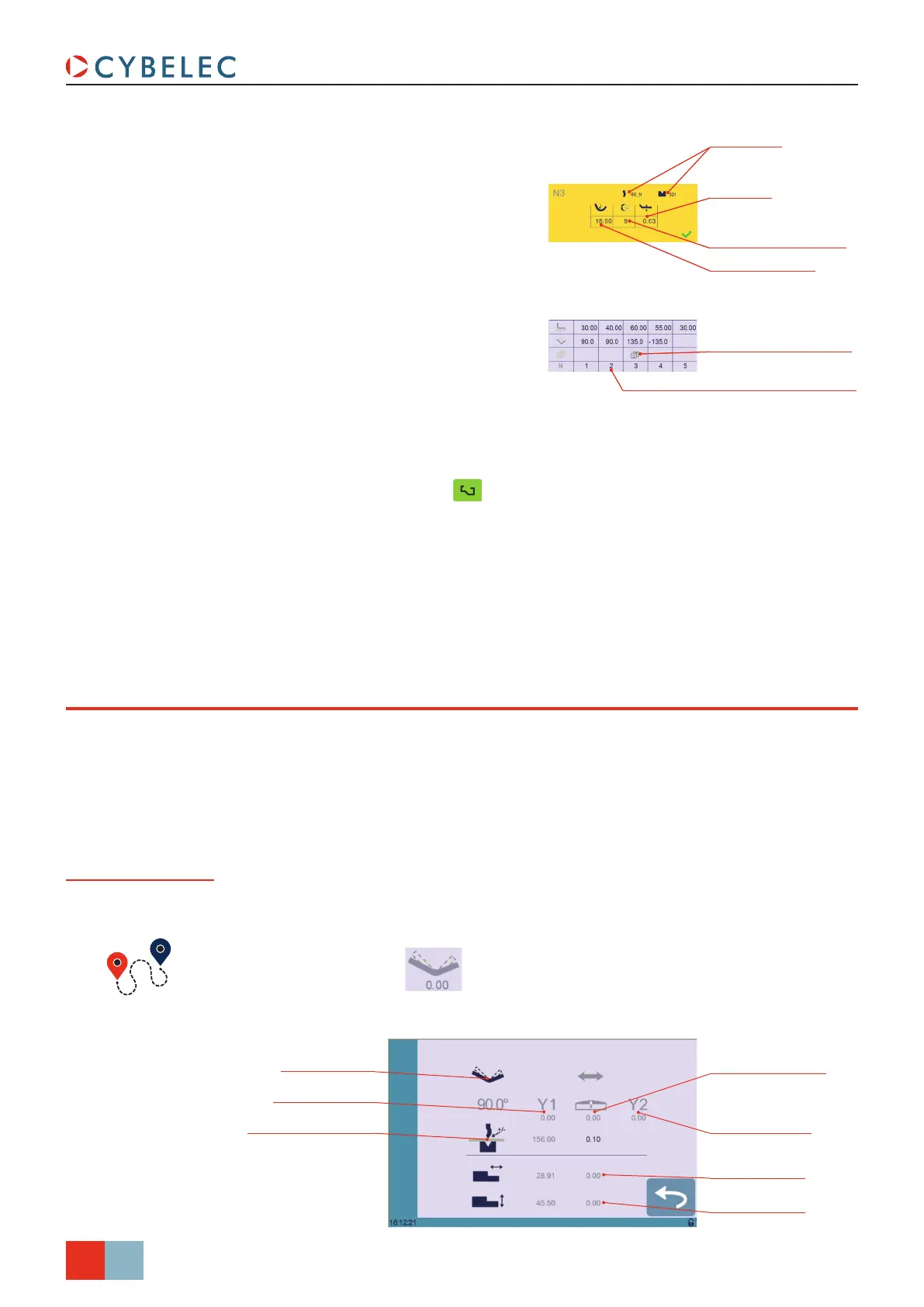
R axis correction
Pinch Point correction
Angle correction
X axis correction
Y1 axis correction
Y2 axis correction
Crowning correction
CybTouch 8 PS User Manual
bend correcTion
All program corrections are made in the Bend Numerical Page (see page 14).
Corrections can be made to:
• The angle (Y1 + Y2, see Angle Correction (Y axis) and/or crowning if available, see
Crowning, page 29),
• The back gauge position (X and R, if available), see Back gauge (X & R axes)
Correction, page 29.
Angle Correction
(Y axis)
Bend Numerical Page →
After physically measuring the angle, if corrections are to be made, they must be done on
this page, and not directly in the program step.
Max. distance to
ideal curve
Special tools
More icon – means
special functions on bend
Number of steps to
execute the step bending
Large radius value
Touching a step number allows deleting it
or inserting a new one right after it
7. A yellow pop-up is displayed, in which
it possible to:
• Activate (and deactivate) a special
tool by touching its icon, and select
it from a list by pressing ???.
• Change the value of the radius.
• Define how many steps the NC will
make to execute the step bending.
8. A small More icon shows that
something special is programmed on
the bend.
9. To remove the icon (and special
parameters), return to the yellow pop-
up, touch all the activated functions to
make them turn gray, and select OK.
10. Once all the segments and angles are
adjusted, press this button
to
access the Manual Bend Sequencing
(see page 24).
Max. distance to
ideal curve
Special tools
More icon – means
special functions on bend
Number of steps to
execute the step bending
Large radius value
Touching a step number allows deleting it
or inserting a new one right after it



 To Next Page