Need help?
Do you have a question about the CYBELEC CybTouch Series and is the answer not in the manual?
User directives for safe operation and machine interaction.
Explanation of warning signs and icons used for safety and information.
Guidelines for interacting with the pressure-sensitive touchscreen.
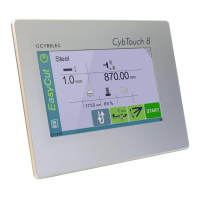
Visual representation of the CybTouch interface and its navigation paths.
Explanation of main navigation elements like Menu and Status Page Zone.
Instructions for safely cleaning the CybTouch display.
Overview of the Status page for monitoring inputs, outputs, and axes.
Guide to accessing and customizing user-specific settings.
How to choose the desired user interface language.
Setting units for length, force, and sigma measurements.
Controls for displaying axis positions on the Bend Numerical Page.
Enabling access to Touch Profile and L-Alpha modes.
Option to view the part's state before and after bending.
Configuring the display options for the Bend Numerical Page.
Enabling a button for direct access to Manual Axes Movement.
Applying permanent correction to the Bottom Dead Centre position.
Enabling communication between CybTouch and a laptop.
Clearing indexation and browsing USB drives.
Allows the user to set the time and date on the CybTouch.
Calibrating the touchscreen for optimal responsiveness and accuracy.
Adjusting screen brightness and enabling Offset Pinch Point.
Defines the counting mode for the part counter.
Choosing data entry mode for back gauge on specific pages.
Controlling axis position recalculation when loading a part.
Allows manual control of machine axes for setup and adjustments.
Enables independent movement of Y1 or Y2 axes.
Accessing service menus for counters, axis settings, and maintenance.
Manually adjusting back gauge and beam axis positions.
Viewing hardware status and performing maintenance actions.
Rearranges memory space to optimize CybTouch performance.
Erasing data and performing internal machine backups.
Shows names and versions of installed software on the CybTouch.
Viewing computer identification and managing machine options.
Enables data transfer between CybTouch and USB storage devices.
Important considerations for successful USB data transfers.
Guidance on converting and importing parts from other Cybelec NCs.
Detailed overview of the main working page for bend execution.
Managing Y axis modes for angle and position control during bends.
Managing X axis modes for flange length and position control.
Managing R axis position calculation and modification.
Modifying part-specific parameters for current bends.
Setting material sigma and configuring back-gauge retraction.
Adjusting speed, defining bending length, and setting up step bends.
Controlling beam return speed and dwell duration at BDC.
Displaying calculated force and setting part extraction opening.
Activating crowning and selecting back gauge finger positions.
Setting part count and enabling manual back gauge movement.
Performing box closure bends and die hemming operations.
Copying a value to all steps within the current program.
Details on selecting and viewing punch tool information.
Details on selecting and viewing die tool information.
Creating part programs by intuitively drawing profiles on screen.
Repeating sequences to apply corrections bend by bend.
Adjusting the measured angle of the bend for accuracy.
Modifying the crowning value to improve bend precision.
Applying corrections to back gauge X and R axis positions.
Executing multiple part programs sequentially.
Steps to convert PC-ModEva files for use with CybTouch.
Procedures for saving existing and creating new part programs.
How to load and remove part programs from the system.
Visually navigating through the list of stored part programs.
Step-by-step guide for performing individual bends.
Details and descriptions of all warning messages.
Details and descriptions of all error messages.
Specific error messages related to beam movement and control.
Messages for serious errors requiring restart or dealer contact.
Links to video tutorials and support contact information.
 General
| Category | Control Systems |
|---|---|
| Manufacturer | CYBELEC |
| Touch Screen | Yes |
| Power Supply | 24V DC |
| Series | CybTouch |
| Screen Type | LCD |
| Display | Color |
| Processor | ARM |
| Communication Ports | USB |


 To Next Page