11
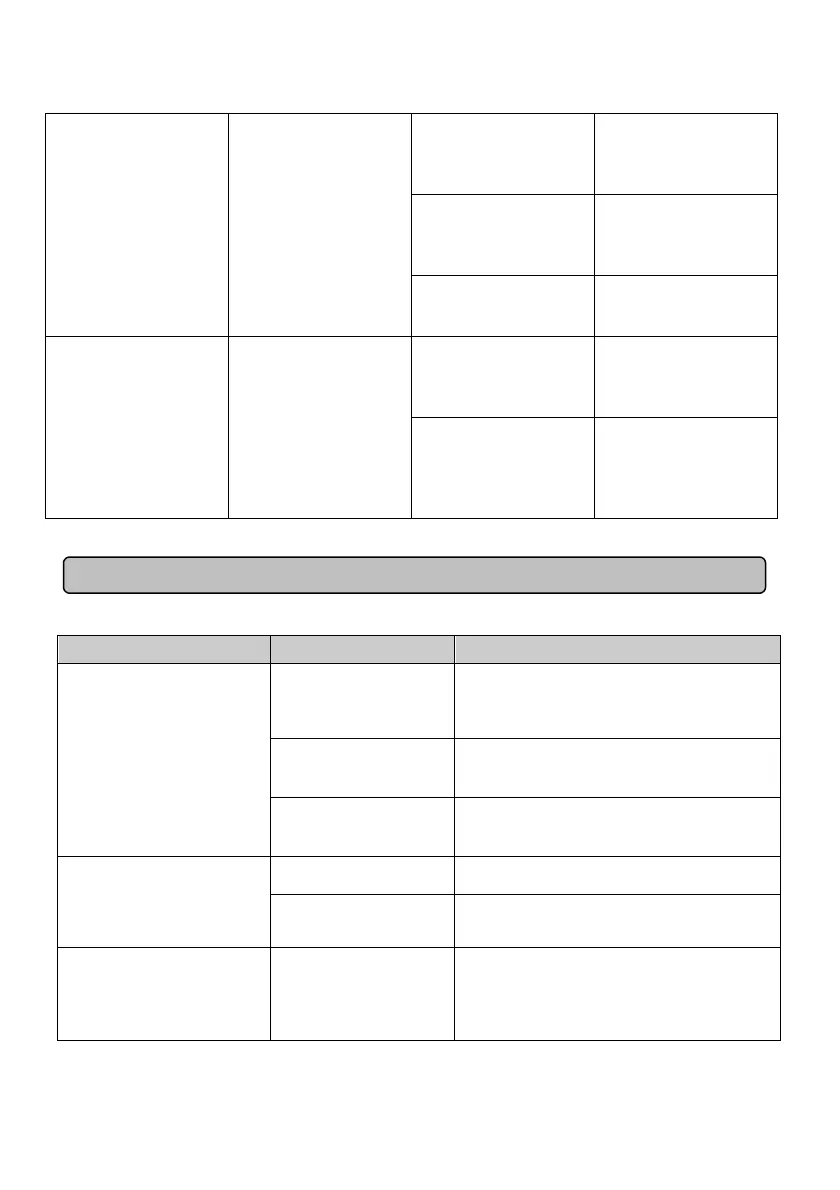
Low Battery
Output-Off
-- Insufficient battery
capacity.
Recharge the battery.
Over Charge or AVR
Error-- In Line Mode,
battery is overcharged
or AVR is faulty.
Inform service agents.
Short Output-Off --
Output Short Circuit
Protection
Check the EPS output
to see if there is a
short circuit.
Can Not Start Up None
Line Input/ Output
Error Output-Off --
incorrect Input/ Output
connection
Check Input/ Output
connection.
Cold Start Battery
High Voltage
Output-Off -- the
battery voltage is too
high during cold start.
Check the reason for
battery over-voltage.
TROUBLESHOOTING
Problem Possible Cause Solution
Outlet does not provide
power to equipment.
Circuit breaker has
tripped due to an
overload.
First, turn the EPS off and unplug at least
one piece of equipment. Wait 10 seconds,
reset the circuit breaker by pressing the
button, and then turn the EPS on.
Batteries are
discharged.
Recharge the unit for at least 4 hours.
Unit has been
damaged by a surge
or spike.
Contact CyberPower Systems about
replacement batteries.
The EPS does not perform
expected runtime.
Batteries are not fully
charged.
Recharge the battery by leaving the EPS
plugged in.
Batteries are
degraded.
Contact CyberPower Systems about
replacement batteries.
The UPS will not turn on.
The on/off switch is
designed to prevent
the damage that
rapidly turns it off and
on.
Turn the EPS off. Wait 10 seconds and
then turn the EPS on.







 To Next Page