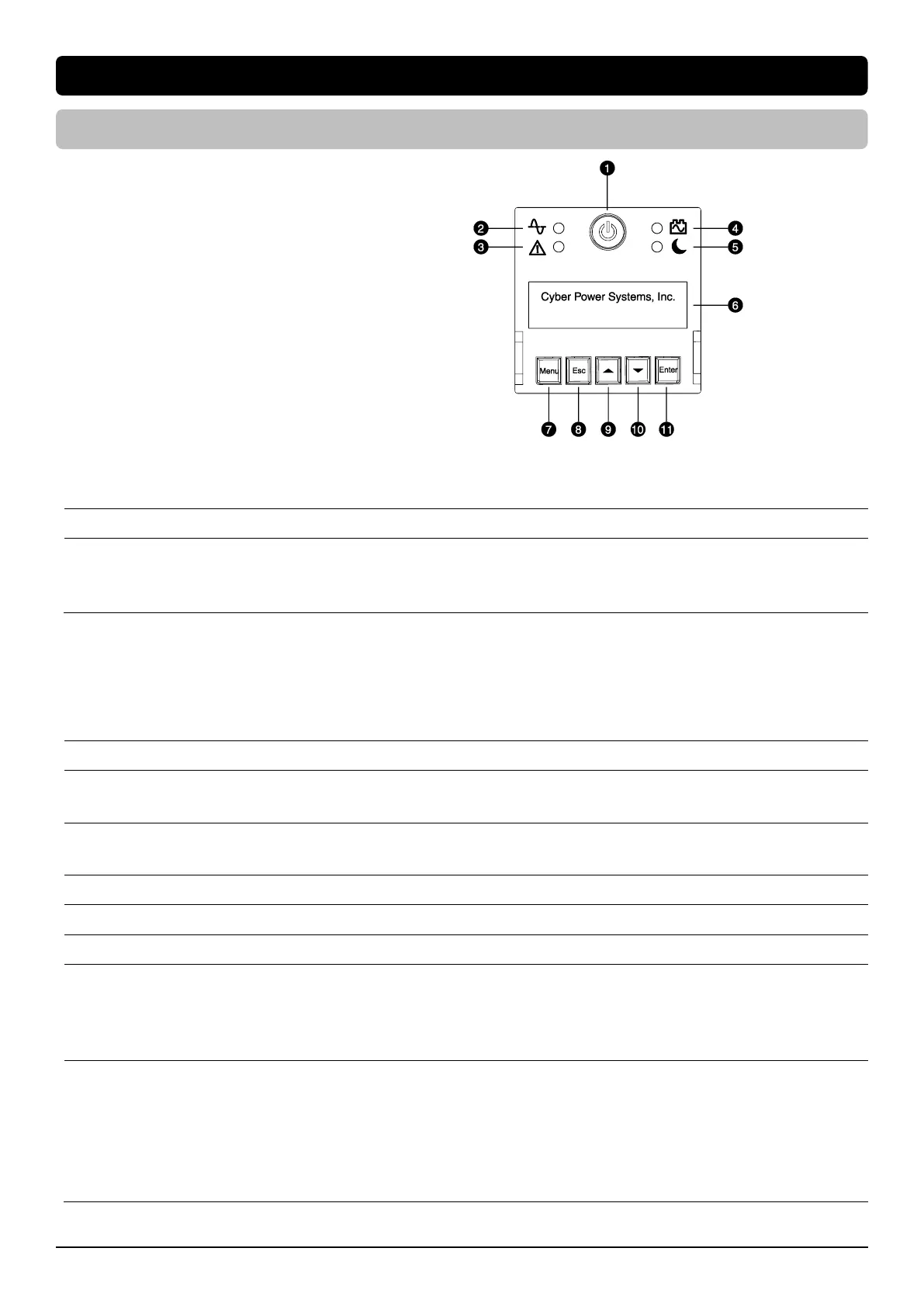
Display Interface
1. Power Switch/Power on Indicator
2. Online Indicator
3. Fault/Warning Indicator
4. On Battery Indicator
5. Night Mode Indicator
6. Display Screen
7. Menu Button
8. Esc Button
9. Up Button
10. Down Button
11. Enter Button
Basic Operation
Press Up/Down Button to scroll through the UPS status. Press Esc button to go back to top.
Operation Mode
Input Voltage Information
Output Voltage Information
Estimated Runtime
Battery Information
Load Information
NCL Status
UPS Temperature
Date & Time
LCD Setting Guide
Press Menu Button to enter Setup Menu and use Up/Down Button to scroll through menus. Press Enter Button to go into the selected menu
and use the Up/Down Button and Enter Button to select the setting item and to complete the setting. Esc Button is pressed to exit the
submenu and go back to previous page.
Utility Quality
Sensitivity
Extended Battery Module
Quantity* *Select models
Night Mode Switch
Night Mode Audible Alarm
Night Mode LCD Switch
Night Mode LED Switch
Night Mode Max Fan Speed
UPS Model Name
UPS Serial Number
Last Battery Change Date
Next Battery Change Date
UPS Firmware Version
LCD Firmware Version
IP Address
MAC ID
Service Port Number
BM Status
UPS Battery Information
Output Voltage
Minimum Output Voltage
Maximum Output Voltage
LCD Hibernation
Cycling Display
Low Battery Threshold
Battery Change Date
Schedule Test
Date and Time
Power Meter Rest
IP Access
IP Address
Subnet Mask
Gateway
Firmware Update**
Back to Default
**Only displayed in standby mode









 To Next Page