Read and follow the important safety instructions before servicing the batteries. Visit CyberPower official website
www.cyberpowersystems.com or contact your dealer for more information on replacement batteries.
The battery replacement video is available online. Scan the QR code below for detailed information.
CAUTION! RISK OF EXPLOSION IF BATTERY IS REPLACED BY AN INCORRECT TYPE. When replacing batteries, replace with the same number of
the following battery: CyberPower RB1250X4 for PR750RT2U, CyberPower RB1270X4H for PR1000RT2U/ PR750RTXL2U/ PR1000RTXL2U,
CyberPower RB1290X4J for PR1500RT2U/ PR2000RT2U/ PR2200RT2U/ PR3000RT2U/ PR1500RTXL2U/ PR2000RTXL2U/ PR2200RTXL2U/
PR3000RTXL2U.
CAUTION! Risk of Energy Hazard, 12V, maximum 6 Ampere-hour battery. (PR750RT2U)
CAUTION! Risk of Energy Hazard, 12V, maximum 9 Ampere-hour battery. (PR1000RT2U/ PR1500RT2U/ PR2000RT2U/ PR2200RT2U/
PR3000RT2U/ PR750RTXL2U/ PR1000RTXL2U/ PR1500RTXL2U/ PR2000RTXL2U/ PR2200RTXL2U/ PR3000RTXL2U)
CAUTION! The used batteries are considered hazardous waste and must be disposed through recycling. Most retailers that sell lead-acid
batteries collect used batteries for recycling, as required by local regulations. Do not dispose of batteries in a fire. The batteries may explode.
CAUTION! Do not open or mutilate batteries. Released material is harmful to the skin and eyes. It may be toxic.
Take the following precautions before replacing the battery:
1. Remove watches, rings, or other metal objects.
2. Use tools with insulated handles.
3. Wear rubber gloves and boots.
4. Do not lay tools or metal parts on top of batteries.
5. Determine if battery is inadvertently grounded. If inadvertently grounded, remove source from ground. CONTACT WITH ANY PART OF A
GROUNDED BATTERY CAN RESULT IN ELECTRICAL SHOCK. The likelihood of such shock can be reduced if such grounds are removed
during installation and maintenance (applicable to equipment and remote battery supplies not having a grounded supply circuit).
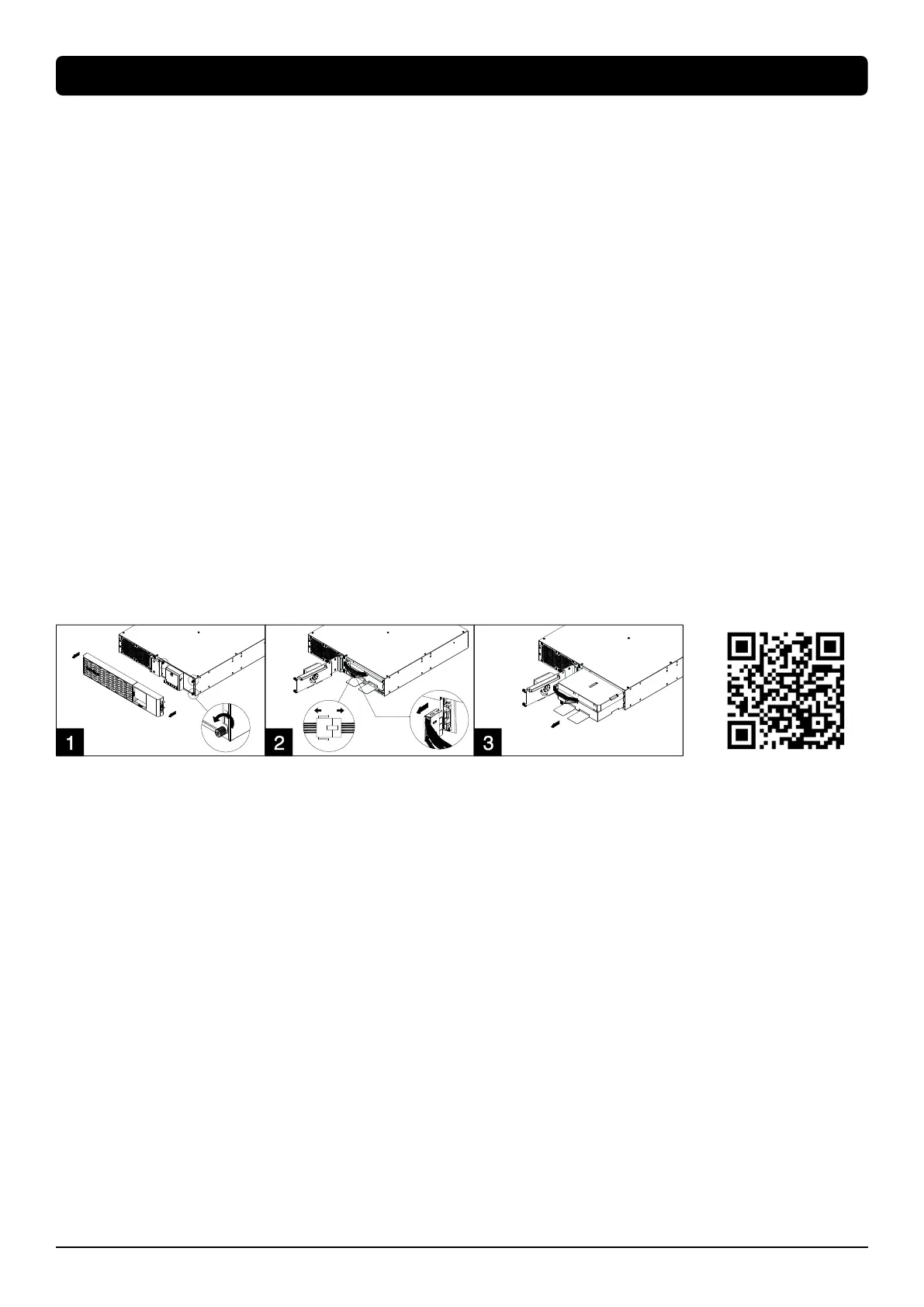
Battery Replacement Procedure
1. Remove faceplate and unscrew the thumbscrews on battery cover and then open the battery cover. Note: Thumbscrews are designed
fixed on the battery cover, do not remove them from the metal cover.
2. Disconnect the battery and battery management module connector.
3. Insert the new battery pack. Assemble the connectors, thumbscrews and faceplate. Recharge the unit for at least 12 hours to ensure the
UPS performs expected runtime.
Reminder: Battery Change Date is optional setup information for users to record the installation date of battery pack. It can be adjusted
through LCD module in Advanced Setup Menu or through software.









 To Next Page