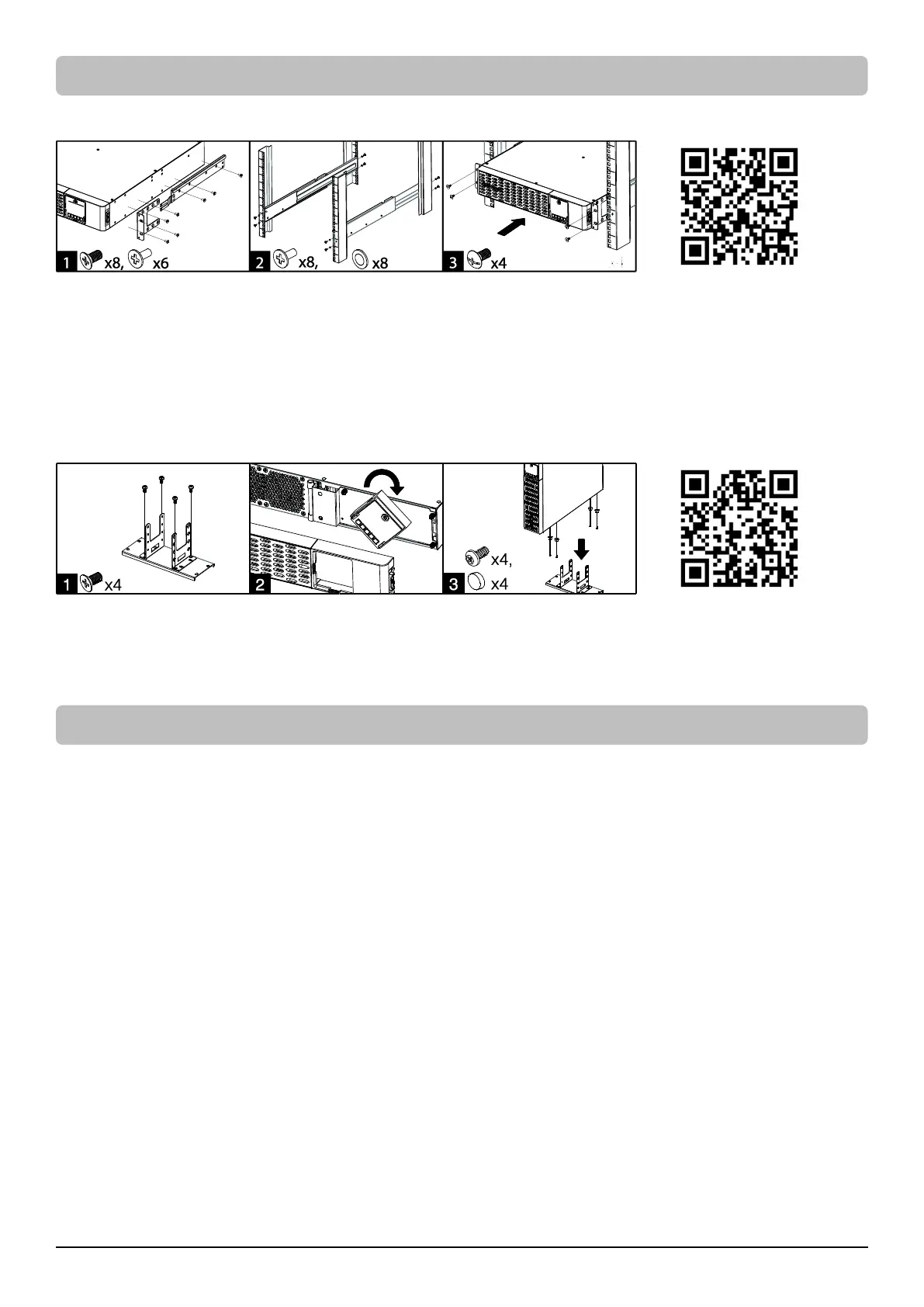
Rack Installation for 4-post Rack
1. Use the provided M5 flat head screws to attach the brackets and provided M5 pan head screws for hanging brackets.
2. Screw the hanging rails to the rack with provided M5 pan head screws and plastic washers.
3. Lift the product upon the hanging rails and slide the unit into the rack. Affix the product to the rack with provided M5 truss head screws.
If handles are needed, affix them to the brackets with M4 flat head screws.
Note: The Rail Kit is included for selected models. See UNPACKING section. For other models, it is also available for purchase. Part number
CP2RAIL02.
Tower Installation
1. Attach the brackets to the baseplate with the provided M4 flat head screws.
2. Remove the faceplate and rotate the LCD module, then re-install the faceplate.
3. Screw the rubber feet with provided M4 round head screws and then put the UPS onto the assembled tower stand. You can also put the
dust covers in the screw holes on the top side of the UPS to prevent dust from falling into the unit.
Normal Use
1. Connect equipment to the outlets on the rear panel of UPS.
2. Plug the UPS into a 2 pole, 3 wire grounded receptacle/ wall outlet.
3. Press the power switch on LCD module once. The LCD screen will light up and show “UPS On/Off” on the first line. Use the Up/Down
button to select “On” or “Delay On” and then press the Enter button to turn on the UPS. The LCD screen will show CyberPower in the
first line and the UPS model in the second line. Then the Online or On Battery Indicator on the LCD module lights up, indicating the UPS
is operating from utility or battery.
4. To turn off the UPS, press the power switch on LCD module once. The LCD screen will light up and show “UPS On/Off” on the first line.
Use the Up/Down button to select “Off” or “Delay Off” and then press the Enter button to turn off the UPS. The LCD screen will show
“Goodbye” and all the indicators will be off.
IMPORTANT! For first time usage, plug your UPS into an AC outlet to disable cold start protection. Otherwise your UPS will not turn on.
IMPORTANT! Do not use an adapter, line conditioner or other surge protection device between the wall outlet and the UPS. Use of such a
device may impede proper operation of the UPS.
Be aware of the following statements:
A. Your UPS may be used immediately upon receipt. However, charging the battery for at least 12 hours is recommended to ensure the
battery reaches its maximum charge. Charge loss may occur during shipping and storage. To recharge the battery, simply leave the unit
plugged into an AC outlet. The unit will charge in either the on or off state.









 To Next Page