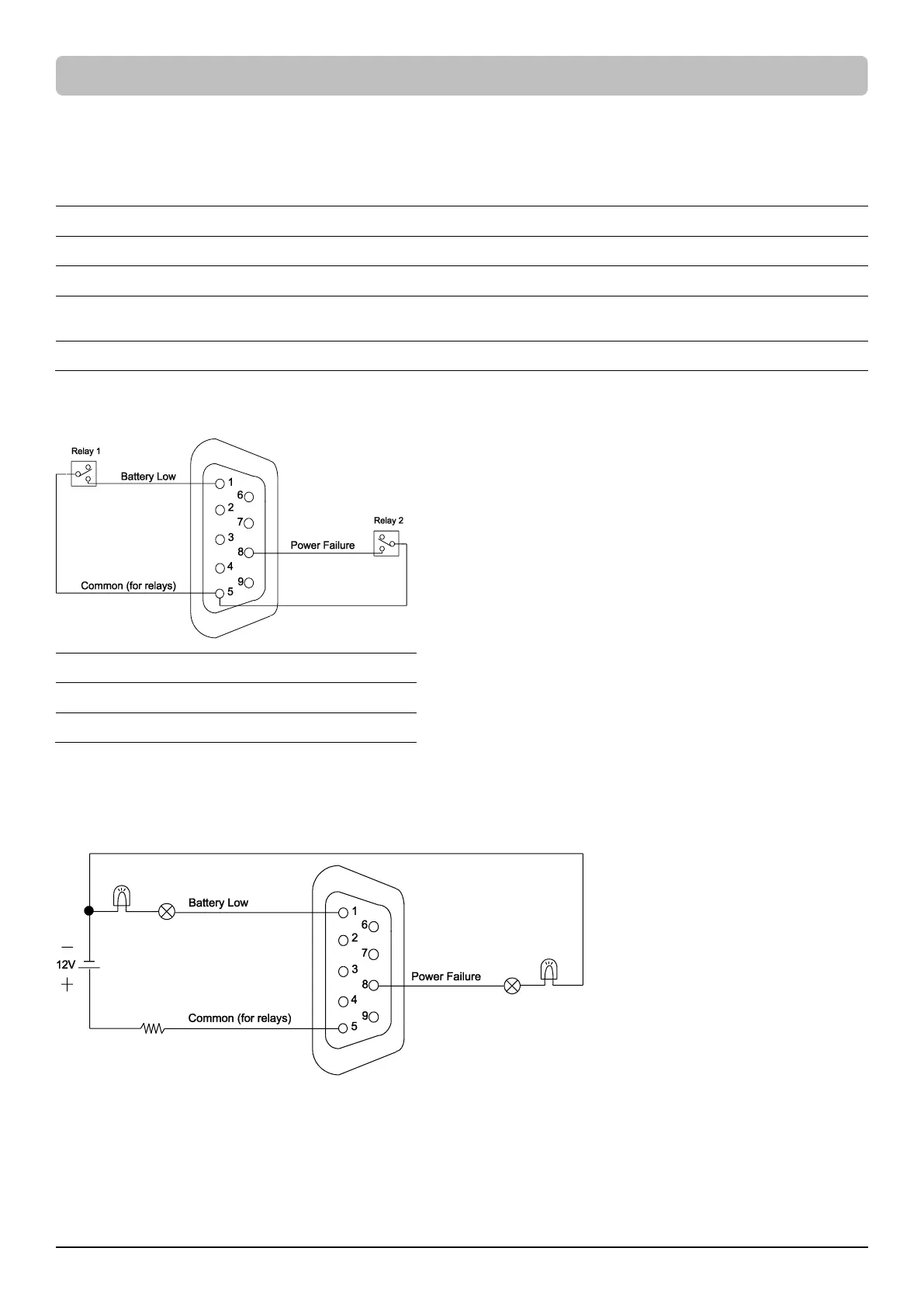
This UPS offers users the solution for UPS status monitoring via two output relays. Refer to Network Operation in this manual, verifying the UPS
is connected to a computer with PowerPanel® Business software installed or is equipped with RMCARD. Follow below circuit to wire your dry
contact port and choose your preferred monitoring status via those interfaces.
UPS status which can be monitored by dry contact is listed below:
UPS detects utility failure.
Battery capacity is lower than threshold.
UPS exits alarms due to Inverter Fault, Output Short, Over Temperature, Overload, Battery Overcharge, Low
Battery, Battery Missing, Battery Defect and Wiring Fault.
UPS has malfunctioned due to Inverter Fault, DC Power Fault, and Over Temperature.
*Default settings of relay contacts are Power Failure and Battery Low (Normally Open).
Internal Circuit
Example Application
Supply 12VDC to the Common contact and connect LEDs to the DB9 port Pin1 and Pin8. When UPS detects utility failure or when UPS battery
capacity is lower than threshold, the connected LEDs will illuminate.









 To Next Page