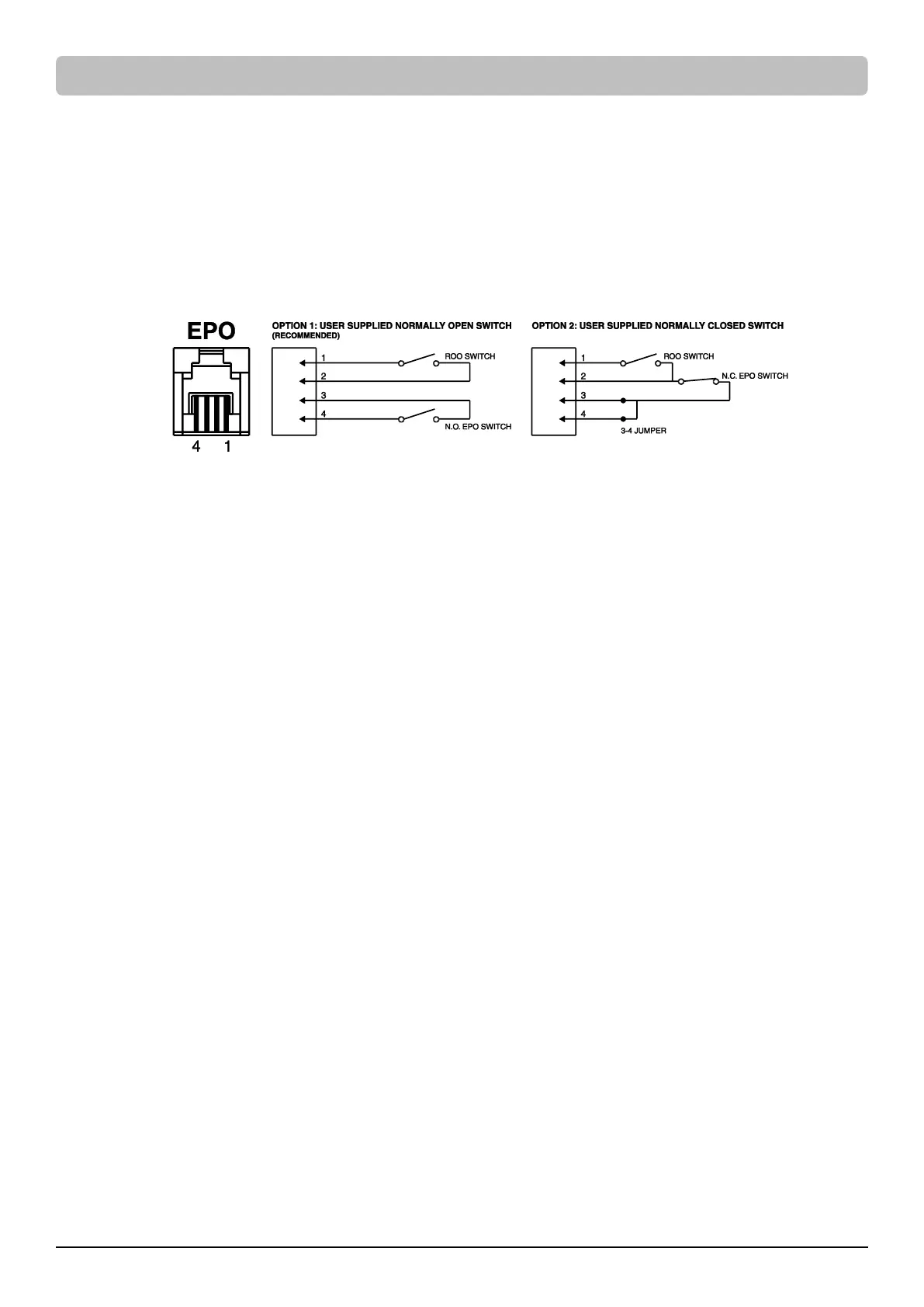
The Emergency Power Off (EPO) port is a safety feature that can be used to immediately shut down the UPS and cut off its power supply to
connected equipment. It is necessary to manually press the power switch on the LCD module to restart the UPS and reapply power to
connected equipment.
The Remote On/Off (ROO) shares the same port with EPO and those two functions can be used at the same time. ROO is a remote power
control function, which allows users not only to power on but also power off the UPS in a remote location.
Installation
1. Verify the UPS is off and unplugged.
2. The EPO/ROO interface is an IEC 60950 safety extra low voltage (SELV) circuit. Follow the appropriate circuit diagram below to wire the
provided EPO cable to your EPO/ROO configuration. Connect isolated dry contacts and use ONLY latching switch.
3. After wiring, make sure the external EPO/ROO switch is not activated to enable UPS output.
4. Plug the UPS into an AC outlet and turn the UPS on via power switch on the LCD module.
5. Activate the external EPO/ROO switch to test the function. Check the status change of UPS from its LCD module.
6. For EPO user: De-activate the external EPO switch and restart the UPS via power switch on the LCD model.
For ROO user: Press the external ROO switch again to restart the UPS.
Restriction on ROO
A. ROO can only turn on the UPS when utility is available.
B. ROO becomes inactive if the UPS is shut down due to Fault, Low Battery or EPO; it is necessary to manually press the power switch on
the LCD module to restart the UPS and reapply power to connected equipment.
C. ROO is active only when UPS power status is the same as ROO circuit.* If they are different, manually adjust the external ROO switch to
synchronize current UPS status.
For instance, the UPS is turned off via power switch on the LCD module; however, the ROO switch stays in “on” position, which means
the contact is closed. Users have to manually press the external ROO switch to “off” position, making contact open, to reactivate the
ROO, verifying the power status shown on LCD module and ROO switch is on the same page. And then users can press the external ROO
switch again to turn on the UPS.
*Note: Power switch on the LCD module, software and external ROO switch can all turn on/off the UPS.









 To Next Page