EN / CZone® Control X User & Installation Manual
CONNECTIONS
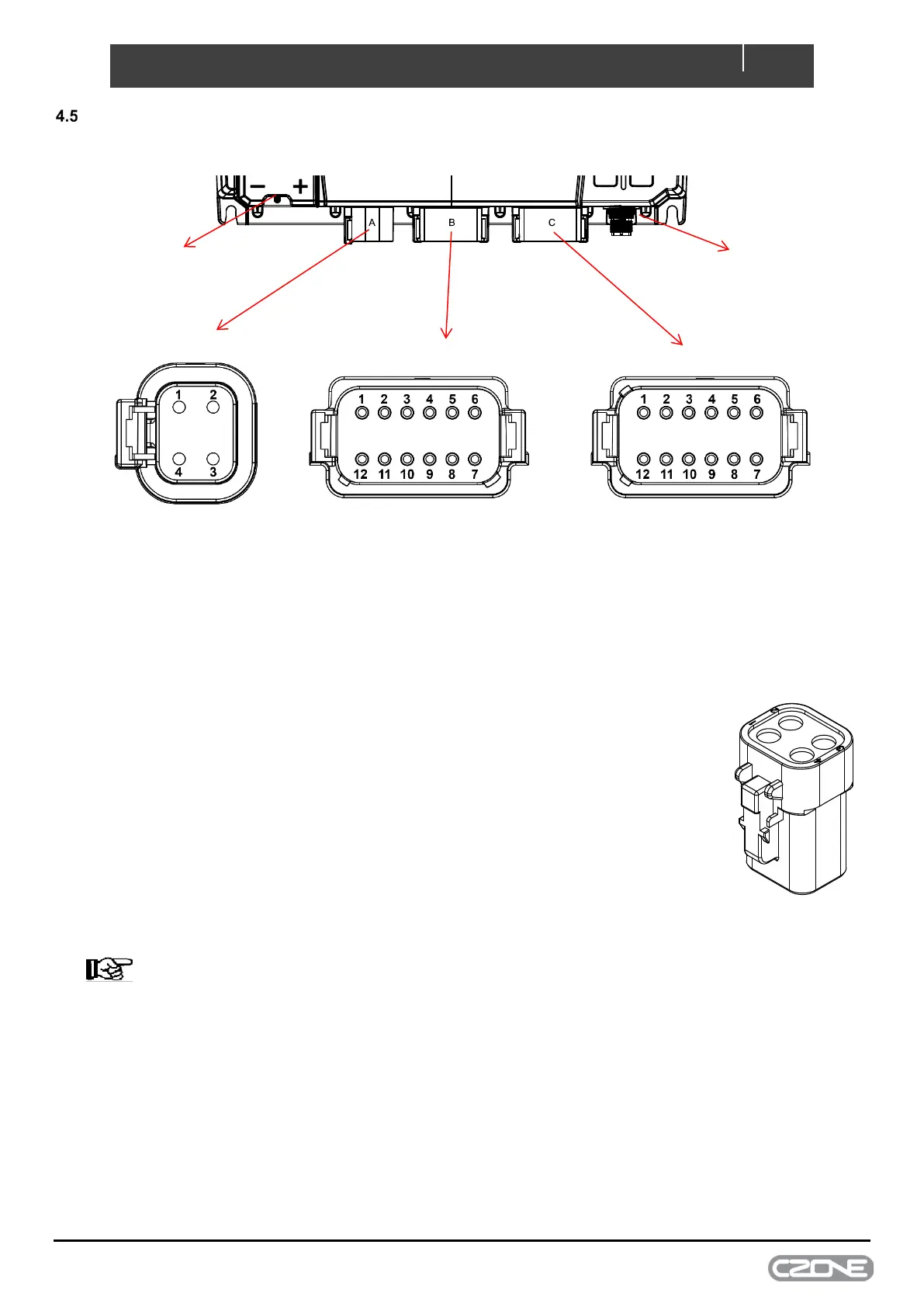
Figure 9. Control X Connections
1. Connector A (Control X PLUS Only)
1. Referring to the load list, strip and crimp the High Current or H-Bridge cables
with the appropriate Deutsch contact and crimp tool.
2. Insert the contacts into the DTP06-4S plug following the plugs position
numbers and secure using the locking wedge.
3. Any unused pins in the connector should be plugged with sealing plugs to
maintain the IPX7 rating. (Deutsch part # 114017-ZZ).
4. Before inserting the connector it’s highly recommended to apply a small
amount of silicone grease along the sealing surfaces/gasket. This will make
assembly/disassembly easier.
5. Insert the connector into the Control X PLUS until it clicks into place.
6. Secure and neaten up the cables against the bulkhead to reduce the strain on
the connectors.
NOTE – Connector A on the Control X will be sealed from the factory. No
blanking plug will be required.
& Negative


 To Next Page