49D-Link DCS-4602EV User Manual
Section 3: Conguration
SNMP
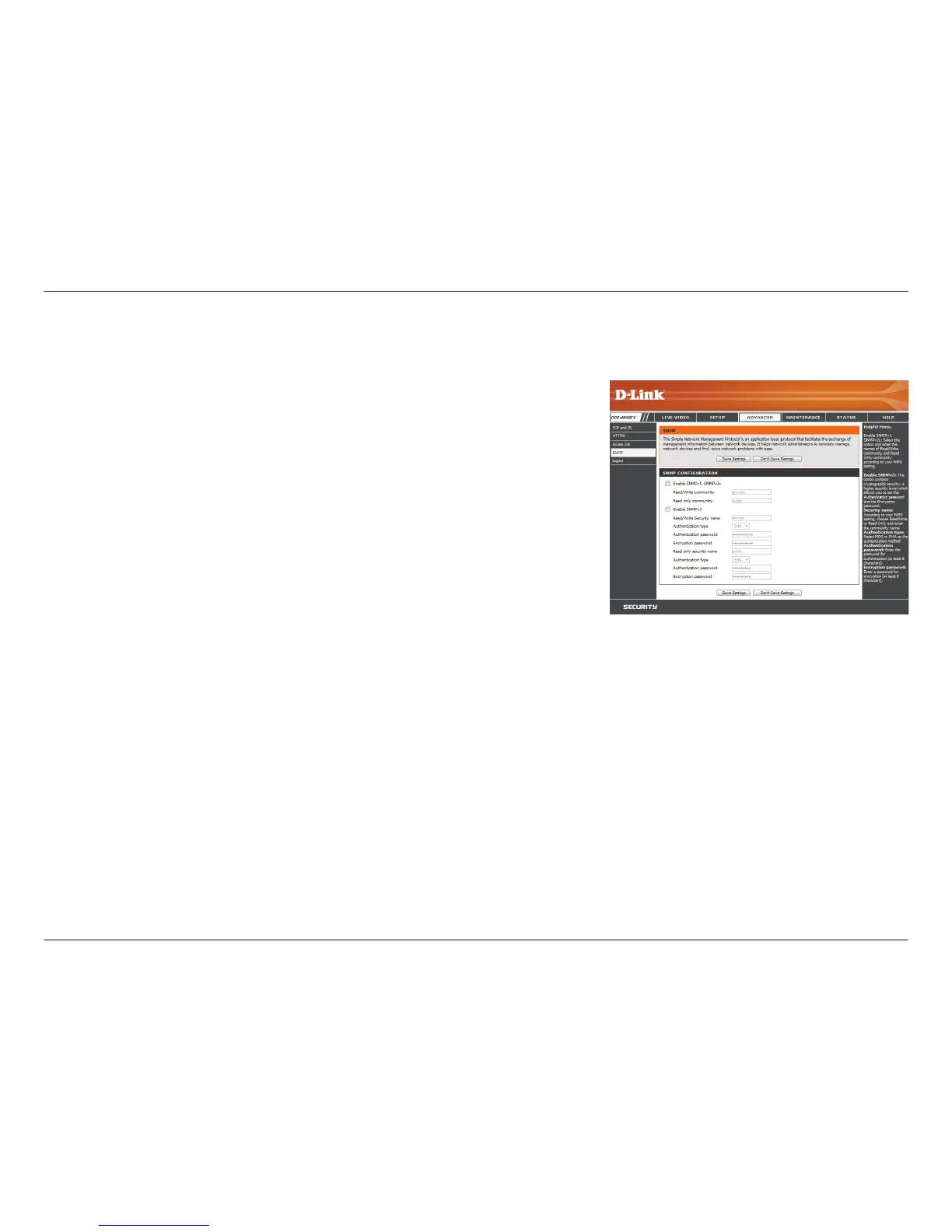
Here you can set the SNMP settings for the camera, which allow for SNMP management of the camera.
Enable SMNPv1, SNMPv2c:
Read/Write Community:
Read Only Community:
Enable SNMPv3:
Read/Write Security Name:
Authentication Type:
Authentication Password:
Encryption Password:
Read Only Security Name
Enable this option to allow for SNMPv1 and SNMPv2c
management of the camera.
Enter a name for the read/write community of your SNMP
server.
Enter a name for the read-only community of your SNMP
server.
Enable this option to allow SNMPv3 management of the
camera.
Enter a name for the read/write community of your read/
write SNMP server.
Enter the type of authentication used by your read/write
SNMP server.
Enter the authentication password used for your read/
write SNMP server.
Enter the encryption password used for your read/write
SNMP server.
Enter a name for the read-only community of your read-
only SNMP server.



 To Next Page