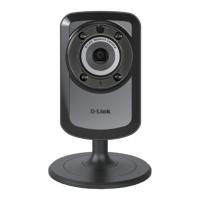
54D-Link DCS-936L User Manual
Appendix A - Technical Specications
Technical Specications
Camera
Camera Hardware Profile • 1/4” Megapixel HD progressive CMOS sensor
• 5 meter IR illumination distance
• Minimum illumination:
• Color (Day Mode), IR LEDs off: 2.6 lux
• B/W (Night Mode), IR LEDs off: 1.5 lux
• B/W (Night Mode), IR LEDs on: 0 lux
• Built-in Infrared-Cut Removable (ICR) Filter module
• Fixed length 2.45 mm
• Aperture F2.4
• Angle of view
• (H) 112°
• (V) 77°
• (D) 120°
• Minimum object distance: 50 cm
• Built-in microphone
Image Features • Configurable image size, quality, frame rate, and bit rate
• Configurable brightness, contrast, sharpness, and saturation
• Configurable motion detection windows
• Time stamp and text overlays
Video Compression • Simultaneous H.264/MJPEG format compression • JPEG for still images
Video Resolution • 1280 x 720, 640 x 352, 320 x 176 at up to 30 fps
Audio Compression • PCM • ADPCM
Connectivity • 802.11n/g wireless with WPA/WPA2 encryption
• Single-band 1T1R mode supports a maximum data rate of 72.2 Mbps (PHY rate)
using 20 MHz bandwidth
1
• Operates on 2.4 GHz band
• microSD card slot
Network
Network Protocols • IPv4, IPv6, ARP, TCP, UDP, ICMP
• DHCP Client
• NTP Client (D-Link)
• DNS Client
• DDNS Client (D-Link)
• SMTP Client
• HTTP Server
• PPPoE
• UPnP
• RTP, RTSP
• HTTPS for configuration
• Bonjour
Security • Administrator and user group protection
• Password authentication
• HTTP and RTSP digest encryption
System Integration
System Requirements for Web Interface • Operating system: Microsoft Windows 10/8/7 or Mac OS X 10.7 or higher • Browser: Internet Explorer 8, Firefox 12, Chrome 20, or Safari 6 or higher
Event Management • Motion detection
• Sound level detection
• Event notification and sending snapshots/video clips via e-mail
Remote Management • Configuration accessible via web browser
Mobile support • mydlink Lite app for iPhone, iPad, iPod Touch, Android, and Windows • mydlink+ app for iOS and Android



 To Next Page