Web Configuration
D-Link DSL-2640B User Manual 105
TR-069 Client
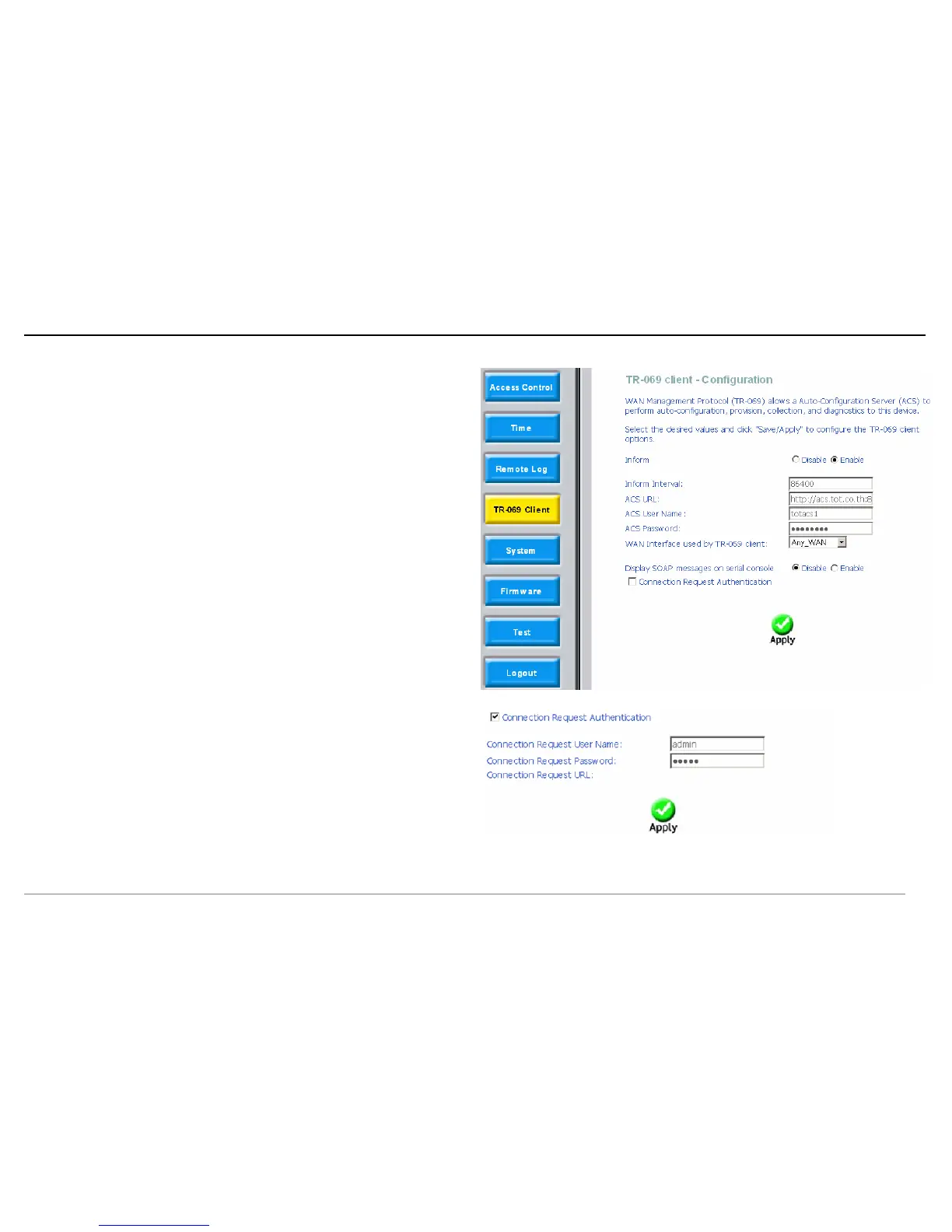
Click TR-069 Client and the right page appears.
Inform: If the Enable option is selected,the CPE accepts the commands from
ACS, the CPE does not accept the commands from ACS when the Disable
option is selected.
Inform Interval: How many seconds does the CPE inform the ACS to
connect.
ACS URL: Enter the ACS URL.
ACS User Name: The ACS user name is that the TR-069 Service provide to
you.
ACS Password: The ACS password is that the TR-069 Service provide to
you.
Display SOAP messages on serial console: When select Enable option,
the SOAP information displays on the serial console, when select Disable, it
does not.
Click Apply to save the he configuration.
Connection Request Authentication: If this checkbox is selected, you need
to enter the Connection Request User Name and the Connection Request
Password. Or you needn’t to enter.
Connection Request User Name: the connection user name that the
TR-069 Service provides to you.
Connection Request Password: the Connection Request Password that the
TR-069 Service provides to you.
Click Apply to save the he configuration.















 To Next Page