44D-Link DSL-3900 User Manual
Section 4 - Conguration
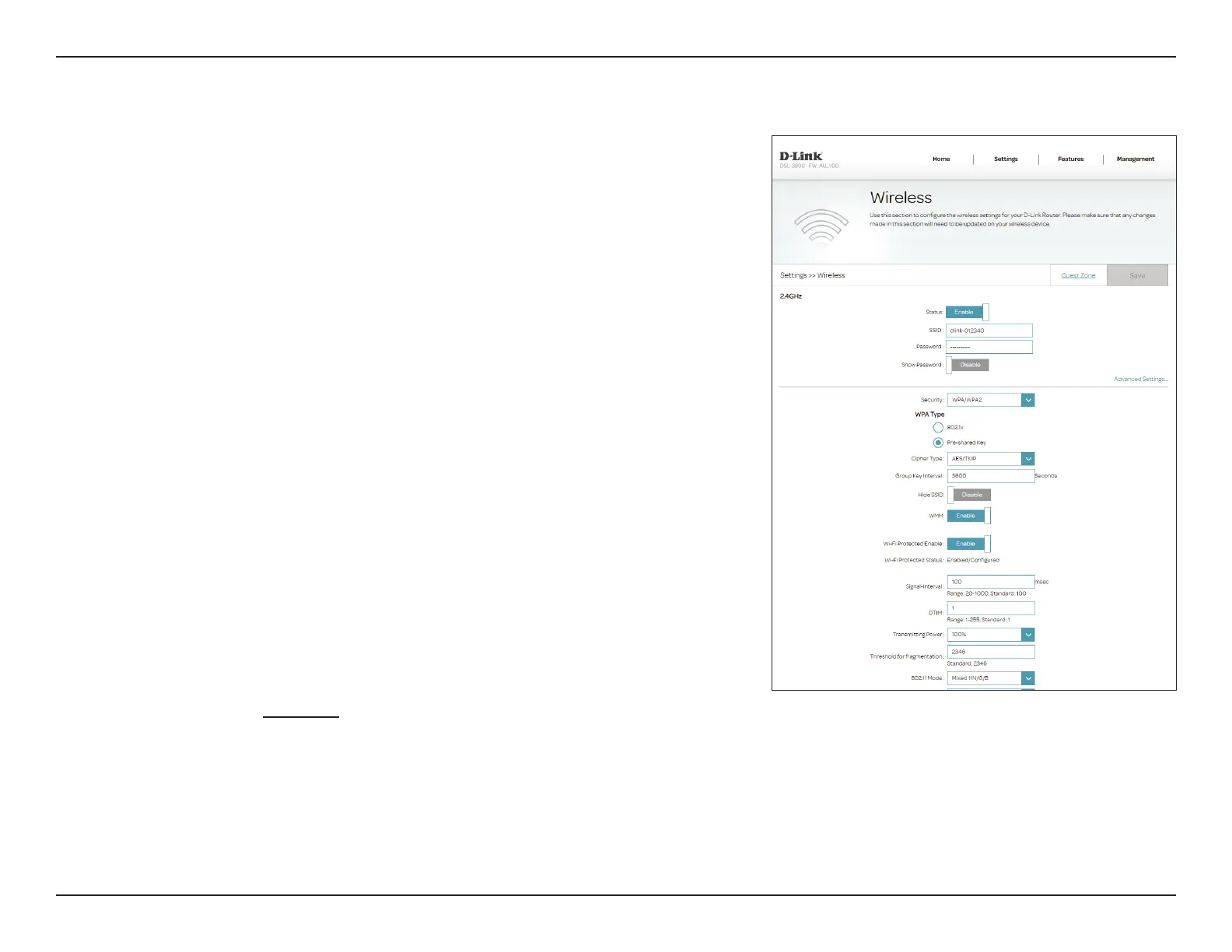
2.4 GHz Channel
Width:
Channel Width is available if you select Mixed 11N/G/B, 11N/G, or
11N for 802.11 Mode. Select 20/40 if you are using both 802.11n
and non-802.11n devices, or select 20 MHz if you want to disable 40
MHz bandwidth communication. The recommended setting is 20/40.
5 GHz 802.11
Mode:
Select the desired wireless networking standard(s) to use. The
available options are 11A Only, 11A/N Mixed Mode, Mixed 11AC/
N/A, or Mixed 11AC/N.
5 GHz Channel
Width:
Select the desired channel width. The available options are 20 MHz,
20/40 MHz, or 20/40/80/160 MHz. Depending upon the selected 5
GHz 802.11 Mode, some options may be unavailable.
20/40 MHz Co-
Exist:
Enable or disable 20/40 MHz Co-Exist.
Short Guard
Interval:
Enable or disable Short Guard Interval.
Channel: Select the desired channel for your wireless network to use. Auto is
the default option.
Preamble Type: Enable or disable short preamble type.
Schedule
Select a user-generated schedule. A schedule that that either the
2.4GHz or 5Ghz Wi-Fi modes will be turned on or o according to.
Click Schedule to edit schedules.
Click Save when you are done.
Advanced Settings (continued)



 To Next Page