DVG-5004S User’s Manual VoIP Gateway Configuration
D-Link Systems, Inc. 34
3-3-6 Hot Line
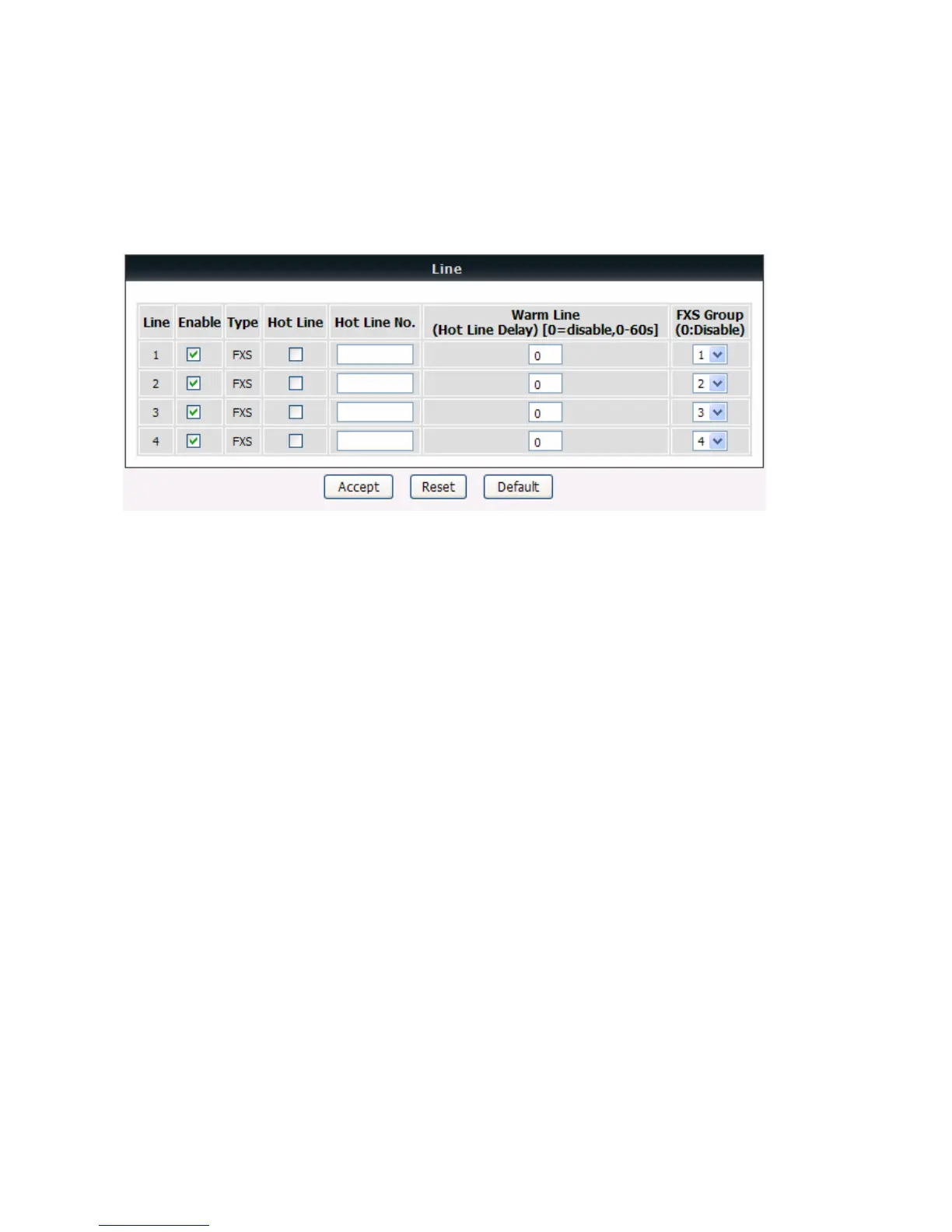
General Settings → Hot Line
Enable: Tick the check box to enable a line. If some lines are not used, disable them (Pause Function) to
avoid unnecessary waiting when an incoming call is diverting to the line.
Hot Line: Check to direct the call automatically to a pre-configured destination without any action when the
FXS is off-hook. (ie. as the user picks up the phone). When the FXS is under Hot Line mode, no other
phone numbers can be dialed.
Hot Line No.: Enter the number for pre-defined destination.
Warm Line: Enter the time for the call to start with a pause, so the user can dial another number. The call
will be automatically directed to the pre-configured destination within timeout period.
FXS Group: Select group hunting when there is an incoming call and DVG will automatically assign an
unassigned call according to the Hunting Priority. If Line 2 does not want to be set as an assigned line to
receive any inbound calls, please set it to be “0”. Users can adjust hunting priority


 To Next Page