DVG-5004S User’s Manual VoIP Gateway Configuration
D-Link Systems, Inc. 42
3-3-9 Calling Features
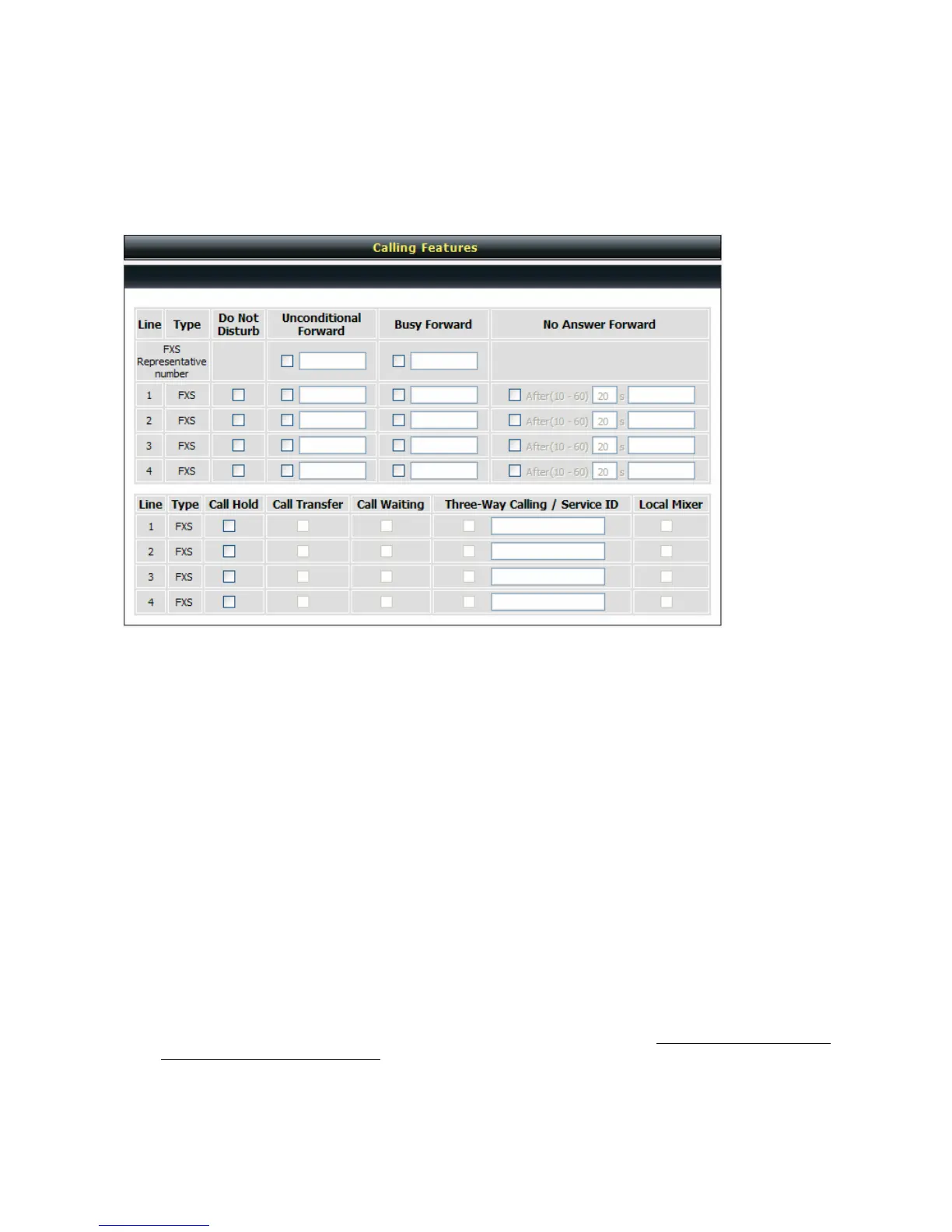
General Settings → Calling Features
Do Not Disturb: Check the box to reject (busy tone played) incoming calls.
Unconditional Forward: Check the box to forward incoming calls to the assigned “Forwarding Number”
automatically.
Busy Forward: Check the box to forward incoming calls to the “Forward incoming Number” when the line is
busy.
No Answer Forward: Check the box to forward incoming calls to the “Forward incoming Number” after
ringing timeout (configurable from 10 to 60 seconds) expires.
Call Hold: Check the box to hold the call on the specific FXS port.
Note: Call Transfer or Call Waiting can only be activated when Call Hold is checked..
Call Transfer: Check the box to transfer the call to another destination.
Call Waiting: Check the box to accept incoming call while talking.
Three-Way Calling / Service ID: It is used for Nortel Style 3-Way conference. Please enter correct service
ID assigned on the SoftSwitch or IPPBX.
Local Mixer: Enable 3-Way conference mixer on DVG. This option is conflict to “Three-Way Calling /
Service ID”, don’t enab;e these two options
simultaneously.
Note: The availability of a Three-Way call also depends on your VoIP network. Please also check with your
service provider for these services.


 To Next Page