34D-Link DVG-5802S User Manual
Section 3 - Conguration
QoS Engine
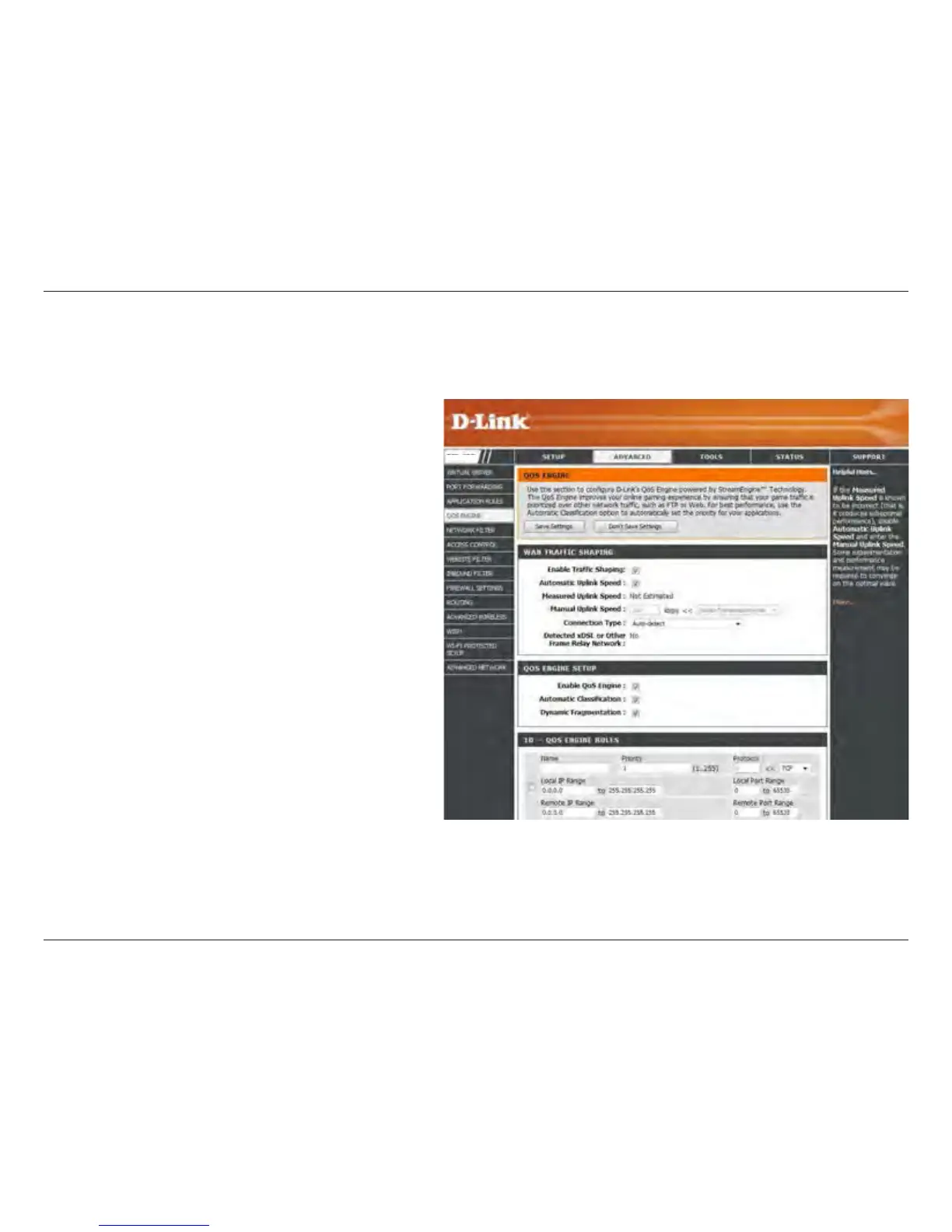
This option is disabled by default. Enable this
option for better performance and experience with
online games and other interactive applications,
such as VoIP.
This option should be enabled when you have a
slow Internet uplink. It helps to reduce the impact
that large low priority network packets can have
on more urgent ones.
This option is enabled by default when the QoS
Engine option is enabled. This option will allow
your router to automatically determine the uplink
speed of your Internet connection.
This displays the detected uplink speed.
The speed at which data can be transferred from
the router to your ISP. This is determined by your
ISP. ISP’s often speed as a download/upload
pair. For example, 1.5Mbits/284Kbits. Using this
example, you would enter 284. Alternatively you
can test your uplink speed with a service such
as www.dslreports.com.
By default, the router automatically determines whether the underlying connection is an xDSL/Frame-relay network or some
other connection type (such as cable modem or Ethernet), and it displays the result as Detected xDSL or Frame Relay Network.
Enable QOS:
Dynamic
Fragmentation:
Automatic
Uplink Speed:
Measured
Uplink Speed:
Manual Uplink
Speed:
Connection
Type:
The QoS Engine option helps improve your network gaming performance by prioritizing applications. By default the
QoS Engine settings are disabled and application priority is not classied automatically.
DVG-5802S


 To Next Page