DVG-N5412SP User’s Manual SETUP
D-Link Systems, Inc. 29
802.11n only - Allow all 802.11n compliant wireless devices to associate with the wireless AP.
Mixed 802.11g and 802.11b - Allow a mix of both IEEE802.11g and 802.11b compliant wireless
devices to associate with the wireless AP.
Mixed 802.11n and 802.11g - Allow a mix of both IEEE802.11n and 802.11g compliant wireless
devices to associate with the wireless AP.
Mixed 802.11n, 802.11g and 802.11b - Allow a mix of both IEEE802.11n, 802.11g and 802.11b
compliant wireless devices to associate with the wireless AP.
Access Mode: DVG-N5412SP has ability to serve as two operating modes in wireless network separately.
AP: As a wireless AP that allows wireless-equipped stations to communicate with a wired network and
the other wireless network for Internet access and resources sharing.
Client: As a wireless client, you are allowed to access Internet via an Access Point in infrastructure
mode or build a group of wireless network for files and printer sharing in ad-hoc Mode. Under
Wireless Client Mode, Bridge Mode is not available for the VoIP Router
Network Type: Select network type for Access Client Mode.
Infrastructure: Connect to another wireless AP or WISP.
Ad hoc: Connect to another wireless Ad hoc device. Usually it is used for peer-to-peer connect mode.
Channel Width: Wireless channel width for 802.11n. Select 40 MH for higher speed.
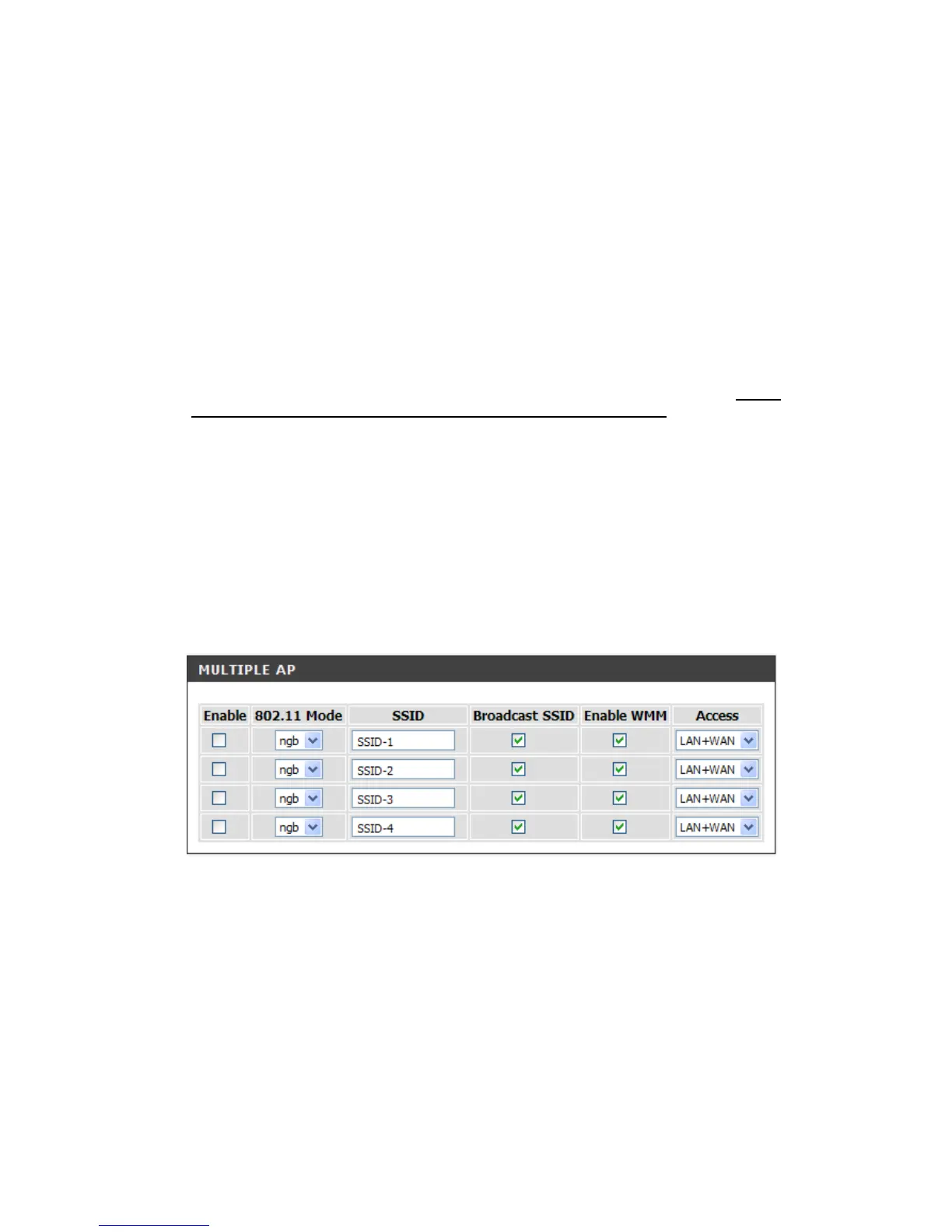
Broadcast SSID: Broad AP’s SSID for convent usage. To hid SSID for more security.
Enable WMM: Wi-Fi Multimedia. It provides higher priority for multimedia stream to get better quality.
Enable Universal Repeat Mode: Set DVG-N5412SP to be wireless repeat mode. Please fill the same
SSID as the root AP in “SSID of Extended Interface”.
SETUP -> Wireless Setup -> Wireless Basic
Multiple AP: It is used for different level of clients. Such as different departments or guests. And you could
assign different password for each SSID.


 To Next Page