DVG-N5412SP User’s Manual ADVANCED
D-Link Systems, Inc. 70
Note: E.164 Numbering depends on the proxy. If you fail to make a call, please contact your VoIP Service
Providers.
ADVANCED → VoIP → SIP Advanced
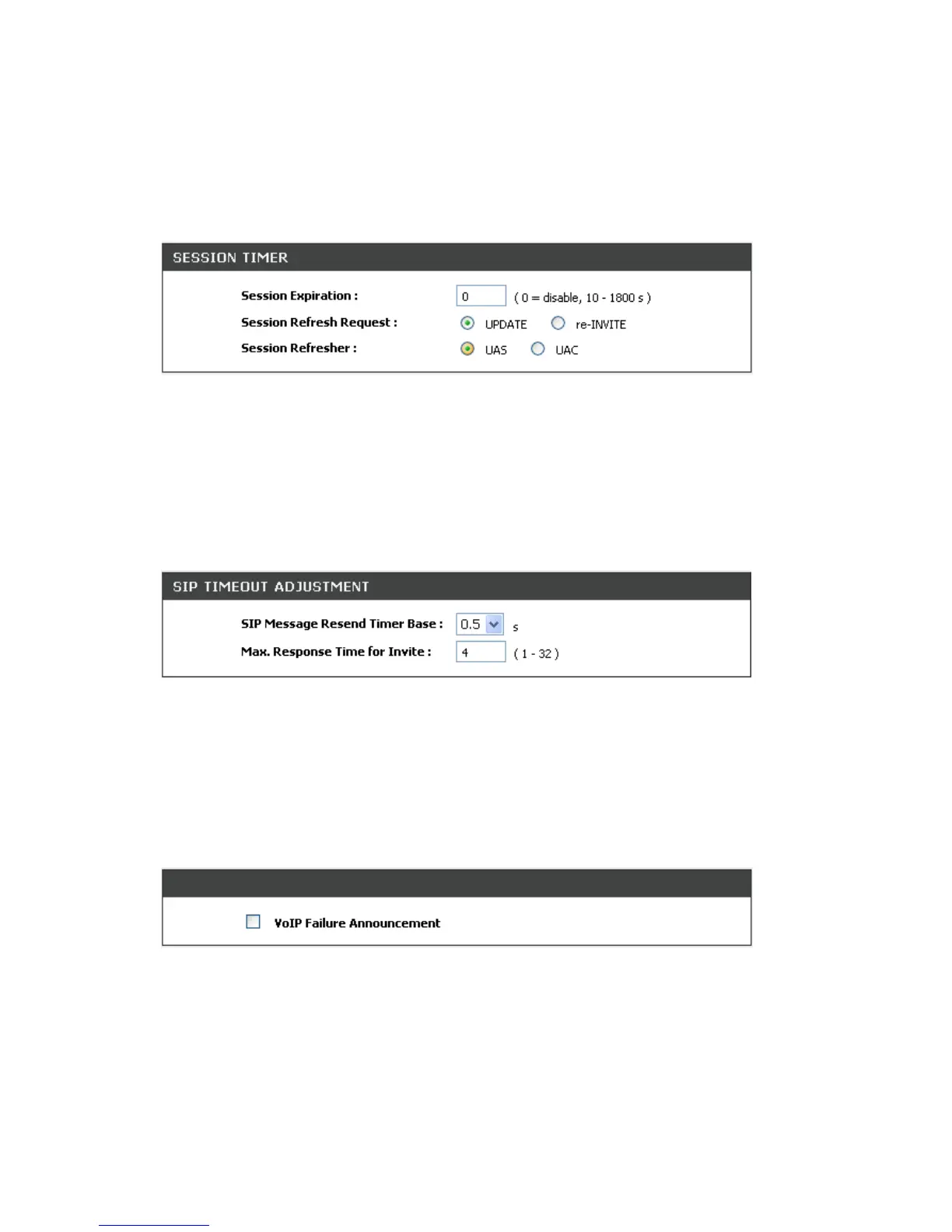
Session Expiration: This field will set the time that the VoIP Router will allow a SIP session to remain die
(without traffic) before dropping it.
Session Refresh Request: Select UPDATE or re-INVITE to send refresh requests to the Server.
Session Refresher: This determines which side of an expired call session will initiate the session refresh.
uac – specifies that the Caller side will initiate the session refresh. uas – specifies that the Call receiver (the
“Callee”) will initiate the session refresh.
ADVANCED → VoIP → SIP Advanced
SIP Message Resend Timer Base: Select the resend timer base from the drop-down menu if response is
not received within the base time. The sequence of sending is like "base time" * 2, and send again at "base
time" *2 *2. The maximum resend time is four seconds. Resend action will stop when the total resend time
has reached 20 seconds.
Max. Response Time for Invite: Enter the maximum response time for INVITE packet. When the
destination does not reply within the set time, the call is failed.
ADVANCED → VoIP → SIP Advanced
VoIP failure announcement: Check the box to play a voice announcement if the VoIP Router fails to
register to the SIP proxy server while FXS is off-hook.


 To Next Page