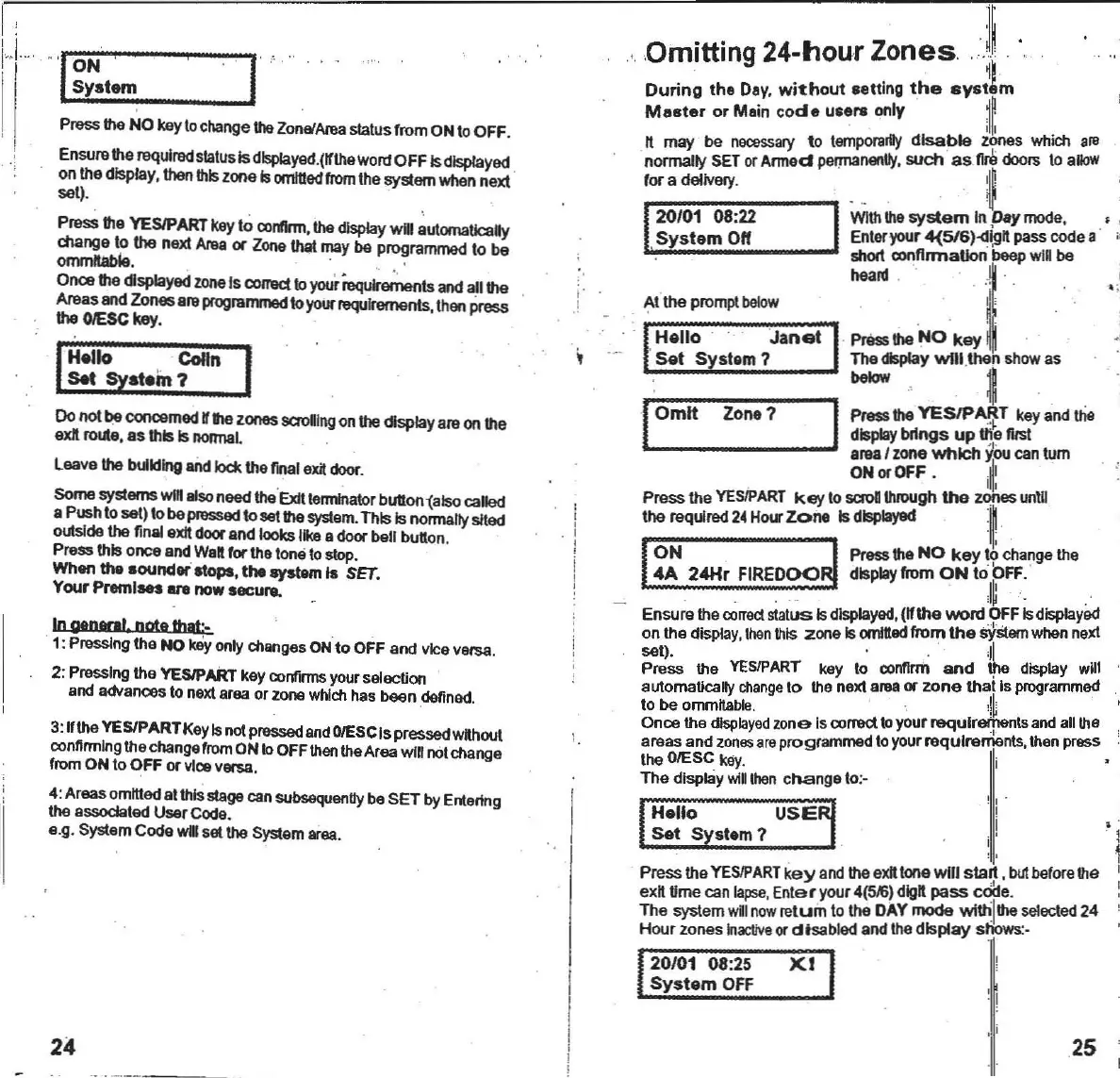
Omitting 24-hour
zonesJ~
, , '
During
the Dey,
without
.etting
the
svat1m
Master
or Main
cod
e users only
~~
,
illl
n may
I>e
necessary
to
tempofllrDy
disable
z?nes which .18
normally SETor
Armed
permanenllf
,
such
as
11I8
doors
to
alloW
for a delivery.
~
20/01 08:22
WIth
tho
system
InDaymode. , ,
System
011
Enteryour4(516)-<l\gn passcodea
M:.,:--~_~~:
r··~
Set
Systom?
ThedisplayWllI ,then show as
below
~
I
Omit
Zone?
IPressthe
YES1P~T
keyanduie
display
brings
up
the IlISt
"
area I zone
which
~~ou
cantum
ON
or
OfF
• , I
I,
Press the
YESIPART
key
to saoII
throUgh
the
zones
unlll
the required24Hour
Zone
Is
displayed
1,
I
ON
1 Pressthe
NO
key
10
change
the
4A
24Hr
FIREOOO~
display
from
ON
to?FF,
'
" I - ,
Ensurethe
correct
status Is
displayed
.
(~tha
word
OFFIs
displayed
on the
display,
then
this zone Is
omitted
from
the
sYstem
whennext
set).
;11
Press the
YESIPART
key to
confirm
and
"'"
display
will
automatically
change
to the next aruaor
zone
that
Is
programmed
to be
ornmltable.
" !
~
Once the
displayed
zone Iscorrea toyour requlretpenls andallthe
areas and
zones
areprogrammed toyourrequirements, then press
the
OIESC
kay_ i
The display
will
then
cnange to:-
I
i
J
I'
,I
!
..::.r.::=::.
__
I'
PresstheNO keyto
change
the
Zone/Alea
statusfrom ONtoOFF,
Ensurethe
required
status
Is
dlsplayed
,(~theWOrtl
OFF Isdisplayed
onthedisplay,
thenlidszoneIs
omitted
from
thesystemwhennext '
set).
Press the
YESIPART
key to
contlrm,
the
display
will
~utomalJcally
changeto the next
Anla
or Zone that maybe
programmed
to be
ommlIable.
, ' . .
Once
thedisplayedzone Is
CXlITeC\
10yourlequlreffientsand all the
Areasand Zonesare
programmed
to
your
requirements
then
Press
the
GlESC
key. •
Hello '
Colin
Sat
SYstem?
Do notbe
conoemed
rthezonessaolIlngonthedisplayareonthe
exll route,as this
Is
nonnaL
,
Leavethe building
aiId
lockther...1eXi door.
Some systems
W1I1
alSo
need the
'EJdt
Iermk>ator
bu1lon1also
called
aPushto
setl tobe pmssed to
..
tthe
system
.This Is normallysited
outsldethe final
exJI
doorand looks likeadoor bell button.
Pressthis onceandWaftfor tholonetostop.
Whenthe
.ounder
atops,the ayatemI.
SET.
Your Premises are now secure.
In
genMlI
note
that
·.
1: Pressingthe NO
k&y
only
changes
ONto OFF and viceversa.
2:
Pressing
the
YESIPART
key
confirms
your
seleenon
and
adVances
to nextareaor
Zone
which
hasbeen
defined
,
3:lIthe YESIPARTKeyIsnot
pressed
and
OIESC
Ispressedwithout
connrmlng
thechangefromONtoOFF
than
theAreawill notchange
from
ON to OFF or viceversa,
4:Areasomittedalthls stagecan
subsequanlly
beSET by
Entertng
the associated UsarCode.
e,g. SystemCooe willsat
the
System
area.
,
,
,
, ,
,
,
!
!
Hello
USE
Sat
System?
! I ·
,
!
"
.'
24
20/01 08:25
System
OFF
X:I
~
!
25



 To Next Page