EasyManua.ls Logo

DA Systems Abacus 64 - Testing the System; Walktest

Default Icon
28 pages
Print Icon
To Next Page IconTo Next Page
To Previous Page IconTo Previous Page
Loading...
"
~
"
.,. '.
....
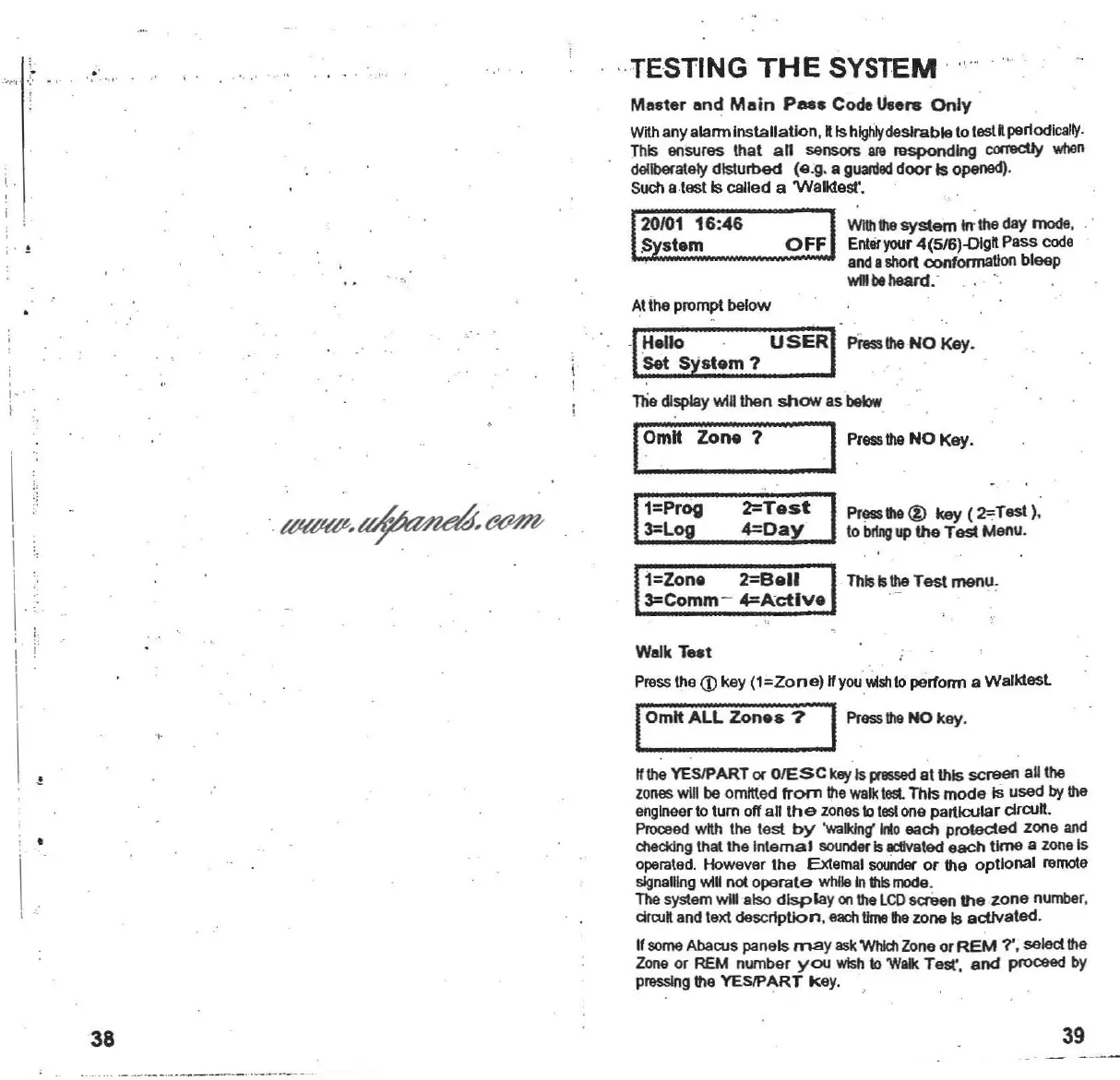
TESTING
THE
SYSTEM '
'..
M
••
ter
end
M.in
Pees
Code u
....
Only
With
any alarm
Installation
,IIIs
highly
desirableto testIIperiodically.
This
ensures
that
an
sensors am
responding
correctly wilen
deliberately
disturbed
(e
.g. a
gUanled
door
Is opened).
Such a
testis
called
a Walktest'.
With
the
system
Inthe day mode.
L
::;4.
;,;;:
:.:.:..
;:.O;..;F~F;,.,
Enter
your
4(5/6)-olgll
Pass
code
and
ashort confoonaUon bleep
wOl
beheard. ·
1
20/01
16:46
SYstem
..
...
Atthe prompt
below
1- ' .
llie
dlsplay win then
MOW
as
balow
I
Omit
Zone
? I
Press
the
NO Key.
1=Zone
2=gell
3=Comm-
4=Actlve
-r
I
I
i
I
1=Prog
3=Log
2=Test
4=Day
Pressthe@ key
(2';Test)
.
to
bring
up
the
Test Menu.
This
IsIheTest menu,
I
\
!
Wslk
Test
Pressthe
<D
key
(1=20ne)
lIyouWlshto perrorm a
Walktesl
IOmit
ALL
Zones?
I
Press
the
NO key.
lithe YESIPART or
GIESe
keyIs pressedat this
screen
an the
zones
will baomllled from the
walk
tost.
This
mode
Is used bythe
engineer
to tum off all
the
zonestotostone
particular
drcull
.
Proceed
wIIh
the
test
by
'walldng'
lrIo each
protected
zone and
dlecldng that the
Internal
sounderIsactivated
each
time
a zane Is
operated. However
the
External
sounder
or
the
optional
remote
signalling win not
operate
whileInthismode.
The system win
.Iso
display
onlIle
LCD
screen
the
zone
number.
drwft and text
description
. each
lime
ille zone Is aetJvated.
If
some
Abacus panels
may
as\(
Whidl Zone or
REM
7'. selecl the
Zone
or REM number
you
WIsh
10
Wall<
Test'.
and
proceed
by
pressinglIle
YESIPART
key
.
38
39
www.ukpanels.com