EasyManua.ls Logo

DA Systems Abacus 64 - Chime Mode; Turning Chime ON and OFF; Selecting Zones To Chime

Default Icon
28 pages
Print Icon
To Next Page IconTo Next Page
To Previous Page IconTo Previous Page
Loading...
.
.....
\ "
..
..
, ,
.... .
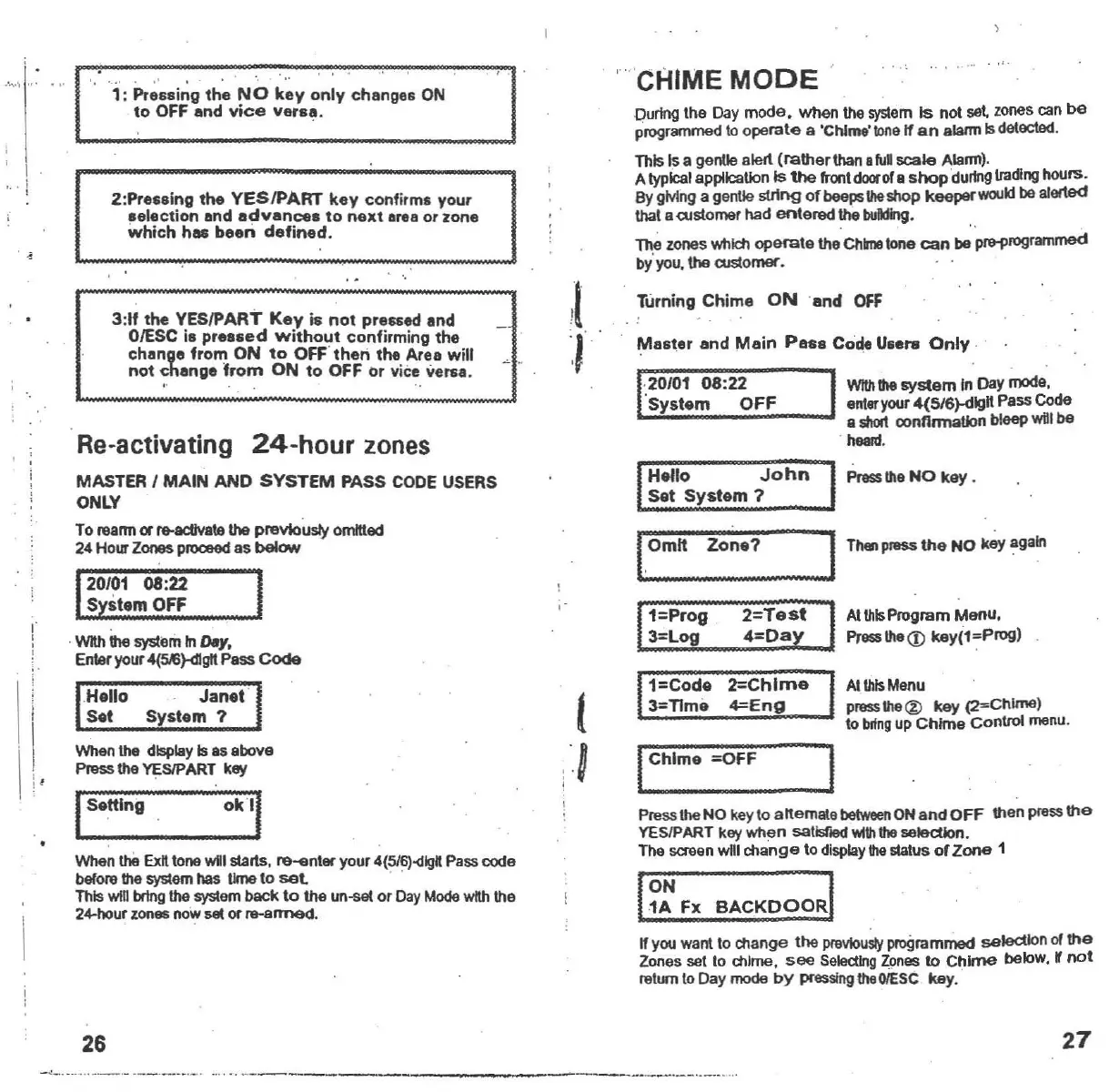
1:
Pressing
the
NO
key
only
changes
ON
to
OFF
and
vice
Varea.
2:Pre.eing
the
YESIPART
key
confirms
your
aelection end
advances
to
next
llnteor
zone
which
hac
been
defined
.
3:11
the
YESIPART
Key
is
not
pre.sed
and
OIESC
i.
pre
••
ed
without
confirming
the
chang.
from
ON
to
OFF
'then
the
Aree
will
not
change
from
ON
to
OFF
or
vice versa.
" 'CHIME
MODE
During
Ihe
Day
mode.
when
the
system
Is
nol
set zones can
be
progra<TV1l8d
to
operale
a 'Chlma'1onalf
an
alalm Isdelac1ed ,
ThisIs a genlle alerl
(rather
than
iuD
scale
Alarm),
A typical application Is
the
fronldoorof e
shop
durfn9tmdlnghours.
By gMng a gentle sll1ng
of
beeps
1he
shop keeper
would
be
alerted
thaI acustomer had
enlered
tha
building
.
The zones which
ope
ea
le
the
Chinotone
cen
be pr8i'rogrammed
bY'you, \he customer.
Turning
Chime
ON
'and OfF
Ma.ter
and
Main
Pua
Code
U
.....
Only
,
AI
IIl1s
Program
Menu,
Presslhe
<D
keY(1
~Prog)
Press
ilia
NO
key
,
AI
U1Is
Menu
p
.....
lhe@
key
(2=Chlme)
10
bflng
up
Chime
Control menu.
2=T05t
4=Day
1=Code
2=Chlme
3=T1me
4=Eng
Hello
John
Sat
System?
1=Prog
3=Log
1,;.,. 1ThenpI9SS
the
NO
k~y
again
l.0mlt
Zone?
PressIheNO keyto alternate betweenON
and
OFF
then press
the
YESIPART key
when
satislled
WIIh!he
selection.
The screen will
change
\0 displaythe
s1atus
of
Zone
1
I~:
Fx
BACKDOORI
If you wanl to change
lhe
previously
progrnmrrled seleCtIonof
the
Zones set to chime,
see
Seiecllng
zones to
Chime
beloW, W
not
relurn 10Day mode
by
presslnglheOIESC key.
IChime
=OFF
Re-activating
24-hour
zones
MASTER
I
MAIN
AND
SYSTEM
PASS
CODE USERS
ONLY
To
rearm
or....adlvale the previously omitted
24Ho...
Zones
proceed as below
20/01 08:22
System
OFF
When the displayIs as above
P""",
the YESIPART key
ISe
,ttlng
Okll
When
th8
Exnlone will starts,re....nler your
4(516).<flgtt
Passcode
belore !he
systemhas tJme10
sal
' '
Thiswill
b<tng
the system back 10 the
un-<let
or
Day
Modewith the
24-hour
zones nowset orre-armed.
,WI\hthe system In
o.Y.
Enteryour
4(~)-dlgtl
Pass
COde
Hello
Janat'
Set
Syst.m?
"
,
,
!
26
27
-
~
_
.
-
_
....._ ,- --- -_.-.._. .
...
" .._-- --
www.ukpanels.com