-. ' "
.,
- -
~.
' .
Press the YESIPART key before
the
system
has
time
to set, then
enteryour4(516)- digit pass
coda
,
• Mlins supply
,.utty,
Power
,.ilure.
'
& Keybolfcf
twnpeted
with,lUther
·
the
c
..
opened
up
or
more
thM'l
24
key P
.......
weAl
~
w ithouc •
v.lid
c;odebeing
entered.
•
St.ndby
blttery
is
disch.raed
fwill onIyocC\6 during Meins
.faUurel.
• TeJephone fine
'adty(
lJ{
-AB..Nm
. .
USER
stem?
TRBL Phone
TABl
Power
TRBl
Supply
System
Faults
Unconnected
with
Zones
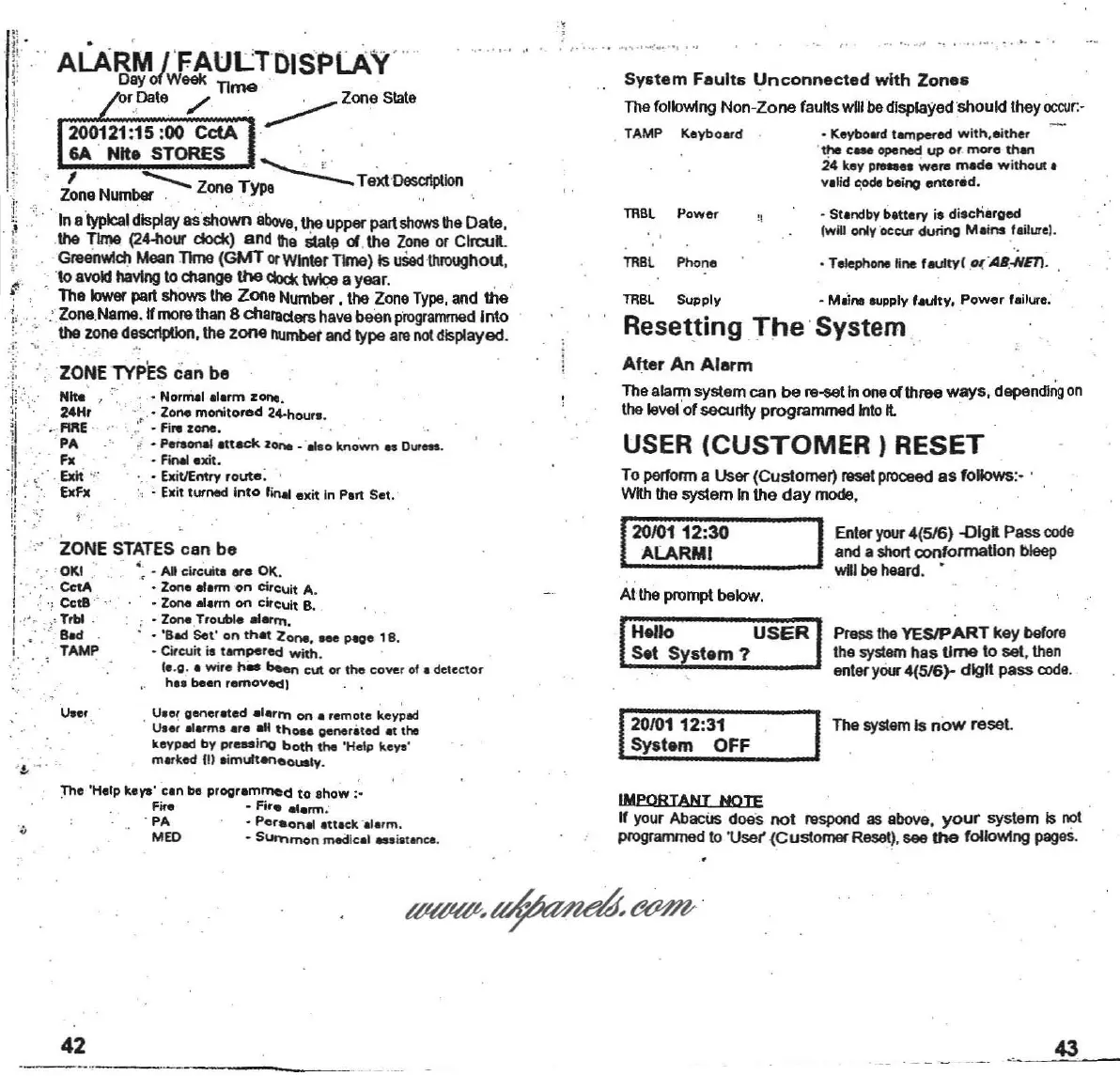
Thafollowing Non-Zone
fauRs
willbe displayed should they
occur.
·
USER
(CUSTOMER)
RESET
Resetting.
The
'System,
A~er
An Alarm
Thealarmsystemcan be re-setIn
one
01
threewwys,
depending
on
thelevelof
secu~ty
programmed
Into
It
Atthepromptbelow.
To
perform
a User (Customer)
reset
proceed
as follows:- .
wah
thesystemInthe day
mode.
1
20101 12:30 IEnteryour4(516)-DIgRPass code
.
ALARMI
, anda shortconformation
bleep
will
be
heard
.
. TAMP Keyboatd
• Norm.1
,I.,m
ZOl'M.
,
<,
.Zone
monitored
24-hour• •
' .•: • F
i,.
lone
. _ . .
•,,i • P
....
onaI
.nack
lone
•·
...
0
known
••
D
uren.
· - FiMI
exit
.
. " • ExitlEntry
route
: '
~
Exitturned
Into
rirlill
exit in Part
Set.
ZONE
TYPES
can
be
. .
ALARM /'FAULTDISPLAY....
. Dirt
'ofW&el<
TIme
..
. rDate
/'
~
Zone
State
200121
:15:00
CctA
6A . Nile STORES " .
,
--
Zone
TYP~
Te~Descl1ptlon
. Zone
Number
'.
,
,"
Ina
typical
display
asshown
above,
the
uppal"
part
shows
thaDate.
the Time
(2~
dock) and Ille
State
01
.
the
Zone
or CIfcuR.
Greell'Mch
Mean
TIme
(GMT
or
WinterTime) Is
uSed
thlOllllhout.
. ·to
avoid
havingto change
the
cb:l(twiceayear. .
The lowerpartshows the Zone Number, the
Zone
Type.
and the
..
Zone
Name.Ifmorethan8 chamaershavebeen
programmed
Into
the zone
d~~
,
the
zone
....mberand type am
not
displayed.
"
j;
o..
l:
,.
j
jf
r
~i
1
-l'
I
.
~
'
11
: .
!: .
"
I
i "
ZOKO,N
....
E
STATES
can
be
..
~
- AI
cw-
cuita
ere
Ot(.
i '.
'.
CetA
• Zone
.Ienn
on
citcuit
A.
/ . , -: CctB · • Zone .Iarm on cirCuit B.
I
J
"~
'
~
Trbl . - Zona.Trouble e1erm.
! . . :
!---
Bad • 'Bad
Set"
on
that
Zone.
Me
~e
18.
: . ' .
-.
TAMP • Circuit
il
tampered
with.
.' .
~
le.Q• •
wi,.
hes
been
cut
Of
the
cove
r of • detector
h
..
been
rem ov
ed
)
!
,
.
~,
,
'
.
"'to.... '
U
••
r .
· U
••
t
generated
alarlTl
on
•
,emote
keypad
0.
.
lIl.me
.r.
aM
tha.
gener.ted
at the
keypad by
pressing
both
the
'Help keys'
marked (II
eimuft.eneously
.
20/0112:31
System
OFF
The
system
Is
now
reset.
:The 'Help
keys'
cen
be
programmed
to
show
:_
Fir.
-
Fir.
alarm
.
· PA •
Pe
feonal
,Uack,
l.rm
.
MEO • Sl.IrTlrnon
med
ical
.s
iatanca.
IMPORTANT
NOTE
, .
If your
Abacus
does not
respond
as
above,
your
system Is
not
programmed to 'Use( (Customer Reset). see
the
follo'Mng
pages.
42
.__....
_-
43



 To Next Page