;
5
...
...
_
~
-
-
-
,
...,
.
_
-.
~ ...
- '
.
~
'-
.
~
.
_
-
-
-..- -....
FINAL EXIT AND
ENTilY
ROUTES
An !mportanlconeeptlnall securltye1arrnlnstallallons Isthe FINAL
EXIT and alsothe
ENTRYIEXII
ROIJTE.
r
lha
contSct(SMWIS)
on \he final ext
doo
r ace
tr1ggered
v.tIefl iIle
systei/i
Is
set.
the
Deledors
along
1he
entry/exll routo.... programmedlnol
10
read
Instenlaneously
InIo
on
AlARM
condllon.lnstead,iIl.,yhavea pra-
set delay
whk:ll
gives
iIle
user lime to tum off tho alarm. Wyou
deviate from
tho
ENTRY
/EXIT
ROUTE.
the alarmI
wm
FULLY
actJvate
,
Irlggemg
the external and
Internal
SOUnders
and may, r
filled
wI1h
a
conrnunJcator.
remolesignal '
I.
II
AlARM
SYSTEMS
EXPlAINED
Arst,some
basic
concepts about
alann
mtallaUons
iii
general,
and
how they
feature
IntheAbaaJS
system.
'III
,
OPERATIONAL
PRINCIPLES
~I
Your premiseswmhave
been
dMded
Inlo
a
number
atzonesfor
alarm
purposes
. Each zone Is
proteclsd
by
an
elarm detector. In
cerlalndrcumslances
zones
may
have
been
further
dMded
Into
two
~
alarmdeledorci'aJIIs(ClraJ!Aandl:mJltB).
Il
" .
Youralarm
systemwIJI
have
beenpiOgllll1tl'l9d byyourlnstaQerwith
a preset
'Ex!
T1me
' and '
En
try
TIme'
.
ThIs
Is the
Uri\e
aHowed
10
permIlthe userto
leave
and
8I1terlhe
pramlses
respeCtJvelyWlthout
catislngan
alarm
condltJon
.
If
.
One atIhe
alann
zooes
must
be
programmed
by
your
1lnstaller
asa
flnalexll zone.
This
Isthe
last
zoneto
be
dosed
on
ex!
and\he ftrst
zonato
be
opened
on
entry
(normally
1he
front
doc".
'I;
'I,
In most alarm Installations
one
ormomoftheremalnlngalannzones
:,,111
havebeen
progra~med
byyour
Inslaller
as
an :11;
ExlVEnlry
Route
Zone. .; I
This Is the
area
ofyourpremises thet
you
require topass
through
after selling the
alarm
panel
on
ex~
of
before
un-setllng iIle panel
on
entry
(typically,
theenlrance
halQ
. .11
Whena zoneIs
programmEllll
asan
'ExilIEntry
RouteZone'iIle user
has
ITee
access
w!hln
the
zone
durlng
the 'Exit and
EnlJy'
time
wfthout
causlng
analarm.
II:
, UNDERSTANDING YOUR " .
ALARM SYSTEM ·
II
I
Your Abacus
Alarm
System Is a
versatile
and
easy to
operale
system.
Ifs
IIe
xlble
design calers
for.
wlda
range
ilf
InstanalJons
,
,from slmple
residential
premises to
small
o!rlCe
or
lixlustrtalunlts.
10
provlde
maxi'num
secur1ly
: .
.~
I I
~
.' .
IMeoRTANTNQIF' Ii
Falseelann
caJIs
area nuisance " . I'
Take great
care
10
avoid
maldng
\hem.
CareruDy
study
thismanual, so thai
you
know
how
0
avoid
false
alarms.
,
I
I
I
I
i
!
..
--.
....
~
~ .
.
..
-.:;.
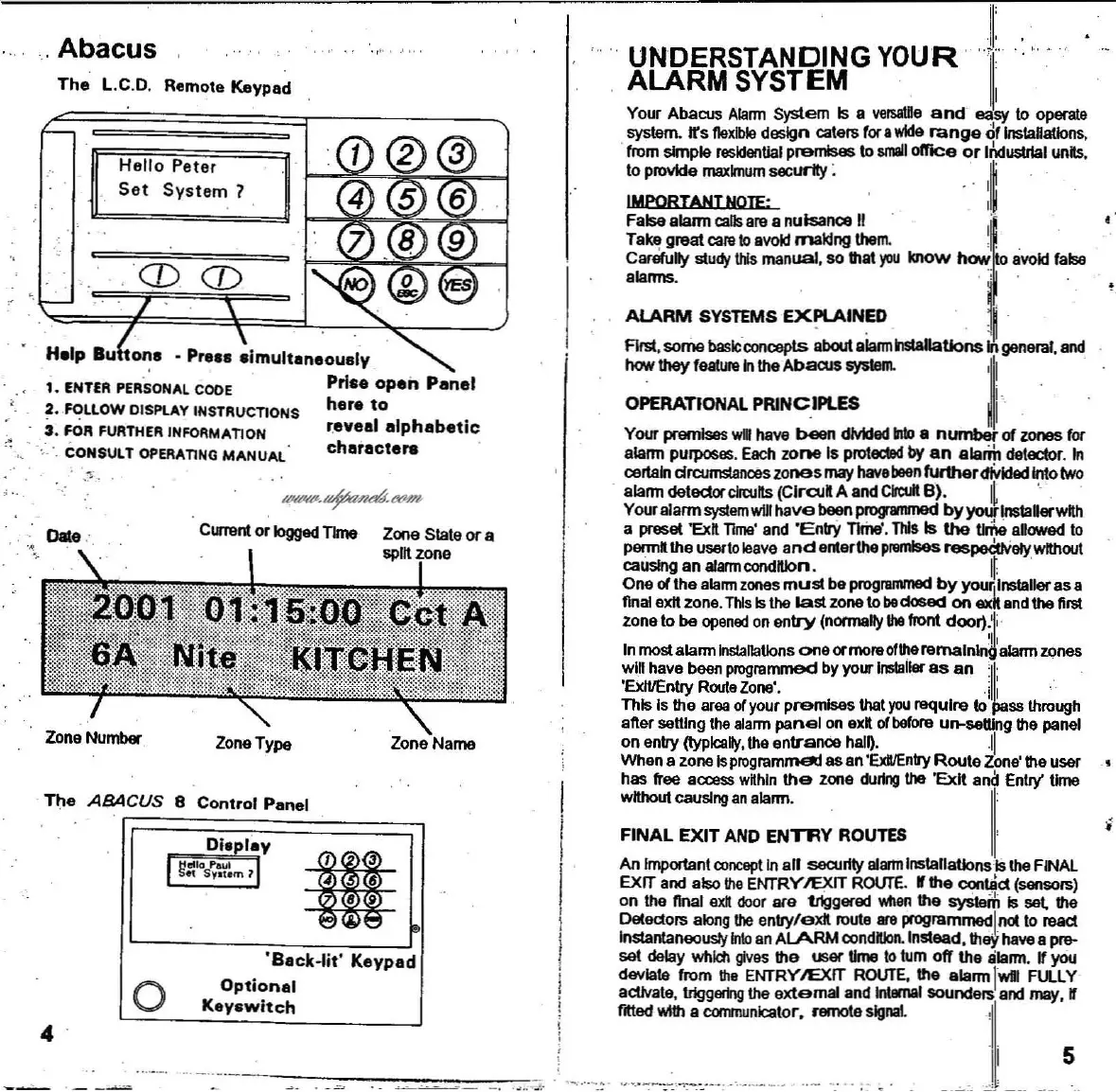
Zone Name
Zone Stale or a
split zone
' r" ,
ZoneType
•
'Back·lit'
Keypad
Optionel
Key.witch
CUlI&nl
or logged
TIme
o
CDC[)
Hello
Pater
Set
System
1
The
L.C.D, Remote Keypad
Date
:.
ZoneNumber
,
Abacus
The
ABACUS
8 Control Panel
4
-
Help Bu
to~s
• Press
simultsnsously
~
1.
ENTER
PERSONAL
coos Prise
open
Panel
2. FOLLOW
OISPLAY
INSTRUCTIONS
hare
to
3.
FOR
FURTHER
INFORMATION ravaal
alphabetic
;
~
0 " , • CONSULT
OPERATING
MANUAl
charactare
; ..



 To Next Page