'.,
-
~
.
TheAlarm
Company
controle which zones
II.
programmed
to
.be.
Syatem
• Are. 1 •
Are.
2
..or
C1e
....
r.zon" . .-
e '
••
' ..
..
. , "
.'
• •
~
.
'
....
-
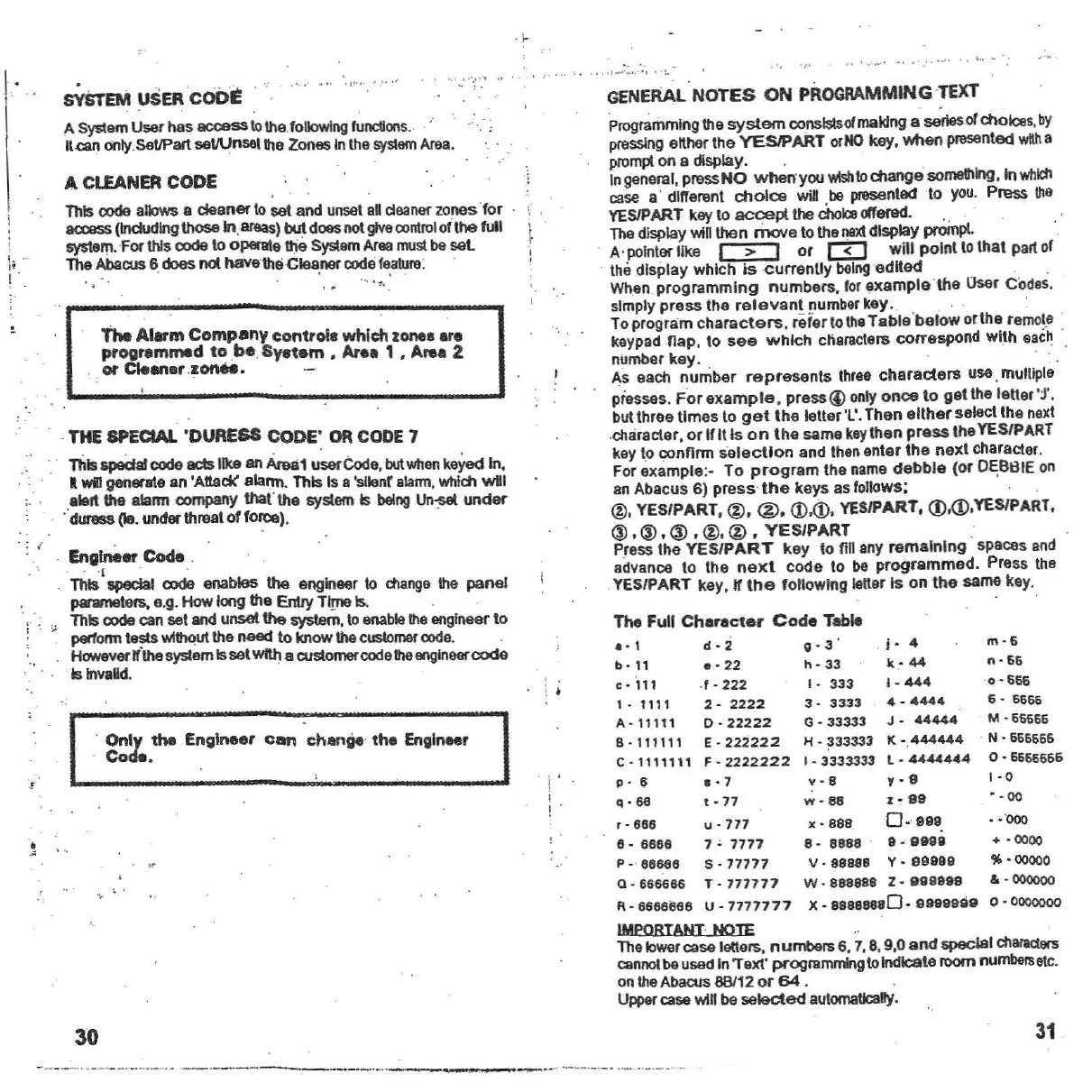
GENERAL
NOTES ON
PROGRAMMING
TEXT
'P
lOQ
rammlng the
system
conslslsofmaking a seriesofchoices.by
pressing
etther the
YESJPART
orNO
key.
when
presentec:J
wtlh
a
prompt
ona display. .
Ingeneral,pressNO
When'yoo
Vlish
to
change
something.
In
which
case a' dillerent
choice
wUI
be presenled 10 you. Pness
Ihe
YESIPART key 10
accept
the
choloe
oIf9l9d.
. ' . ,'
Thedisplay v.illlhen
move
to the
next
display
prompl
.
. A·polnterllke I > I or
l3J
willpolnllolhalpartof
. the display which
Is
currenlly
being
edUed . . .
When
programming
numbers.
lor
example
'the
User Codes,
simply
press
the
relevant
number key. _ . . :
Toprogram
characters
,
r"leriothe
Table
'below
orlhe
remote
keypad
nap
, 10
see
which
characters correspond with
each
.
number key .
As each
number
represents
IhrBB
characters
use.multiple
piesses .
For
example.
pressG) only
once
10
gel
the
leUer'j',
bullhree times 10
getlhe
leller
'l'. Then
either
selecllhe
next
.enaraeter,
or
Ifilis
on
Ihe
same keythen
press
Ihe YES/PART
key to
connrm
salect
lon
and Ihen enter
the
nexl
character,
For example:- To
program
Ihe name
debbie
(or
D~BI3IE
on
an Abacus 6)
press
the
keys as
follOWS:
@, YES/PART
.@.
@.
<D.<D.
YESIPART. (j).(j).YES/PART.
® •® •@ • @. @ •
YES/PART
.
Press Ihe
YES/PART
key to nil any
remelnlng
spaces and
advance 10 the
next
code to be
programmed.
Press the
YES/PART key
,lf
the
following Ieuer Is on
Ihe
same key.
. , .
.... -,.
"',
....,
..
'
A Cl£ANER CODE
This
code
allows a cleaner tosel and unset
aft
cleaner
zonestor
' \ '
aa:ass(lndudlng \hoSeIn.areas) bUldoes notgive oonlroloflhe full \
sysIem.For this code 10opert!\e
1116
System
Area
must be
sal
The
AbaaJS
6.does nothaVe'the
Clea:ner
oode
feature
.
sYSTEM USERCODI:
A SystemUser has accesstothe following
funcUons
.. ..., ,
It
can
only SeUPart
seWnsellhe
ZonesInthesystem Area.
;. .
. : ",
j;
I
m·6
n-
66
'0 · 666
6 -
6666
M
·65666
. N · 666666
0
·6666666
1-0
• - 00
• · '000
+
·0000
" . 00000
&.0000oO
0
-0000ooo
,
Only
the
Engineer
can
change
the
engineer
. Code .
. j
I
! '
The
Full
Character
Code
Table
.
·1
d-2
0·3
' . r- 4
b.11
.
-22
h-33
k
·44
c.
'111 .' - 2 22 1
-3331
·444
1 _ 1111 2 - 22 2 2 3 ·
3333
4 -
4444
A-11111
0
.22222
G·33333
J-
44444
8 - 11111 1 E -
222222
H •
~33333
K
-.444444
C - 1111111 F ·
2222222
I ·
3333333
l-
4444444
p - 6
.·7
v·S
.,·9
q • 66 t - 77
w·
88 1 ·
99
r-666
u-771
x·888
0.
'999
.
e -
6666
7
~
7777
8 -
8888
'
8·
99S9
P -
66666
S -
17177
V ·
aa666
Y·
99999
Q
·666666
T -
771717
W ·
888888
Z -
99g9ge
R -
6666866
U -
7777177
X·
88888880·
9999999
IMPORTANT NOTE
Tholowe'case lolIers, numbers 6, 7,8,9,0
and
speclal
chlllaclers
cennctbe usedInT ext· programming 10indicate
mom
numbers
etc.
on the Abacus
68/12
or
64
.
Uppercasev.inbe
selecled
aulomaUcany,
30
31
- - --- , ._--_._....__..
..
_._ -- _.-_.
-._
.._,
--_.,---_
... ._-
--
- -,_
...
_.
_- --



 To Next Page