Page 9-19
SECTION 9 - COMPONENT REPAIR
Convection Element, Fan and Fan
Motor
Turn off the gas supply and power to the
range at the junction or fuse box.
Remove the oven racks from the oven.
Remove the oven door(s) as described on
page 8-1.
Remove the convection filter from the back
wall of the oven by lifting it up and out.
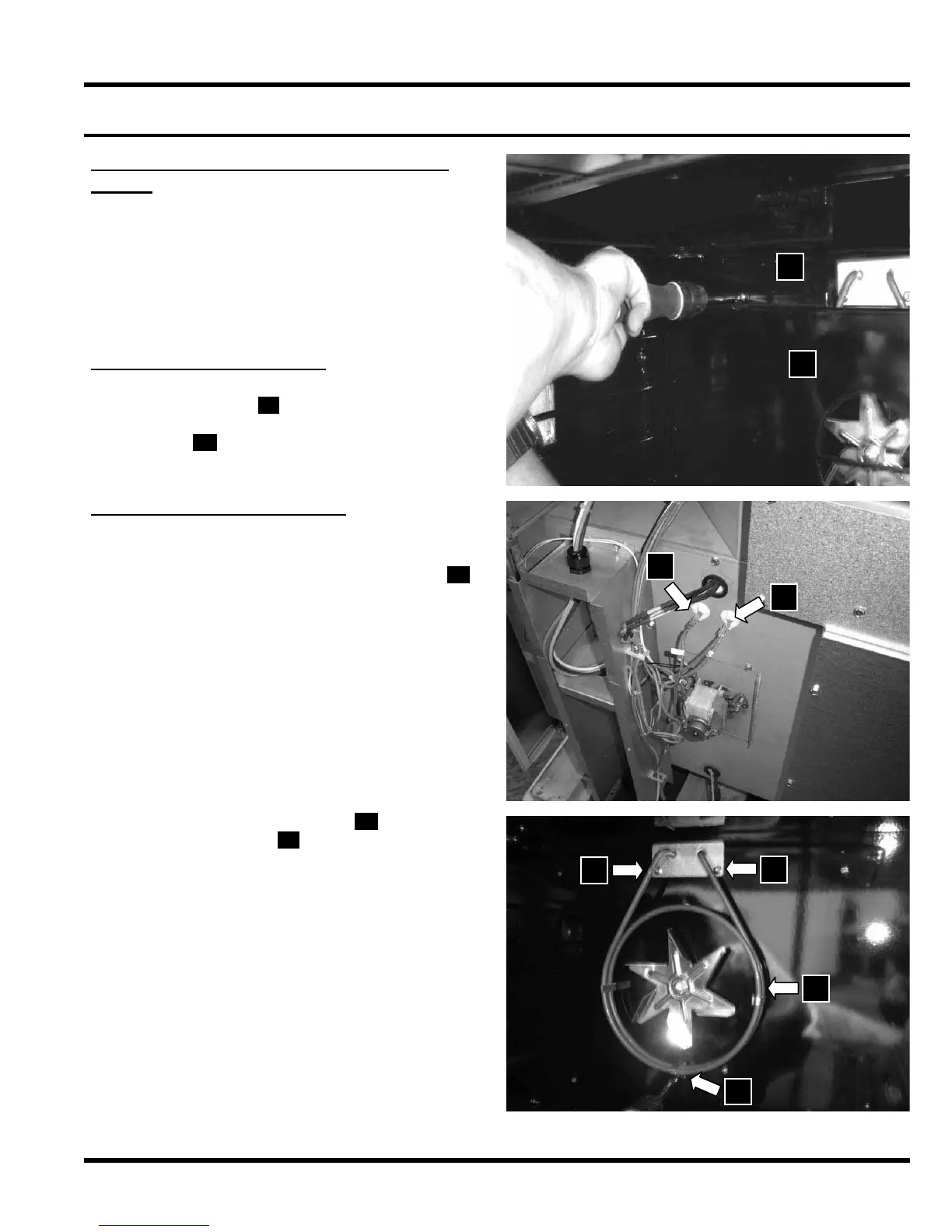
Convection Baffle Removal
Remove the four (4) screws that hold the
convection baffle
P in place. The screws are
located near the four corners of the baffle at
the back
Q of the oven.
Remove the convection baffle.
•
•
•
•
•
•
Oven Component Repair (continued)
P
Q
Convection Element Removal
Remove the back panel as described on page
8-3.
Disconnect the convection element wires
R
from the element behind the back panel.
•
•
Remove the three (3) screws S holding the
convection element
T in place.
Grasp the convection element near the top
and pull it slowly out of the back wall with a
gentle, rocking motion.
Replace and reconnect the convection element
in the reverse order.
•
•
•
R
R
S
S
S
T



 To Next Page