Page 9-20
DACOR RANGE SERVICE MANUAL
Convection Fan and Fan Motor Removal
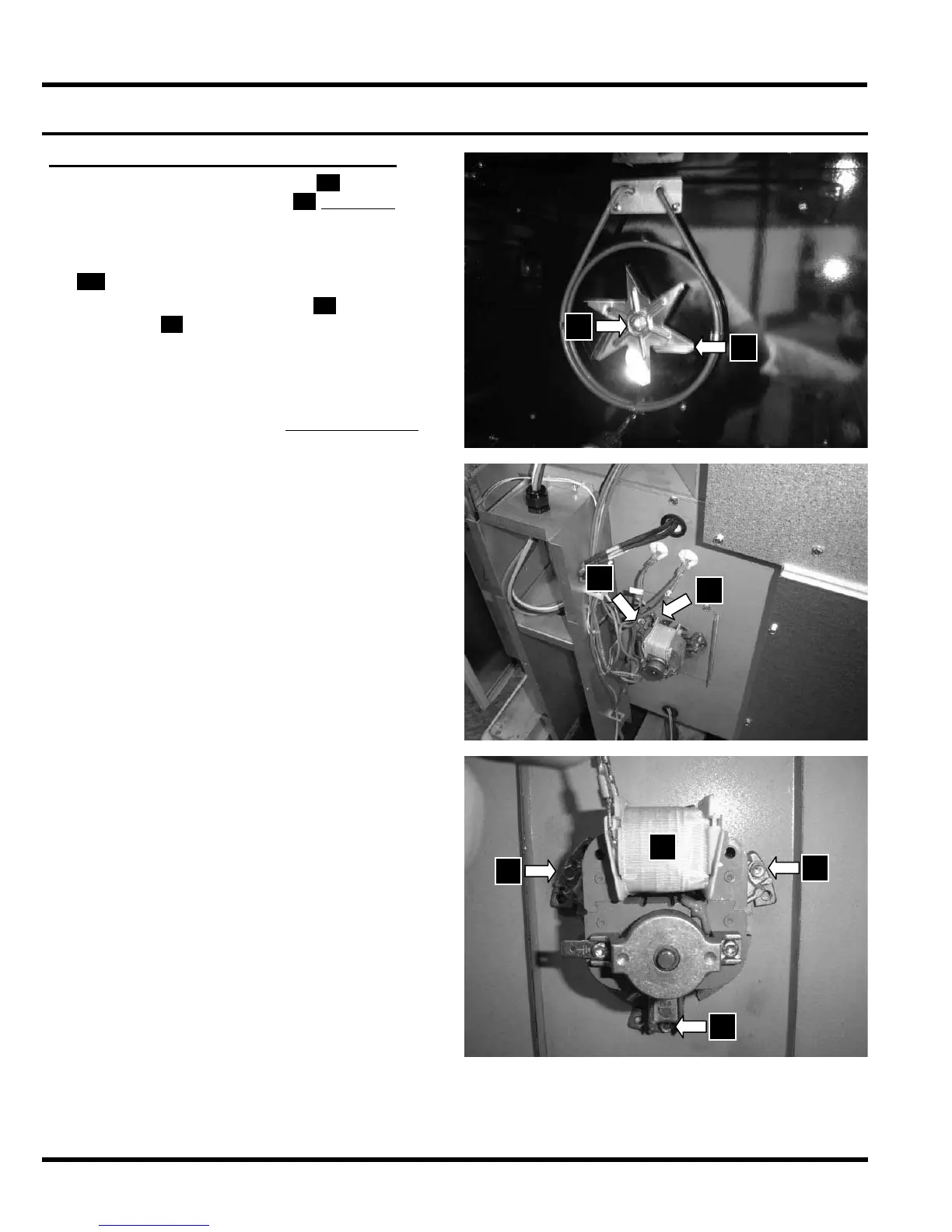
To remove the convection fan
U , hold it with
one hand and turn the nut
V clockwise with
a wrench.
With the back cover removed (see page 8-3),
label the location of the convection fan wires
W and disconnect them.
Remove the three (3) screws X that attach
the motor
Y to the back panel to remove it
Reassemble the fan motor and fan in the
reverse order. When replacing the fan, make
sure that the washer is installed behind the
fan blade before installing the fan. Use a
wrench to tighten the nut counterclockwise.
Reinstall the four (4) mounting screws that
hold the baffle in place.
Reinstall the convection filter.
Reinstall the racks.
Reinstall the oven door as described on page
8-2.
Test the oven to ensure that repairs were
properly completed.
•
•
•
•
•
•
•
•
•
W
W
V
U
S
X
X
X
Oven Component Repair (continued)



 To Next Page