14. key: (Flash / Delete)
15. and keys: Tone control / Scroll menu opons.
16. Speaker
17. Hole for lanyard (lanyard not included).
18. VOLUME Up/Down (side)
19. Baery Compartment Cover
Base Keys:
20. Base Flasher: In-Use Indicator & Line connecon indicator
(oponal)
21. Keypad & two-touch Memory keys:
22. Volume Keys: Adjust base speakerphone volume
23. Talk Key: Press to acvate base speakerphone
24. # key
25. Mute key: Mutes base microphone
26. key
27. Memory key: Two-touch memory control
28. Page key: Press to intercom or paging handsets
29. Baery Charge indicator
30. Handset charging cradle
31. Speaker: for speakerphone and ringer
32. AC Adapter jack (rear): For connecng to power
33. Phone Jack: For connecng phone line
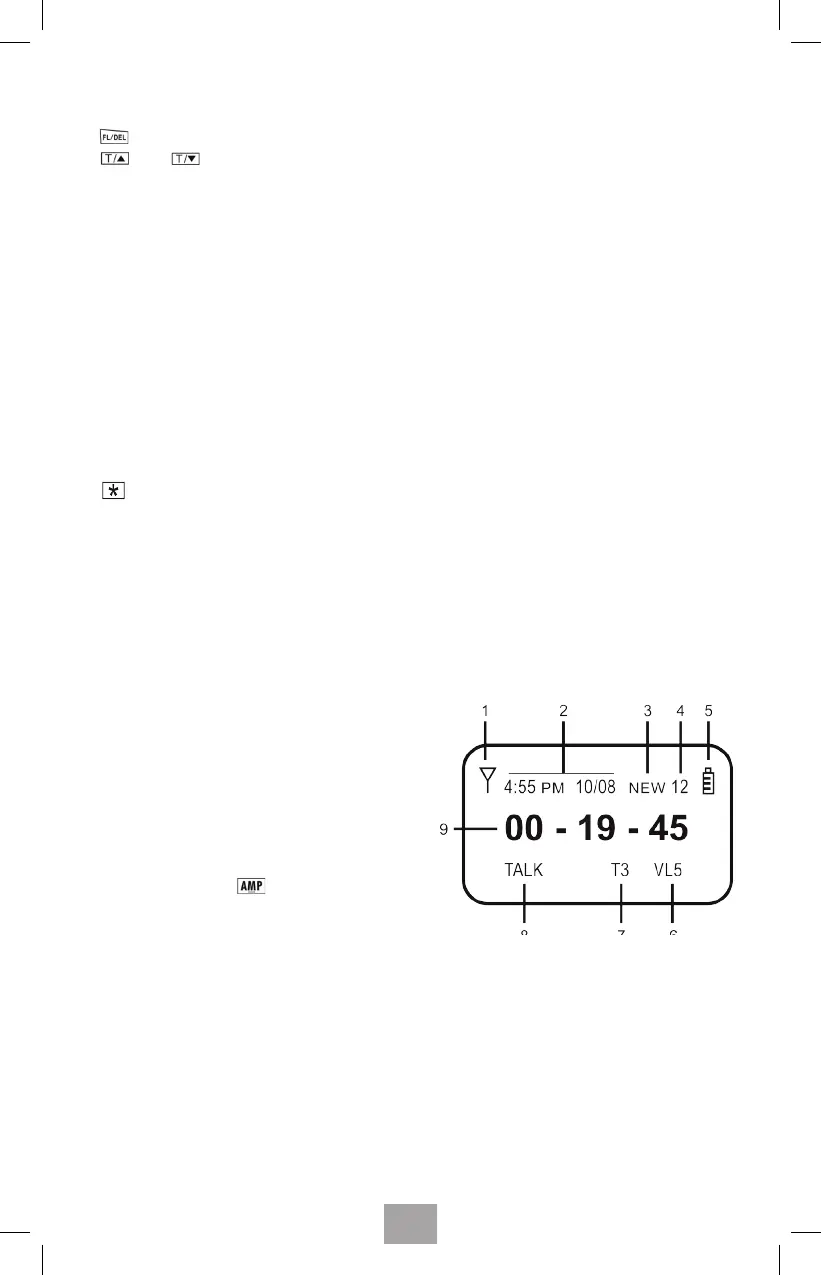
7. HANDSET SCREEN ICONS
1. Antenna strength
2. Time & Date
3. New call icon
4. # of new calls or old calls
5. Baery strength indicator
6. Volume level - VL1 to VL5
7. Tone seng - T1 to T4
(eecve when is on)
8. TALK (or SPEAKER)
9. Call mer (HH:MM:SS)
33



 To Next Page