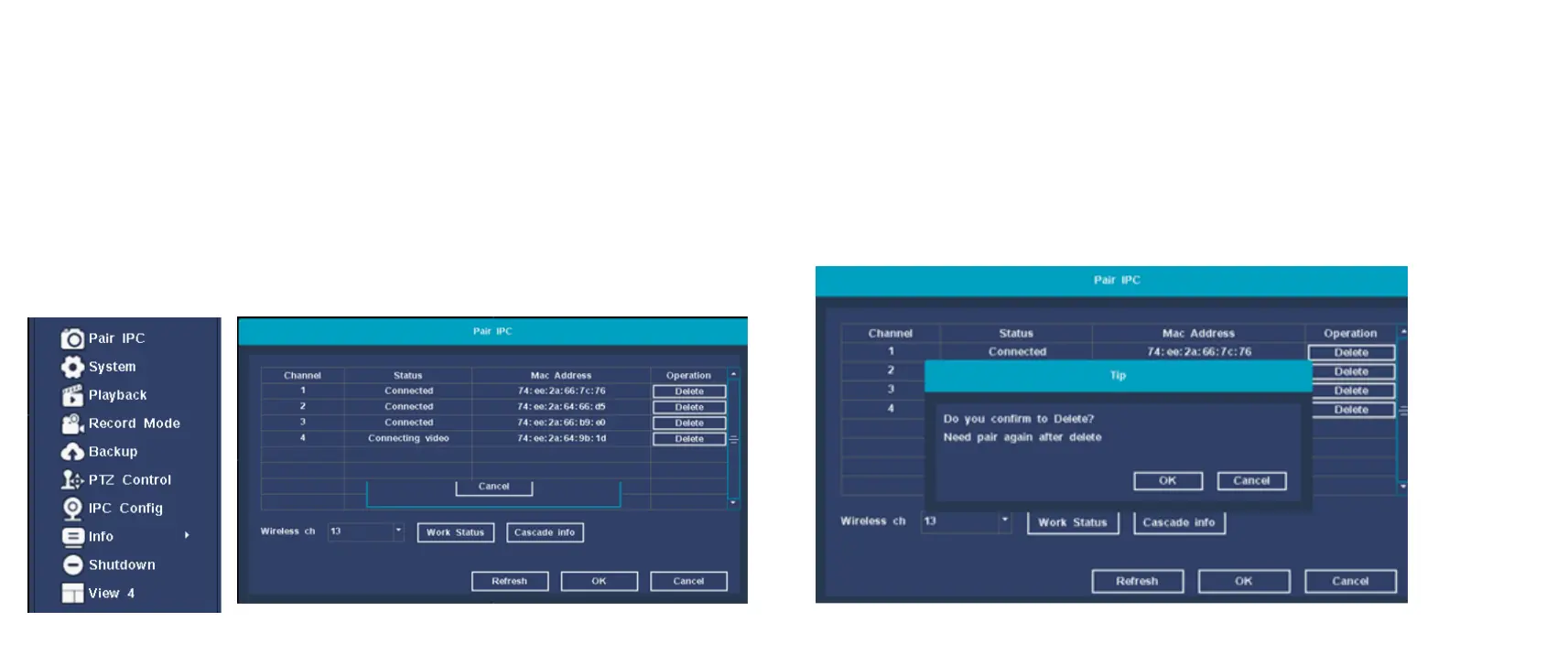
Add camera
Add or replace wireless camera,please fellow the steps below.
a) Wait 1.5minutes for camera start up.
b) Enter ”Main menu (right-click the main interface→Pair IPC”,
delete camera which status is " not connected" in the Channel
list.
c) Click ”Pair” button,and pop-up a window,"Pairing,pus and hold
IPC button ".
d) Push the pair button in IPC within 5 seconds.
e) It mean pair successfully when dispaly "connected" in status
column.
Camera removal
On the IPC pairing interface, select the camera to be deleted and
click the 【Delete】 button, a prompt box will pop up: Are you
sure you want to delete? After deletion, you need to re-pair, click
the 【OK】 button to complete the device deletion operation. As
shown below:


 To Next Page