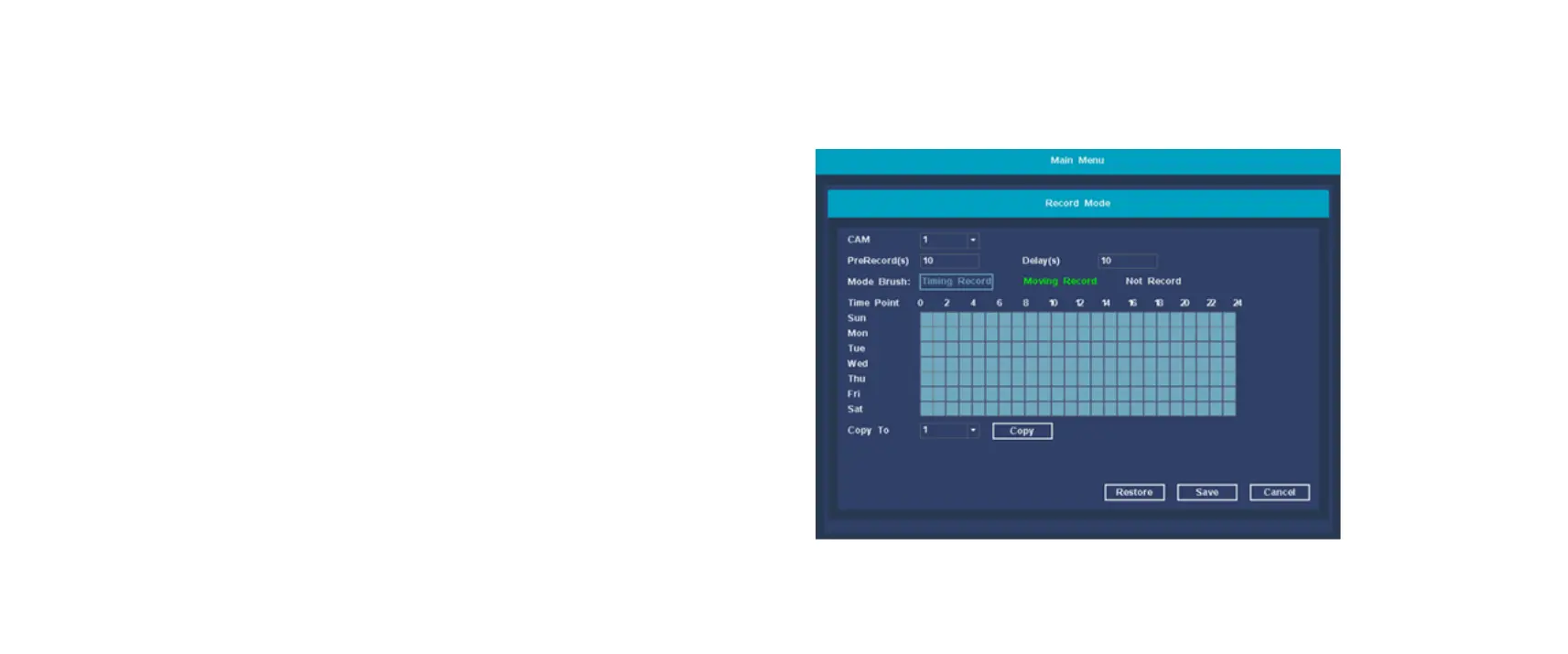
Record Mode
Set NVR recording plan parameters.
【CAM】Select the corresponding channel number to set the
channel, for all channel settings, select the full
【Prerecorded(s)】Record 1-30 seconds before the recording
action state occurs (the length of time may vary due to the size of
the stream);
【Delay(s)】After the recording action setting starts, the recording
will be delayed for a period of time;
【Audio coding】 The mark indicates that the recording is
enabled, and the audio encoding of the recording is enabled.
【Mode Brush】
Timed Record: perform ordinary recording within the set time
period
Moving Record: record the motion detection alarm period within
the set time period
Not Record: no video will be recorded within the set time period.
【Copy】Reproduce the recording settings of one channel to
other channels.
【Restore】Restore recording settings to system default.


 To Next Page