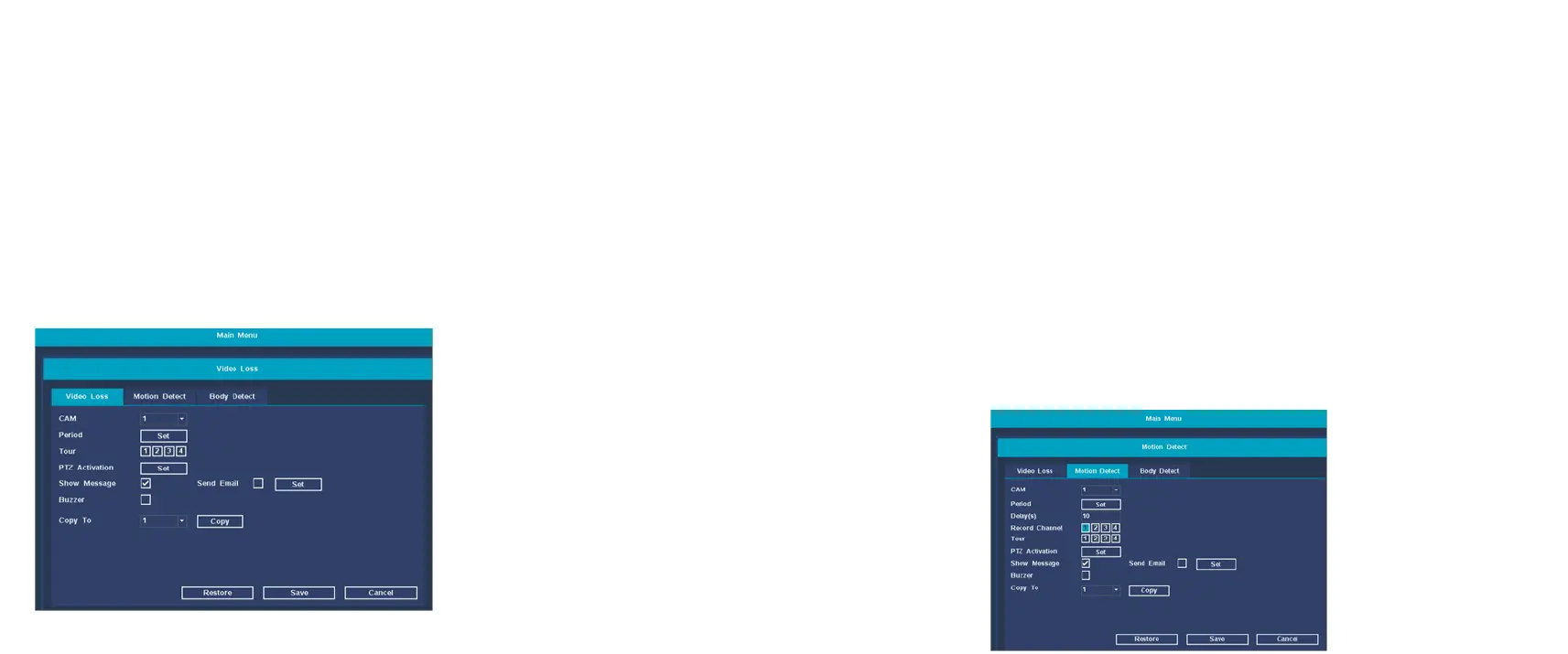
Alarm function
【CAM】 Select the corresponding channel number to set the
channel, and set all channels in a unified way.
【Period】 The device will trigger the motion detection alarm
signal within the set time range
【Show Message】 On the NVR preview screen, a dialog box for
prompting alarm information will pop up;
【Buzzer】 When the alarm occurs, the device emits two long
beeps
You can configure an email to receive email alerts
Motion Detect:
【CAM】 Select the corresponding channel number to set the
channel, and set all channels in a unified way.
【Period】 The device will trigger the motion detection alarm
signal within the set time range
【Delay(s)】 When the video is lost, it means that when the
alarm is over, the alarm will stop for an extended period of time,
ranging from 10 to 300 seconds;
【Show Message】 On the NVR preview screen, a dialog box
for prompting alarm information will pop up;
【Buzzer】 When the alarm occurs, the device emits two long
beeps.
【Record Channel】 Select the channel to set the motion
detection area;


 To Next Page